

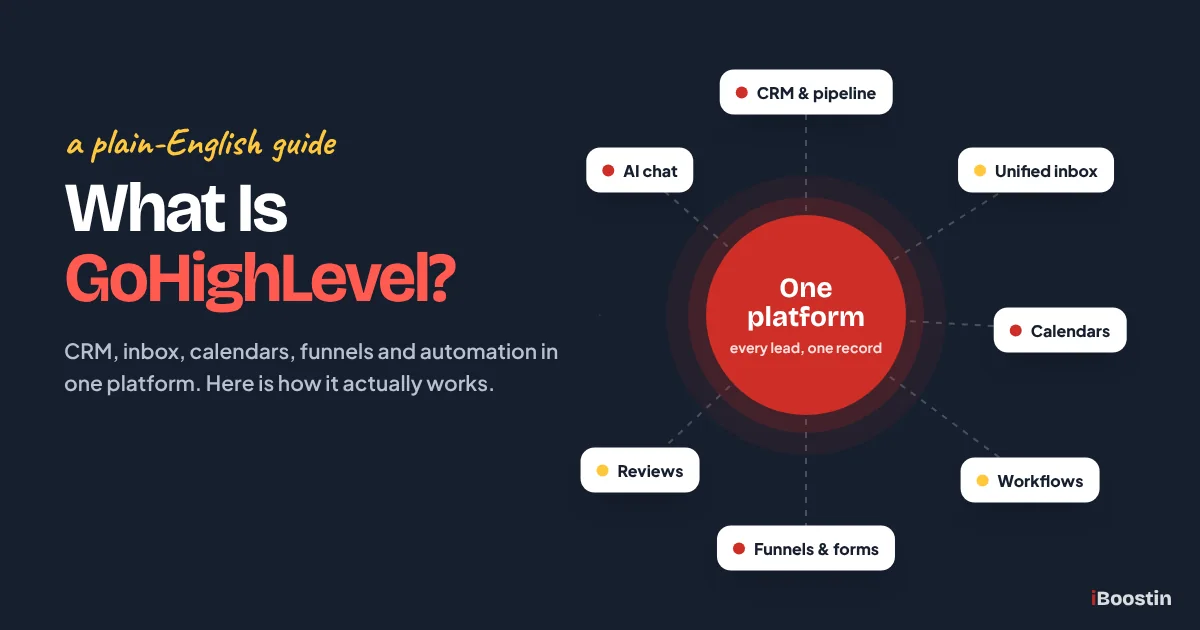
GoHighLevel is an all-in-one sales and marketing platform. It puts your CRM, sales pipeline, text and email inbox, booking calendars, websites and funnels, marketing automation and review requests inside one account, so every lead is captured, answered and followed up from the same place.
It was launched in 2018 by Shaun Clark, Varun Vairavan and Robin Alex and is based in Dallas, Texas. The company describes it as a platform “purpose-built for marketing agencies, entrepreneurs, and SMBs” (General Atlantic announcement). In practice, two groups use it: business owners who want one system instead of five or six separate tools, and marketing agencies that run it for their clients.
This guide explains what GoHighLevel actually does, how the pieces work together, how accounts are structured and who it suits. It is written by the iBoostin team, who build, fix and manage GoHighLevel accounts for service businesses and agencies every month.
Key takeaways
- GoHighLevel (also called HighLevel or GHL) combines CRM, pipelines, messaging, calendars, funnels, automation and reputation tools in one platform.
- Its real strength is automation: a new lead can get a text reply, a booking link and a reminder without anyone touching a keyboard.
- Agencies manage clients through sub-accounts and can copy a full setup to a new client with a snapshot.
- It is powerful but not plug-and-play. Texting in the US needs A2P 10DLC registration, and email needs a properly set up sending domain.
- Most problems come from a rushed setup, not from the software.
What Is GoHighLevel?
GoHighLevel is a cloud-based CRM and marketing automation platform that replaces the separate tools most businesses use to win and keep customers. Instead of a CRM in one app, a scheduler in another, a website builder, an email tool and a review tool, everything lives in one dashboard and shares the same contact record.
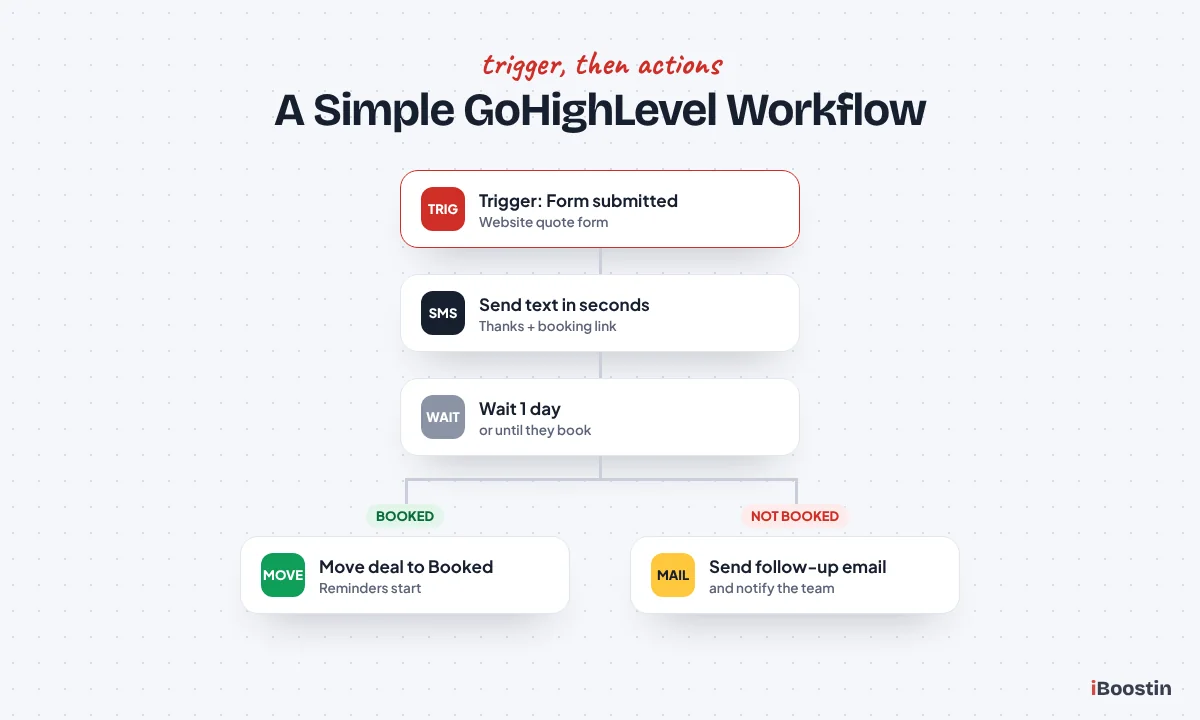
That shared record is the point. When someone fills in a form on your website, GoHighLevel creates the contact, adds them to your pipeline, texts them within seconds, sends a booking link, reminds them before the appointment and asks for a Google review after the job, all from one place and one history.
GoHighLevel, HighLevel, GHL and LeadConnector: same platform
You will see four names for the same product:
- HighLevel is the company and the official product name.
- GoHighLevel comes from the website address (gohighlevel.com) and is what most people search for.
- GHL is the short form used by agencies and in communities.
- LeadConnector is the neutral brand used for the mobile app and for white-label domains, so agencies can show the platform to clients without the HighLevel name.
Is GoHighLevel a CRM?
Yes. At its core GoHighLevel is a CRM: it stores contacts, their conversations, deals, appointments, notes, tasks and payments. What makes it different from a traditional CRM is that the marketing tools (funnels, forms, email, SMS, reviews and AI chat) are built in, so the CRM fills and updates itself instead of waiting for someone to type data in. If you want a CRM built around your own sales steps, our GoHighLevel CRM setup page shows what a proper build includes.
What Is GoHighLevel Used For?
GoHighLevel is used to capture leads, reply to them fast, book them into calendars and follow up until they buy, then bring them back for reviews and repeat work. The most common uses we set up for clients are:
- Answering every new lead in seconds. A form fill, missed call or Facebook lead triggers an instant text and email, day or night.
- Booking appointments automatically. Leads pick a time in your calendar, then get reminders by text and email so fewer people miss the call.
- Tracking every deal. Each lead becomes an opportunity in a pipeline, so you can see who is new, who is booked, who got a quote and who paid.
- Keeping all conversations in one inbox. Texts, emails, Facebook and Instagram messages, Google Business Profile chats and website chat arrive in one place, with the full history on the contact.
- Getting more Google reviews. After a job or appointment, happy customers get a review link automatically.
- Running websites, funnels and forms that feed straight into the CRM, with no copying between tools.
- Winning back old leads. Contacts who went quiet get a reactivation message months later instead of being forgotten.
- Running client accounts for agencies. Agencies give every client their own sub-account and manage them all from one login.
How Does GoHighLevel Work?
GoHighLevel works by connecting every step of a lead’s journey to the same contact record and letting workflows move the lead forward automatically. Here is what happens behind the scenes for a typical service business.
- A lead comes in. Someone fills in a form on your website or funnel, calls and you miss it, sends a Facebook message or submits a Facebook lead ad. GoHighLevel creates or updates the contact and records where they came from.
- The lead gets an instant reply. A workflow sends a text and an email within seconds, often with a booking link. If the lead texts back, the reply lands in the conversations inbox and your team gets a notification on the mobile app.
- The lead is added to your pipeline. An opportunity is created in the right stage, such as “New lead”, so nothing slips through.
- The lead books a time. They pick a slot in your calendar. The appointment syncs to Google or Outlook, and the opportunity moves to “Booked”.
- Reminders go out. Texts and emails before the appointment cut no-shows. If they do not show, a no-show workflow offers a new time.
- You close the deal. You move the opportunity to “Won”, send an invoice or collect a payment, and the sale is tied to the original lead source for reporting.
- The review request goes out. After the job, the customer gets a short message with your Google review link.
- Long-term follow-up keeps working. Leads who did not buy stay in a nurture sequence, and past customers get reminders for repeat work.
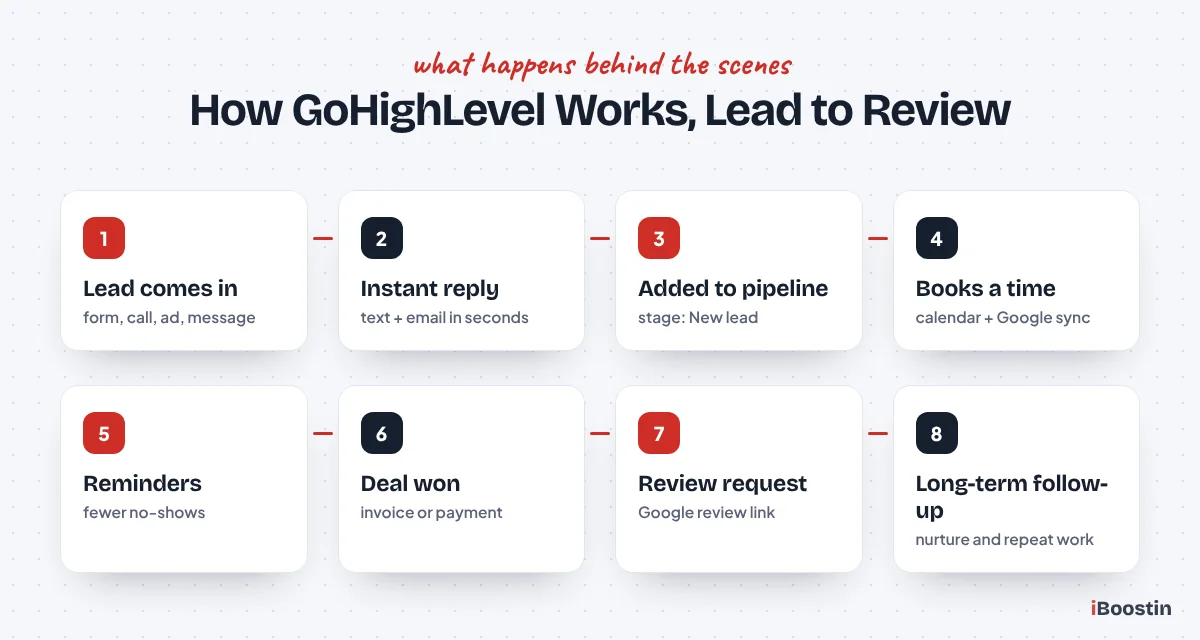
Every one of those steps can run without a person, but your team can step in at any point from the inbox or the pipeline. If you want to see how these automations are built, our step-by-step guide on how to build workflows in GoHighLevel walks through triggers, actions and wait steps one by one, and our list of GoHighLevel workflow examples shows 20 ready-made ones.
GoHighLevel Features Explained
GoHighLevel has a long feature list, but most businesses use the same ten or so every day. Here is what each one does and what it replaces.
CRM and contacts
Every person who contacts you becomes a contact with their details, tags, custom fields, notes, tasks, appointments, messages and payments on one screen. Smart lists let you filter contacts, for example “leads from Facebook this month who have not booked”, and act on them in bulk.
Pipelines and opportunities
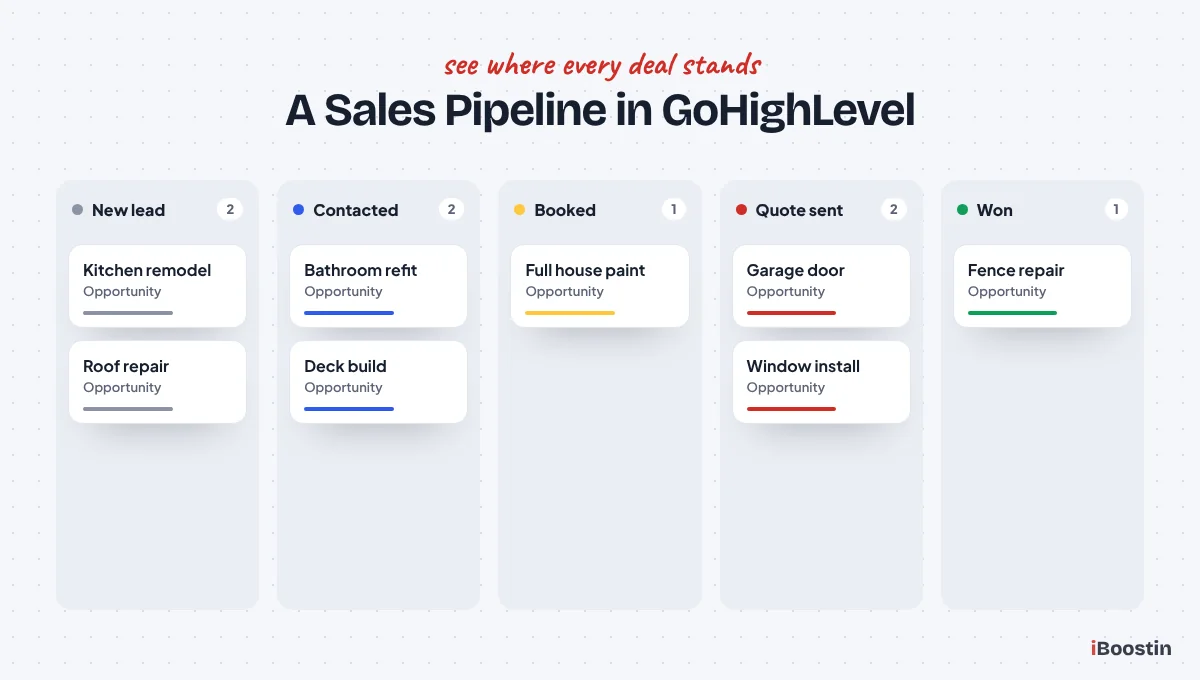
Pipelines show your sales process as stages, such as New lead, Contacted, Booked, Quote sent, Won and Lost. Each deal is an opportunity card with a value, so you can see how much revenue sits in each stage. Workflows can move cards between stages automatically when a lead books, pays or goes quiet.
Conversations (unified inbox)
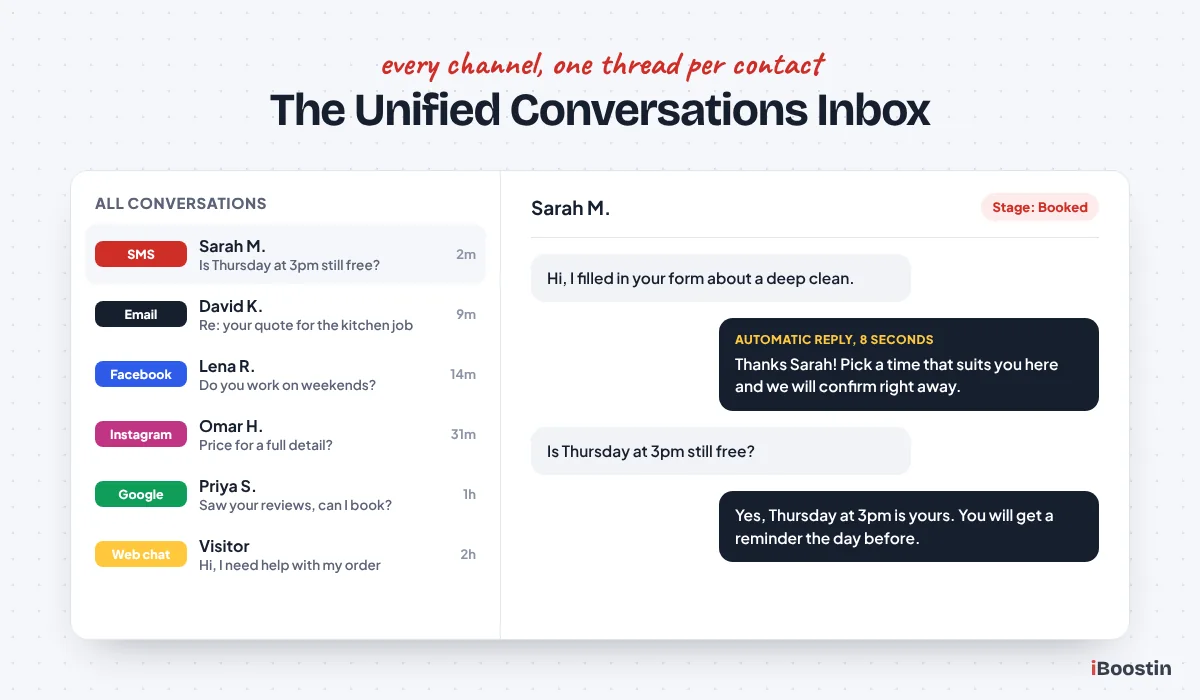
The conversations inbox collects SMS, email, Facebook Messenger, Instagram DMs, Google Business Profile messages, WhatsApp and website live chat in one thread per contact. Your team replies from the same place, on desktop or in the LeadConnector mobile app.
Phone system and texting
GoHighLevel includes its own phone system (LC Phone) for local and toll-free numbers, call tracking, call recording, voicemail and two-way texting. To text US numbers from a 10-digit local number, your business must complete A2P 10DLC registration with the carriers. Skip it and your texts get filtered or blocked. Our guide on how to register for A2P 10DLC in GoHighLevel covers every field, and our A2P 10DLC registration service handles it for you.
Calendars and booking
You can create booking calendars for one person, a team with round-robin assignment, classes or services. They sync with Google Calendar or Outlook, block buffer time between meetings and send confirmations and reminders by text and email.
Websites, funnels and forms
The drag-and-drop builder creates landing pages, multi-step funnels and full websites on your own domain. Forms, surveys and quizzes write straight into the contact record and can start a workflow the moment they are submitted.
Workflows and automation
Workflows are the engine of GoHighLevel. Each one starts with a trigger (a form is submitted, a call is missed, an appointment is booked, a tag is added) and then runs actions: send a text, wait 10 minutes, check a condition, move the deal, notify a team member. One of the first workflows we build for every client is missed call text back, which texts the caller automatically when nobody picks up. When workflows do not behave, our troubleshooting guide on why a GoHighLevel workflow is not triggering covers the usual causes.
Email marketing
You can send one-off campaigns, newsletters and automated sequences from the same platform. Good deliverability depends on a dedicated sending domain with SPF, DKIM and DMARC records set correctly. If messages are landing in junk folders, read why GoHighLevel emails land in spam.
Reputation management
GoHighLevel sends review requests by text or email after a job and lets you see and reply to Google reviews from the dashboard. A simple rule we use for clients: send the request only after a completed appointment, and route unhappy customers to a person before they post.
Payments and invoices
With Stripe or another supported payment provider connected, you can send invoices, take deposits on bookings, sell products in funnels and send text-to-pay links. Payments are recorded on the contact and the opportunity.
Memberships, courses and communities
Coaches and trainers can host online courses, member areas and communities inside the same account, so logins, payments and follow-up stay in one system.
AI features
Conversation AI can reply to website chat, SMS and social messages, answer common questions and book appointments, then hand the chat to a person when needed. Voice AI can answer phone calls. Content AI helps draft emails, posts and page copy. These tools work well when they are trained on your real services and given clear rules, which is exactly what our guide on setting up Conversation AI in GoHighLevel explains. If you would rather have the bot built and tested for you, see our GoHighLevel AI chatbot service.
Reporting and attribution
Dashboards show leads, appointments, pipeline value, call results and ad performance. Attribution reports connect each sale back to the source that created the lead, so you know which channels actually make money.
Mobile app
The LeadConnector app lets your team reply to messages, take calls, check appointments and update deals from a phone, which matters for owners who are on job sites all day.
How a GoHighLevel Account Is Structured
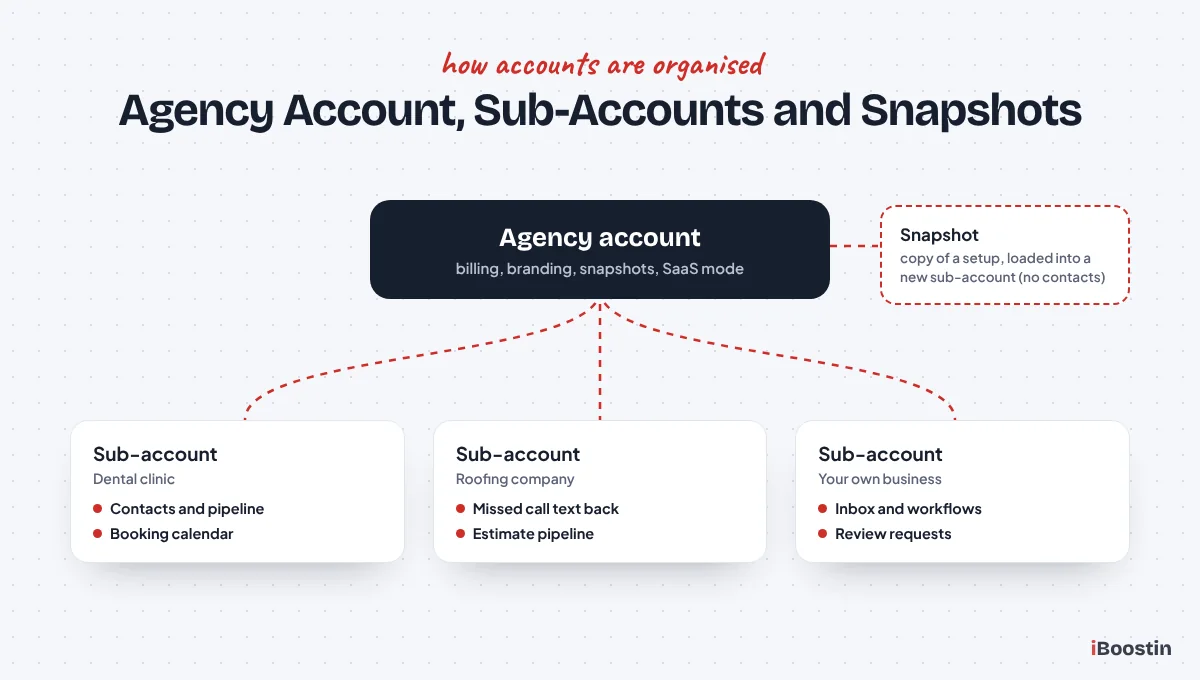
GoHighLevel has two levels: an agency account at the top and sub-accounts underneath it. Understanding this saves a lot of confusion when you first log in.
Agency account
The agency account is the top-level login. It is where you manage billing, create sub-accounts, build snapshots, set up white-label branding and control which features each client can use. A business that uses GoHighLevel only for itself still has an agency account, with one sub-account for its own business.
Sub-accounts
A sub-account is where the actual work happens: contacts, pipelines, calendars, workflows, funnels and conversations all live inside a sub-account. HighLevel’s own help center explains that every sub-account works as a “location” in the system (HighLevel help article). An agency gives each client their own sub-account, so one client’s data never mixes with another’s.
Snapshots
A snapshot is a copy of a sub-account’s setup: pipelines, workflows, calendars, funnels, forms, custom fields and templates. Agencies use snapshots to load a proven setup into a new client account in minutes. A snapshot does not bring over contacts or conversations, and it still needs to be adjusted to the new business: its triggers, calendar settings, phone numbers, domains and message copy all need checking before launch.
SaaS mode
On the higher plans, SaaS mode lets an agency sell GoHighLevel to clients as its own software, with its own plans and automatic billing. Clients sign up, pay the agency and get a sub-account, often preloaded with a snapshot.
White label
White label means clients see the agency’s brand instead of HighLevel’s: a custom domain for the login page, the agency’s logo and colors, and the LeadConnector mobile app instead of a HighLevel-branded one. Agencies that want help building client accounts behind their own brand can use white label GoHighLevel fulfillment, where we do the build and the agency keeps the client relationship.
| Level | Who uses it | What lives there |
|---|---|---|
| Agency account | Agency owner or business owner | Billing, sub-accounts, snapshots, branding, SaaS settings |
| Sub-account | Each business or client | Contacts, pipelines, calendars, workflows, funnels, inbox, phone numbers |
| Snapshot | Agency | A reusable copy of a sub-account’s setup (no contacts) |
Who Uses GoHighLevel?
GoHighLevel suits any business that lives on leads and appointments, plus the agencies that serve them. These are the groups we see most, and the features each one leans on.
| Business type | What they use GoHighLevel for most |
|---|---|
| Home services (plumbers, roofers, cleaners, HVAC) | Missed call text back, estimate pipelines, review requests after each job |
| Clinics, dentists and med spas | Online booking, appointment reminders, no-show recovery, recall reminders |
| Real estate agents | Instant reply to buyer leads, long-term nurture, showing reminders |
| Coaches and consultants | Lead magnet funnels, application forms, discovery call calendars, courses |
| Car rental, travel and tourism | Booking follow-up, confirmations, WhatsApp and SMS replies |
| Law firms and professional services | Intake forms, fast follow-up on new enquiries, document reminders |
| Marketing agencies | Client sub-accounts, snapshots, SaaS mode and white label branding |
One example from our own work: Luxury Toys, a car rental company in Dubai, uses GoHighLevel so every booking enquiry is followed up automatically instead of waiting for someone to reply by hand. And for more than six months we have run monthly GoHighLevel management for 3rd Hand Solutions, a GoHighLevel agency, building and maintaining its funnels, automations and follow-up sequences.
What GoHighLevel Replaces
Most businesses that move to GoHighLevel are trying to cut down the number of tools they log in to. This is the usual overlap.
| Tool category | Common examples | GoHighLevel feature that covers it |
|---|---|---|
| CRM and sales pipeline | HubSpot, Pipedrive | Contacts, pipelines, opportunities |
| Scheduling | Calendly, Acuity | Calendars with reminders and sync |
| Funnels and landing pages | ClickFunnels, Leadpages | Funnel and website builder |
| Email marketing | Mailchimp, ActiveCampaign | Email campaigns and sequences |
| Business texting | Podium, SimpleTexting | Two-way SMS with LC Phone |
| Review requests | Birdeye, Podium | Reputation management |
| Website chat | Intercom, Tidio | Chat widget and Conversation AI |
| Courses and memberships | Kajabi, Teachable | Memberships and communities |
| Simple automations between tools | Zapier (in part) | Built-in workflows |
It does not replace accounting software, a full project management tool or industry-specific software such as a dental practice system. In those cases GoHighLevel sits next to them and is connected through integrations or webhooks.
What GoHighLevel Does Not Do Well
GoHighLevel is powerful, but it is honest to say where people struggle:
- The learning curve is real. There are dozens of settings, and a feature that is set up wrongly can quietly stop working.
- Texting needs registration. US texting from local numbers requires A2P 10DLC approval, which can take time and gets rejected if your website and opt-in wording are not right.
- Email needs technical setup. Without a dedicated sending domain and DNS records, emails are more likely to land in spam.
- Snapshots are a starting point, not a finished system. Most need real changes before they fit your business.
- Design flexibility is lower than a dedicated website platform for complex sites, which is why some businesses keep their main website on WordPress and use GoHighLevel for funnels and the CRM.
None of these are reasons to avoid it. They are reasons to set it up properly once, test it and keep it maintained. For an honest look at the trade-offs in more depth, see our GoHighLevel review.
How to Get Started With GoHighLevel
Getting a GoHighLevel account working well comes down to doing the setup in the right order. This is the order we follow for every new client:
- Create the account and your sub-account with the correct business name, address, time zone and contact details.
- Connect your domain for your website or funnels, and set up a dedicated email sending domain with SPF, DKIM and DMARC.
- Buy a phone number and start A2P 10DLC registration early, because approval can take days.
- Build your pipeline with stages that match how you actually sell.
- Set up calendars with availability, buffers, reminders and Google or Outlook sync.
- Build forms and funnels that feed leads into the pipeline.
- Create your first workflows: instant lead reply, missed call text back, appointment reminders and review requests.
- Connect integrations such as Facebook lead ads, Google Business Profile and Stripe.
- Test everything with dummy contacts before a real lead touches it.
- Train your team on the inbox, the pipeline and the mobile app.
Our full step-by-step guide on how to set up GoHighLevel from scratch goes through each of these steps in detail.
Should You Set Up GoHighLevel Yourself or Hire an Expert?
You can absolutely set up GoHighLevel yourself if you have the time and like learning software. Hiring help makes sense when your time is better spent selling, or when leads are already coming in and you cannot afford gaps.
| Do it yourself | Hire a GoHighLevel expert | |
|---|---|---|
| Best for | Owners who enjoy tech and have time to learn | Busy owners and agencies that need it working now |
| Time to a working system | Several weeks of learning and testing | Usually days, depending on A2P approval |
| Risk | Broken triggers, rejected A2P, emails in spam | Lower, if the expert tests and documents the build |
| What you end up with | A system you understand deeply | A tested system, a handover document and training |
If you decide to hire, make sure you keep admin access to your own account, ask how each automation is tested and get a written list of what was built. Our guide on how to hire a GoHighLevel expert lists the 12 questions to ask, and our roundup of the best GoHighLevel agencies compares the main options.
Frequently Asked Questions About GoHighLevel
What is GoHighLevel in simple words?
GoHighLevel is one online platform that handles your leads from start to finish. It captures them from your website, ads and calls, replies by text and email, books them into your calendar, tracks them in a sales pipeline and asks happy customers for reviews, all from one account.
What is GoHighLevel used for?
It is used for lead capture, instant follow-up, appointment booking, sales pipeline tracking, email and SMS marketing, review requests, websites and funnels, and, for agencies, managing many client accounts from one login.
Is GoHighLevel only for marketing agencies?
No. It was built with agencies in mind, but many local businesses, clinics, coaches and service companies use it directly for their own business with a single sub-account.
Is GoHighLevel the same as HighLevel?
Yes. HighLevel is the company and product name, GoHighLevel comes from the website address, GHL is the short form, and LeadConnector is the neutral brand used for the mobile app and white-label domains.
Do I need A2P 10DLC registration to text from GoHighLevel?
If you text people in the United States from a local 10-digit number, yes. Carriers require A2P 10DLC registration for business texting, and unregistered messages are filtered or blocked.
How long does it take to set up GoHighLevel?
A basic setup with a pipeline, a calendar and a few workflows can be done in a few days. A full build with funnels, phone numbers, email domain, integrations and testing usually takes one to three weeks, mostly because A2P approval depends on the carriers. A done-for-you GoHighLevel setup shortens this because the build runs while registration is in review.
Can GoHighLevel automate my follow-up completely?
Most of it. Workflows can reply to new leads, send reminders, chase no-shows, nurture cold leads and request reviews without anyone touching them. A person should still handle real conversations and closing. Our GoHighLevel workflow automation service builds and tests these workflows for you.
Get GoHighLevel Working for Your Business
GoHighLevel can answer every lead in under 60 seconds, fill your calendar and keep your follow-up running while you work. The difference between a tool you pay for and a system that brings in customers is how well it is set up. iBoostin builds, fixes and manages GoHighLevel accounts for small businesses and agencies, with every workflow tested and documented before launch.
Sources: HighLevel official website, HighLevel careers page, General Atlantic investment announcement, HighLevel help center: agency sub-accounts.