In this guide
- WordPress vs Wix: The Quick Answer
- What Is Wix?
- What Is WordPress?
- Ease of Use
- Design and Flexibility
- SEO: Which Platform Ranks Better?
- Speed and Performance
- Online Stores
- Maintenance, Security and Support
- Ownership, Lock-In and Growth
- Which Should You Choose?
- Common Mistakes When Choosing a Website Platform
- What About Squarespace and Other Builders?
- Switching From Wix to WordPress
- Frequently Asked Questions About WordPress vs Wix
- Pick the Platform That Fits Where You Are Going
For most small businesses that want to grow through search, WordPress is the better long-term choice, because it gives you full control, stronger SEO options and no platform lock-in. Wix is better if you need a simple site quickly, want hosting, security and updates handled for you and do not plan to scale far beyond a brochure site.
The choice usually comes up at a very practical moment. You need a website, a friend built theirs on Wix in a weekend, and a developer is telling you WordPress is the professional option. Both sound reasonable, and most comparison articles do not help much: some quietly push one platform through affiliate links, and others compare the wrong version of WordPress entirely.
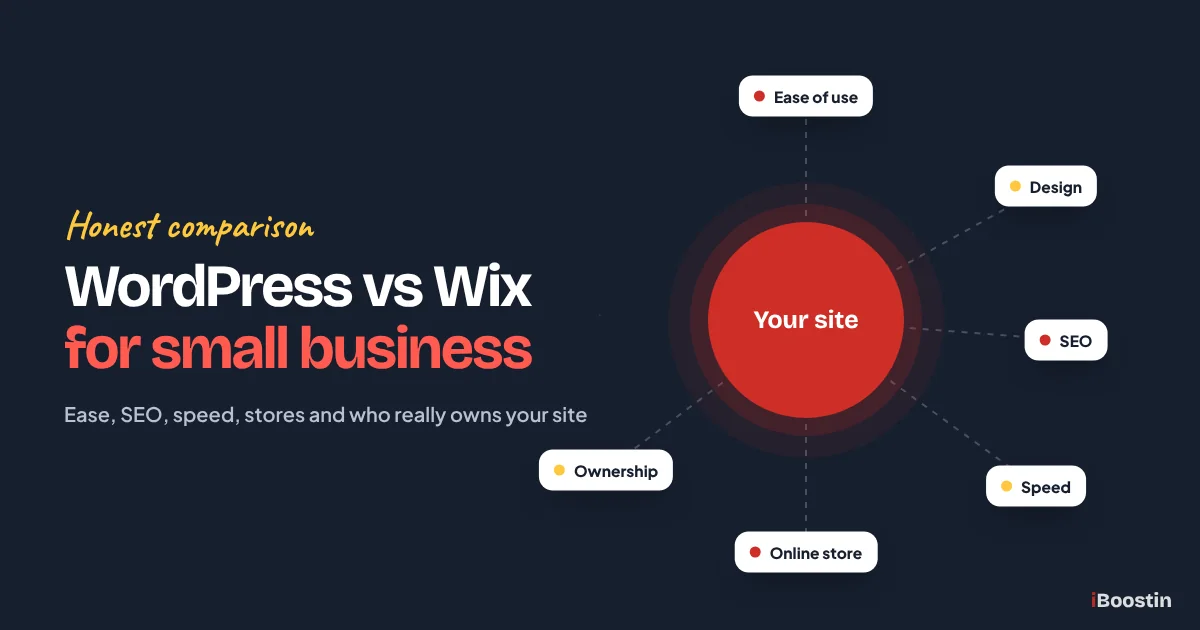
This guide compares Wix with self-hosted WordPress, the version most business websites use, on the things that matter to a small business: ease of use, design, SEO, speed, online selling, maintenance, ownership and growth. At iBoostin we build on WordPress, but we also tell clients when Wix is the better fit, and you will find those cases here too. If you decide on WordPress, our step-by-step guide on how to create a website in WordPress shows how to build it properly.
Key takeaways
- Wix is a hosted website builder: easy to start, with hosting, security and updates handled for you, but limited control and no way to move the site elsewhere.
- WordPress (self-hosted) is open-source software on your own hosting: more flexible, stronger for SEO and content, but you are responsible for updates and backups.
- For a small, simple site that rarely changes, Wix can be the faster and easier choice.
- For businesses that rely on Google for leads, plan to grow content or need custom features, WordPress is usually the better investment.
- The biggest hidden difference is ownership: a WordPress site can move to any host, while a Wix site stays on Wix.
WordPress vs Wix: The Quick Answer
Before going into detail, here is the short version. Wix is like renting a fully furnished office: you move in quickly, the landlord handles repairs, but you cannot knock down walls and you cannot take the building with you. WordPress is like owning the building: more responsibility, but you can change anything and move whenever you like.
WordPress.org, Not WordPress.com
Many comparisons pit Wix against WordPress.com, a hosted service with limits on lower plans. That is not what most businesses mean by WordPress. This guide compares Wix with self-hosted WordPress, the free WordPress.org software installed on your own hosting, which is what agencies and most business websites use.
The difference matters. Self-hosted WordPress lets you install any plugin or theme, control your hosting and move your site whenever you want. If you read a comparison that says WordPress cannot do something Wix does, check which WordPress they mean.
At a Glance
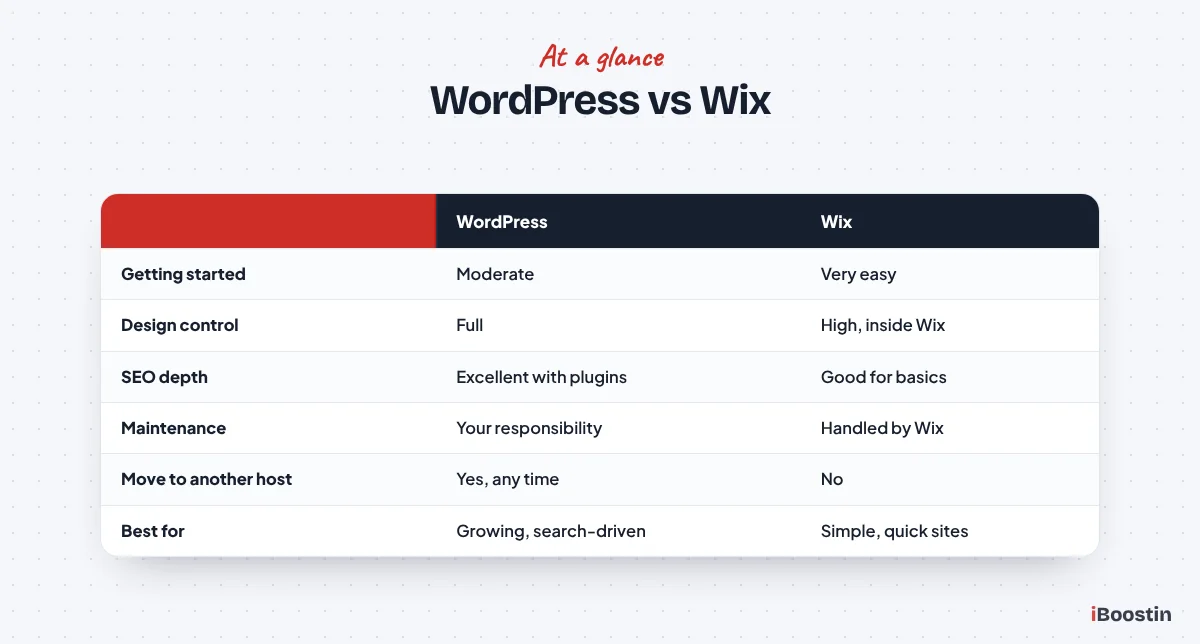
The table below summarizes where each platform wins. The sections that follow explain each point and why it matters for a small business.
| WordPress (self-hosted) | Wix | |
|---|---|---|
| Ease of getting started | Moderate | Very easy |
| Design control | Full | High within Wix’s editor |
| SEO depth | Excellent with plugins | Good for basics |
| Speed control | Full, depends on setup | Handled by Wix, less control |
| Online store | WooCommerce, very flexible | Wix Stores, simpler |
| Maintenance | Your responsibility | Handled by Wix |
| Ownership and moving | Move to any host | Stays on Wix |
| Best for | Growing, search-driven businesses | Simple sites that need to launch fast |
No single row decides the choice on its own. A business that rarely updates its site may not care about content scale, while a business that depends on Google for most of its leads will care about little else. Read the rows that match your goals and weigh those most heavily.
What Is Wix?
Wix is an all-in-one website builder. You sign up, choose a template, edit it in a visual drag and drop editor and publish. Hosting, security certificates, software updates and many features are included in your plan. You never see a server or install software.
Where Wix Shines
Wix is genuinely easy to start with. The editor is visual, templates look polished, and you can have a decent-looking site live in a day without any technical knowledge. Features like bookings, online stores, forms and email marketing are available as built-in tools or apps from the Wix App Market.
Because Wix handles hosting, updates and security, there is very little technical maintenance. For a busy owner who needs a simple online presence, such as a few pages, a contact form and maybe a booking widget, that convenience is a real advantage.
Where Wix Holds You Back
The convenience comes with limits. You can only use what Wix and its app market provide, and you cannot change how the platform works underneath. Advanced SEO, custom features and performance tuning are limited to what Wix allows. Costs also grow as you add premium apps and higher plans.
The biggest limit is portability. A Wix site cannot be moved to another host or platform. If you outgrow Wix, you rebuild the website elsewhere, which means new design work, content migration and careful redirects to protect your rankings.
What Is WordPress?
WordPress is open-source software that powers a large share of all websites, from small business sites to major publishers. With self-hosted WordPress, you install the software on hosting you choose, then build your site with a theme and either the built-in block editor or a page builder such as Elementor.
Where WordPress Shines
WordPress gives you almost unlimited flexibility. Thousands of themes and plugins add features like advanced SEO, bookings, memberships, online stores, multilingual sites and integrations with CRMs and marketing tools. Any developer familiar with WordPress can work on your site, so you are never tied to one provider.
It is also excellent for content. If your growth plan involves service pages, location pages and articles that bring visitors from Google, WordPress handles that better than any website builder. That is a big reason most SEO-focused businesses build on it.
Where WordPress Takes More Work
With freedom comes responsibility. You choose hosting, keep WordPress, themes and plugins updated, run backups and look after security. A neglected WordPress site gets slow and vulnerable. Many owners hand this to a developer or a maintenance service.
The learning curve is also steeper than Wix, especially in the first week. Page builders like Elementor make design visual, but there are more settings and choices to understand. Our guide on how to create a website in WordPress walks through them in order.
Ease of Use
For a complete beginner, Wix is easier on day one. Over months and years, the difference narrows, and for businesses that hand the website to a professional, ease of use matters less than what the platform can do.
Getting Started
Wix asks you a few questions, suggests a template and drops you into the editor. There is nothing to install and nothing to configure. With WordPress, you choose hosting, install WordPress, pick a theme and builder, and adjust a handful of settings before you start designing.
That setup takes a few hours for a first-timer, or minutes for a developer. Once it is done, building pages in Elementor or the block editor feels much like using Wix, with more options.
Editing Over Time
Both platforms let non-technical staff edit text, images and pages. Wix keeps everything in one editor. WordPress separates content, settings and plugins into different areas of the dashboard, which takes a little longer to learn.
A well built WordPress site can be very easy to edit, because the developer can lock down layouts and give staff simple fields to update. A badly built one, with several builders and dozens of plugins, can be confusing. How the site is built matters as much as the platform.
Design and Flexibility
Both platforms can produce attractive websites. The difference is how far you can go beyond the templates and how easily you can change direction later.
Templates and Custom Design
Wix offers hundreds of polished templates and a free-form editor where you can drag elements anywhere. That freedom is great for quick visual changes. However, switching to a different template later usually means rebuilding your pages, and some layouts behave less predictably on mobile.
WordPress themes and page builders allow fully custom designs, from simple templates to completely bespoke layouts. You can change themes or redesign without losing your content, because content and design are separate. For brands that want a distinctive look, our custom WordPress website design service builds sites around the business rather than a template.
Features and Integrations
Wix covers the common needs well: forms, bookings, simple stores, blogs, email marketing and memberships, through built-in tools and its app market. If something is not available there, you usually cannot add it.
WordPress can do almost anything through plugins or custom development: complex booking rules, multi-location sites, member areas, learning platforms, custom calculators and integrations with CRMs like GoHighLevel or HubSpot. For businesses with specific needs, that flexibility often decides the platform.
SEO: Which Platform Ranks Better?
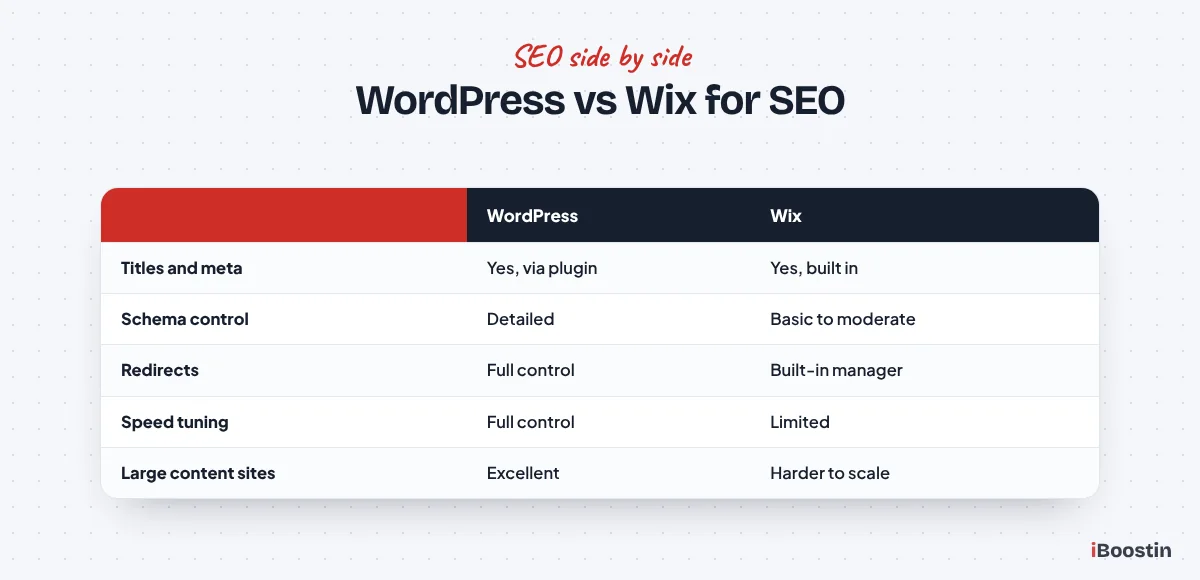
Both platforms can rank on Google. Wix has improved its SEO tools a lot, and a well written Wix site can rank for local searches. WordPress still offers more depth and control, which matters most in competitive markets and for content-heavy sites.
SEO Basics on Both Platforms
Both let you edit page titles, meta descriptions, headings, image alt text and URLs, and both create a sitemap and support HTTPS. Wix includes an SEO setup checklist and connects to Google Search Console. WordPress handles these through plugins like Rank Math or Yoast, which guide you page by page.
For a small local business with a handful of pages, either platform can cover the basics. What usually decides rankings at that level is content quality, your Google Business Profile, reviews and links, not the platform.
Where WordPress Pulls Ahead
WordPress gives you more control over structured data, URL structures, redirects, internal linking at scale, site speed and technical settings. It handles large amounts of content, such as dozens of service and location pages and a growing blog, with more flexibility. SEO plugins add features like detailed schema, redirect managers and content analysis.
That is why most SEO agencies, including ours, prefer WordPress for businesses that plan to compete seriously in search. Our WordPress SEO services focus on exactly these technical advantages.
Speed and Performance
Speed affects both rankings and how many visitors stay. Wix manages performance for you, which avoids the worst mistakes but limits how much you can improve. WordPress speed depends on your hosting, theme and plugins, which means it can be very fast or very slow.
Wix Performance
Wix runs on its own infrastructure and has invested in speed. You cannot change the hosting or the underlying code, so your main levers are image sizes, the number of apps and elements on each page, and keeping pages simple.
For simple sites, Wix performance is usually acceptable. For pages with many elements, apps and animations, it can be harder to reach strong Core Web Vitals scores, and there is less you can do about it.
WordPress Performance
A well built WordPress site on good hosting, with a lightweight theme, caching and optimized images, can be extremely fast. A WordPress site with a heavy theme, many plugins and cheap hosting can be very slow. The platform gives you control, so the result depends on choices.
If speed is a problem on an existing site, our guide on why your WordPress site is so slow walks through the usual causes and fixes. If you use Elementor, read whether Elementor is good for SEO to keep it lean.
Online Stores
Both platforms can run an online store. The right choice depends on the size of your catalog, how much control you want and how much you plan to grow.
Wix Stores
Wix Stores lets you add products, take payments, manage simple shipping and run a small shop from the same editor as the rest of the site. For a business selling a modest number of products alongside its services, it is quick to set up and easy to manage.
Limits appear with larger catalogs, complex product options, custom checkout needs or specific integrations. At that point, businesses usually look at dedicated e-commerce platforms.
WooCommerce on WordPress
WooCommerce turns WordPress into a full online store with products, variations, payments, shipping rules, taxes and thousands of extensions. It is free to install, highly flexible and especially strong when you want content and SEO to drive store traffic.
It needs more setup and maintenance than Wix Stores. If you are weighing WordPress against a dedicated store platform, our guide on WordPress vs Shopify for small business compares them in detail, and our WooCommerce development service builds stores ready to sell.
Maintenance, Security and Support
This is where Wix makes life easier, and where WordPress needs a plan. Neither is better in every case. It depends on whether you want to handle maintenance or have it handled.
Wix Handles the Technical Side
Wix takes care of hosting, security patches, SSL and platform updates. You do not install updates or worry about plugin conflicts. When something goes wrong at platform level, Wix’s support team helps.
The trade-off is control. If Wix changes a feature or has an outage, you wait. You also depend on Wix’s support for problems you could otherwise fix yourself or with a developer.
WordPress Needs a Maintenance Routine
With WordPress, you or someone you hire must keep WordPress, themes and plugins updated, run backups, monitor security and fix issues. Done properly, this takes a little time each month. Ignored, it leads to slow, broken or hacked sites.
Many business owners solve this with a maintenance plan. Our guide on what is included in website maintenance explains what a good plan covers, so you can compare providers properly.
Ownership, Lock-In and Growth
This is the factor most owners overlook when they choose, and the one they care about most a few years later.
Can You Move Your Website?
A WordPress site belongs to you. You can move it to another host, hand it to another developer or export everything at any time. If a hosting company raises prices or provides poor service, you move.
A Wix site lives on Wix. You can export some content, but not the site itself or its design. If you outgrow Wix or want to switch, you rebuild elsewhere. Planning that move without losing rankings takes care, which our guide on how to redesign a website without losing SEO covers step by step.
Thinking Three Years Ahead
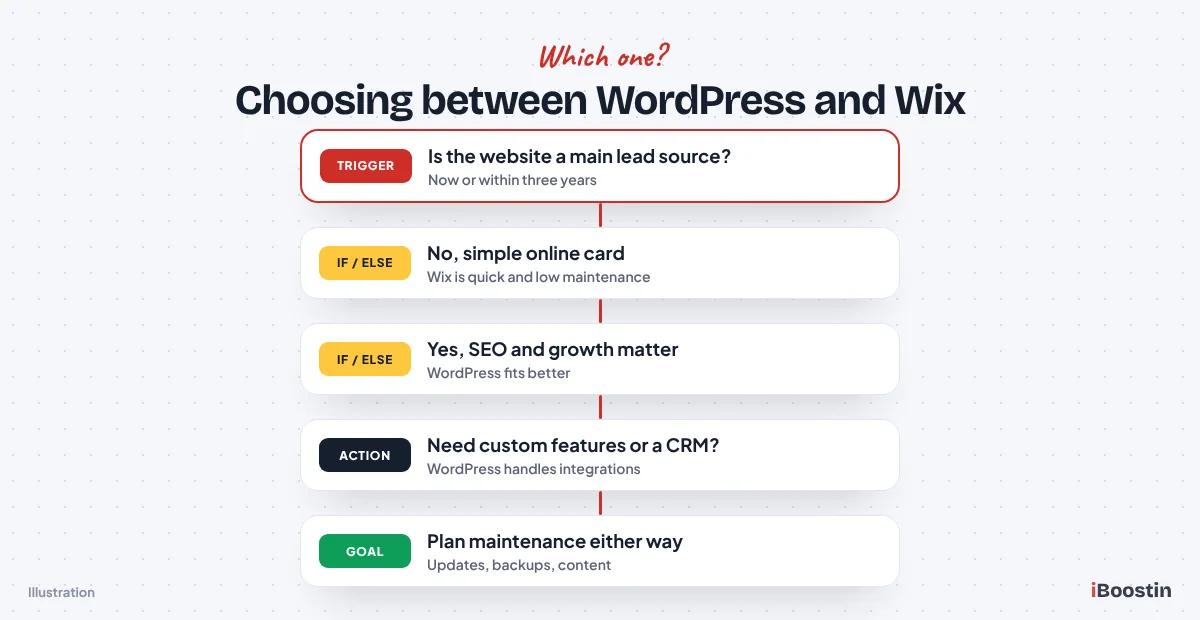
Ask where the business will be in three years. Will you add services, locations, a blog, an online store or integrations with a CRM? Will the website be a main source of leads? If yes, the flexibility and ownership of WordPress usually pay off.
If the website will stay a simple online business card, Wix’s simplicity may serve you perfectly well for years. There is no prize for choosing the more powerful platform if you will never use that power.
Which Should You Choose?
The right platform depends on your goals, budget for help and how much the website matters to your growth. These two scenarios cover most small businesses.
Choose Wix If
Choose Wix if you need a simple website quickly, have little time or budget for ongoing maintenance, do not plan to compete hard in search, and want everything in one place with one support team. Sole traders, new businesses testing an idea and businesses that mainly rely on referrals often fit here.
Even then, write clear service pages, set up your Google Business Profile and connect Search Console. A simple site with good content will still bring enquiries.
Choose WordPress If
Choose WordPress if your website is or will be a main source of leads, you want to rank for competitive searches, you plan to grow content and pages, you need custom features or integrations, or you want full ownership and the freedom to change providers.
Most growing service businesses, multi-location businesses and anyone serious about SEO fit here. If you go this way, hire carefully: our guide on how to hire a WordPress developer lists the questions that separate good builders from the rest.
Common Mistakes When Choosing a Website Platform
Most regrets we hear about platform choice come from a few predictable mistakes. Avoiding them matters more than which platform you pick.
Choosing on Day One Ease Alone
The easiest platform to start with is not always the easiest to live with. Owners who pick a builder only because the first afternoon felt easy sometimes hit limits a year later, when they need more pages, better SEO or a feature the builder does not support. Rebuilding at that point costs far more time than a slightly slower start would have.
Think about the website you will need in two or three years, not only the one you need this week. If you expect to add services, locations, a blog or an online store, factor that in now.
Ignoring Who Will Maintain the Site
A WordPress site that nobody updates becomes slow and insecure. A Wix site that nobody updates keeps running but slowly drifts out of date in content and design. Either way, someone has to own the website after launch.
Decide upfront who will handle updates, backups, content changes and fixes. If the answer is nobody in your team, budget for a maintenance or management service, or choose the platform that needs the least technical upkeep for your situation.
What About Squarespace and Other Builders?
Squarespace, GoDaddy’s builder and similar tools sit in the same group as Wix: hosted, easy to start and handled for you, with less control and limited portability. Most of the Wix points in this guide apply to them too.
How Other Builders Compare
Squarespace is known for clean, design-led templates and suits portfolios, creative businesses and simple service sites. Other builders vary in features and polish. All of them trade flexibility for convenience, and none of them lets you move the site itself to another platform.
If you are comparing several builders with WordPress, the same questions apply: how important is search, how much will the site grow, who will maintain it and how much do you value owning the site outright.
Switching From Wix to WordPress
Many businesses start on Wix and move to WordPress as they grow. The move is very doable, but it is a rebuild, not a transfer, so it needs planning.
What the Move Involves
Your content is moved and rebuilt in WordPress, your design is recreated or improved, and every old Wix URL is redirected to its new WordPress equivalent so you keep the rankings you have. Forms, bookings and other features are replaced with WordPress equivalents.
Plan the timing too. Our guide on how long it takes to build a WordPress website gives realistic timelines, and most of the time goes into content and testing, not the technical move.
How to Protect Your Rankings
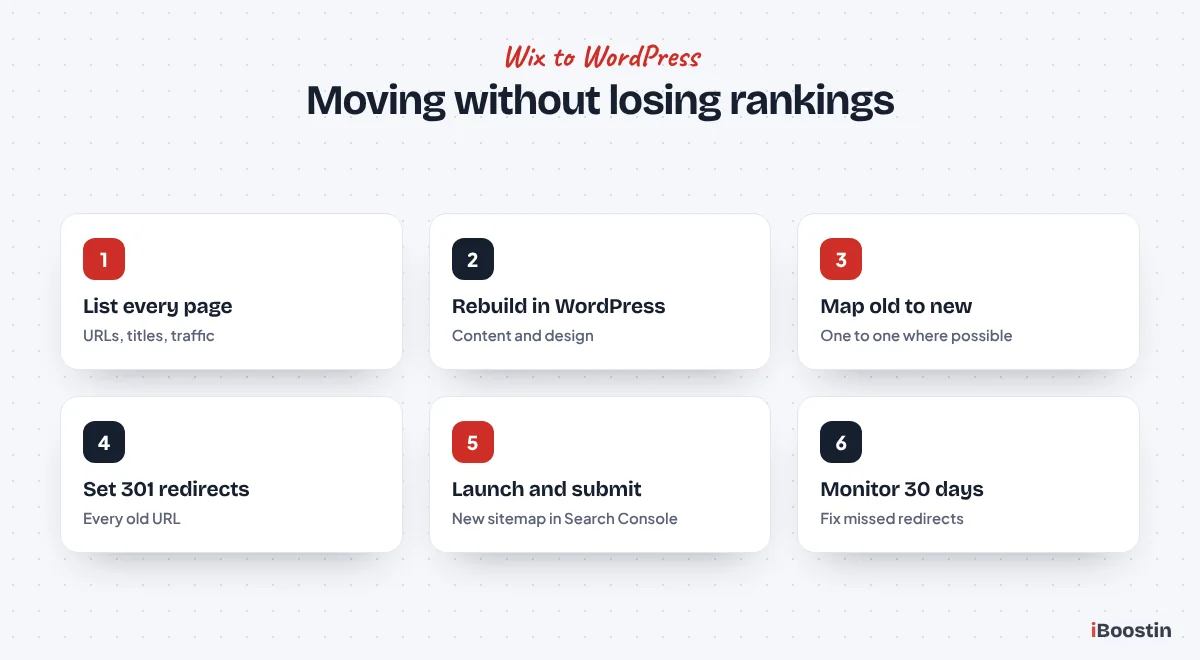
List every page on your Wix site and its address, map each one to the new WordPress page, set up 301 redirects, keep titles and content at least as strong, and submit the new sitemap in Search Console after launch. Monitor traffic and fix any missed redirects in the first weeks.
Our WordPress development services include Wix to WordPress migrations with redirects and SEO checks built in, so your visibility carries over to the new site.
Frequently Asked Questions About WordPress vs Wix
Is WordPress or Wix better for a small business?
It depends on your goals. Wix is better for a simple site that needs to launch quickly with little maintenance. WordPress is better for businesses that rely on Google for leads, plan to grow content, need custom features or want full ownership. Most growing service businesses get more long-term value from WordPress.
Is Wix good for SEO?
Wix covers the SEO basics well: editable titles, descriptions, headings, URLs, alt text, sitemaps and Search Console connection. A small local business can rank on Wix with good content and a strong Google Business Profile. WordPress offers more control over technical SEO, speed and large amounts of content, which matters in competitive markets.
Is WordPress harder to use than Wix?
At the start, yes. WordPress needs hosting, installation and a few settings before you build, and its dashboard has more options. Once set up, editing pages with Elementor or the block editor is straightforward. A well built WordPress site can be as easy for staff to edit as a Wix site.
Can I move my Wix site to WordPress?
Yes, but it is a rebuild rather than a direct transfer, because Wix does not let you export the site itself. Your content is moved, the design is recreated in WordPress and every old URL is redirected to its new page. Done carefully, you keep your rankings and usually improve speed and flexibility.
Which is cheaper, WordPress or Wix?
It depends on what you need. WordPress software is free, but you pay for hosting, any premium themes or plugins and possibly maintenance. Wix includes hosting in its plans, but costs rise with premium plans and apps. Compare the total cost of the features you actually need over a few years, not just the starting plan.
Does Wix own my website?
You own your content, but your website runs on Wix’s platform under its terms, and you cannot move the site itself to another host. With self-hosted WordPress, you control the files, database and hosting, so you can move the site whenever you want.
Can Wix handle an online store?
Yes. Wix Stores supports products, payments and shipping, and suits businesses selling a modest number of products. Larger catalogs, complex product options and specific integrations often outgrow it. WooCommerce on WordPress or a dedicated platform like Shopify are better for stores that plan to scale.
Pick the Platform That Fits Where You Are Going
Wix and WordPress are both good platforms, built for different needs. Wix trades control for convenience, which suits simple sites that need to launch quickly. WordPress trades a bit of convenience for flexibility, SEO depth and ownership, which suits businesses that want their website to drive growth.
If you are still unsure, think about where your business will be in three years and what you will need the website to do then. If you choose WordPress, we can build it for you so you get the benefits without the setup and maintenance burden.