In this guide
- How Long Does a WordPress Website Take? Typical Timelines
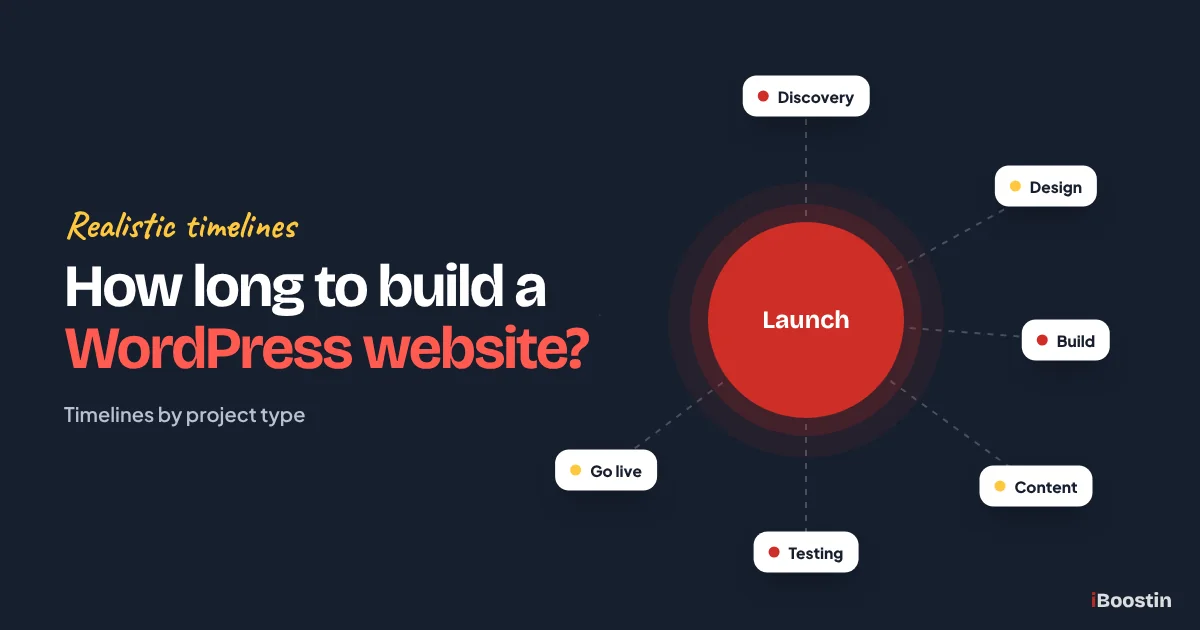
- The Phases of a WordPress Website Project
- How to Prepare Your Content So It Does Not Hold You Up
- Moving an Existing Site to WordPress
- What Affects How Long It Takes
- How Common Features Add to the Timeline
- Example Timeline for a Typical Business Website
- How to Launch Your WordPress Website Faster
- Questions to Ask About Any Timeline
- Why Competitor Estimates Vary So Much
- DIY vs Professional: How Timelines Compare
- Does a Faster Build Mean a Worse Website?
- After Launch: The Work Continues
- Frequently Asked Questions About WordPress Website Timelines
- Plan Realistically, Then Launch With Confidence
Building a WordPress website usually takes from about one week for a simple site using a ready-made theme, to two to four weeks for a customized theme site, six to twelve weeks for a custom-designed business website, and six to sixteen weeks for a WooCommerce store, with large or complex sites often taking three months or more. The biggest factor is rarely the building itself. It is how quickly content, feedback and decisions arrive.
Ask five developers how long a WordPress website takes and you may hear five different answers. That is not because anyone is being dishonest. “A WordPress website” can mean anything from a five-page brochure site on a theme to a hundred-page custom build with a store, bookings and integrations. The timeline depends on what you are building, how it is built and how ready you are.
This guide breaks down realistic timelines by project type, explains each phase of a WordPress project and how long it usually takes, shows what causes delays and gives you practical ways to launch sooner without cutting corners. It is written by the iBoostin team from the projects we plan and build for small businesses. If you want to understand the build process itself, read our guide on how to create a website in WordPress.
Key takeaways
- A simple theme-based site can be live in about a week. Custom business websites usually take six to twelve weeks. Stores and large sites take longer.
- Discovery, design, build, content, testing and launch each take time, and some can run in parallel.
- Content readiness is the biggest single factor. Sites with content ready launch much faster.
- Slow feedback, changing scope, extra features and third-party integrations are the most common causes of delay.
- Agree a timeline with clear milestones and deadlines for both sides before work starts.
How Long Does a WordPress Website Take? Typical Timelines
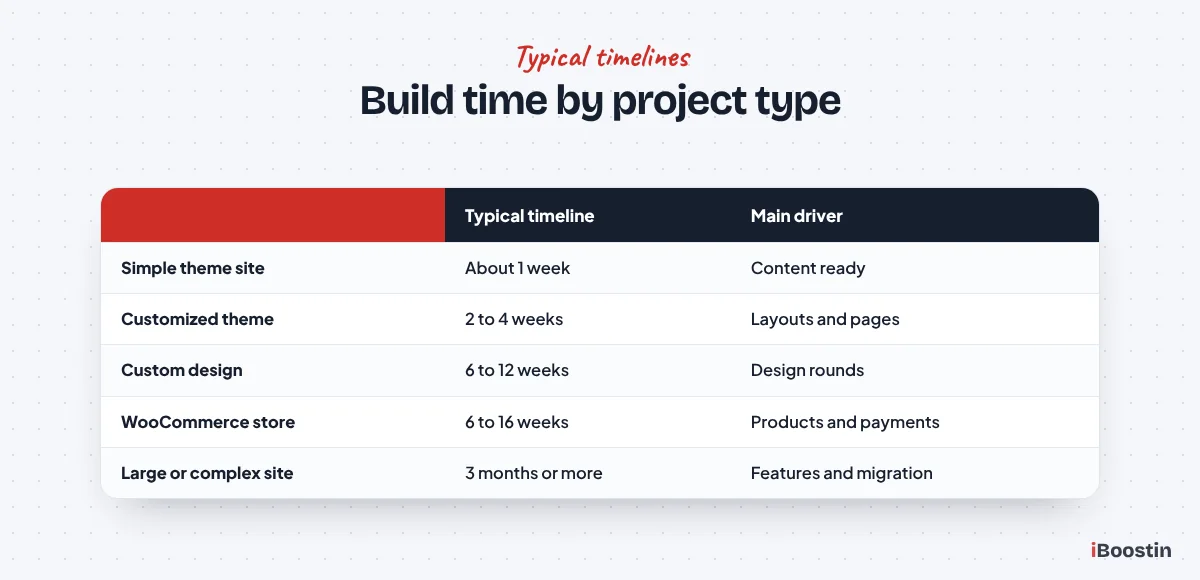
The table below shows typical ranges for common types of WordPress project. Your project may be faster or slower depending on content, features and how quickly decisions are made.
Simple Theme-Based Website
A small site of around five pages, built with a ready-made theme or starter template, with your content and photos already prepared, can often be built and launched in about a week. Some are faster. These sites use the theme’s design with your branding applied, rather than a unique design.
This approach suits new businesses that need a professional presence quickly, or owners testing an idea before investing in a custom site. The trade-off is less design control and a site that may look similar to others using the same theme.
Customized Theme Website
When a theme is used as a starting point but significantly customized, with adjusted layouts, extra sections, custom page templates and more pages, two to four weeks is typical. This covers many small business websites with five to fifteen pages.
The extra time goes into adapting layouts to your content, setting up forms and basic integrations, adding SEO basics and testing on phones and desktop.
Custom-Designed Business Website
A custom design created for your brand, then built in WordPress with a page builder like Elementor or as a custom theme, usually takes six to twelve weeks. This includes discovery, structure planning, design concepts and revisions, development, content entry, testing and launch.
This is the right choice when the website is a main source of leads, when you want to stand out from competitors and when the site needs to grow with the business. Our custom WordPress website design service follows this kind of timeline.
WooCommerce Store or Large Website
Online stores take longer because products, variations, payments, shipping, tax, emails and checkout all need setting up and testing. A small store may take six to ten weeks, while larger catalogs and custom features can take three months or more.
Large sites with many pages, memberships, multiple languages, bookings or complex integrations also sit at the longer end. Migrating an existing site with lots of content adds time for moving pages, redirects and checks.
The Phases of a WordPress Website Project
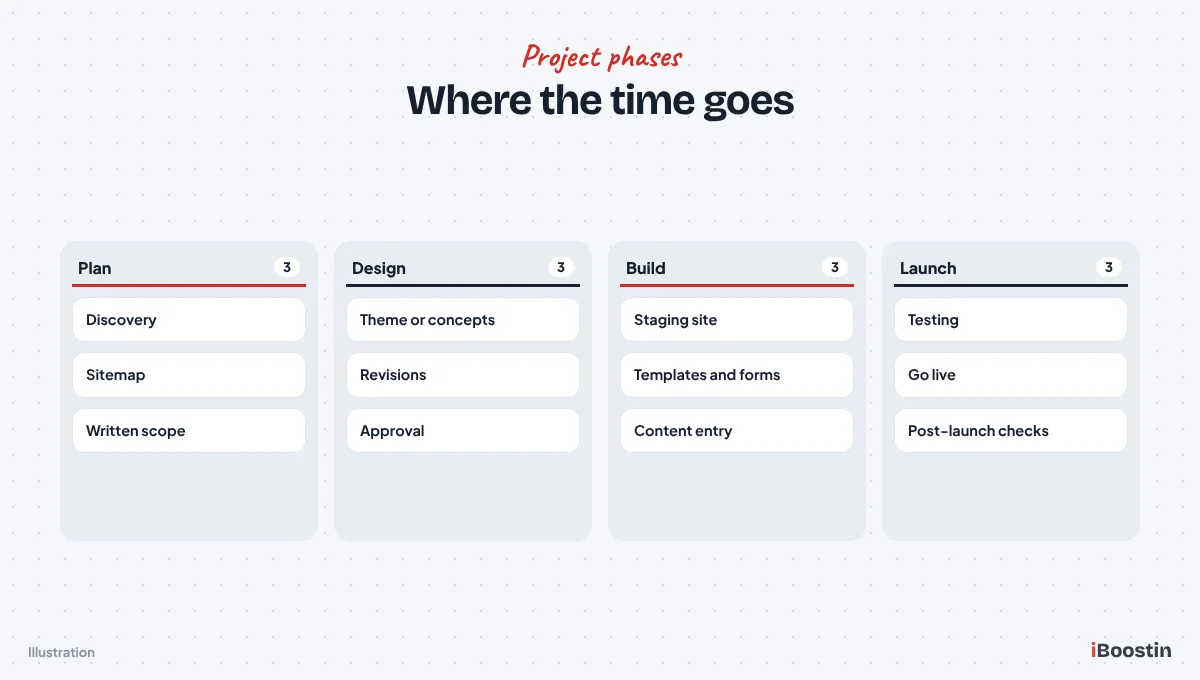
Every WordPress project goes through the same basic phases, even if small projects move through them quickly.
Discovery and Planning
Discovery is where goals, audience, pages, features and content are agreed. For a small site it might be a single call and a short brief. For a larger site it can take one to two weeks, including competitor review, sitemap planning and a written scope.
Good planning saves time later. It also produces a written scope that both sides can refer to when questions come up mid-project. Projects that skip it often stall halfway when someone realizes a key page or feature was never discussed.
Structure and Design
Next comes the site structure (which pages exist and how they connect) and the design. On theme-based projects, this means choosing and adapting a theme. On custom projects, it means wireframes or design concepts for key pages, followed by revisions.
Design typically takes one to three weeks on custom projects, depending on how many pages are designed individually and how many rounds of feedback are needed.
Development
Development turns the approved design into a working WordPress site: installing WordPress, the theme or builder, plugins, templates, forms, integrations and responsive layouts. For most small business sites, development takes one to four weeks.
Custom features, complex integrations and stores add time. Developers usually build on a staging site so the work can be reviewed safely before launch.
Content Entry
Content entry means adding the final text, images, videos and documents to each page. If content is ready, this can happen quickly alongside development. If content is still being written, it often becomes the longest phase of the whole project.
On sites with many pages, content entry and formatting can take a week or more on its own, even when the text is ready.
Testing and Launch
Testing covers phones, tablets and desktops, different browsers, forms and emails, speed, links, SEO basics and, for stores, full test orders. Allow a few days for a small site and a week or more for larger ones.
Launch itself usually takes a day: moving the site to live hosting or switching the domain, setting up redirects if replacing an old site, submitting the sitemap and final checks. Our guide on how to redesign a website without losing SEO covers launch steps for replacing an existing site.
How to Prepare Your Content So It Does Not Hold You Up
Because content is the most common cause of delay, it is worth planning it as carefully as the design. A simple content plan can save weeks.
Page Text
Start with a list of every page and what it needs to say: the main message, the services or details covered, common questions and the action you want visitors to take. Write rough drafts early, even if they need polishing later. A developer can build with draft text and swap in final copy, but cannot build with nothing.
If writing is not your strength, consider a copywriter or an agency that includes content. Professional copy often converts better and arrives on schedule, which can shorten the whole project.
Photos, Video and Branding
Real photos of your team, premises and work build far more trust than stock images, but they take time to arrange. Book a photographer early, or start collecting good quality photos from recent projects straight away.
Gather your logo files, brand colors and fonts at the start. If your logo only exists as a small image from an old website, ask your designer for the original files or budget time to recreate it.
Proof and Supporting Details
Reviews, testimonials, case studies, certifications, team bios and frequently asked questions all help visitors decide. Collecting them often involves contacting customers or colleagues, so start early.
For stores, product data is the equivalent: titles, descriptions, prices, variations, weights and photos for every product. Preparing a spreadsheet of products before the build starts is one of the best ways to keep a store project on schedule.
Moving an Existing Site to WordPress
If you already have a website on another platform, moving it to WordPress adds work to the timeline. How much depends on the size of the site and how much content is being kept.
Small Site Migrations
For a small site on a platform like Wix or Squarespace, most content needs to be copied page by page, because these platforms do not export complete sites in a form WordPress can import. Images need downloading and re-uploading, and every old URL needs a redirect.
For a site of ten to twenty pages, migration usually adds a few days to a week on top of the new build, including redirect setup and checks.
Content-Heavy Migrations
Sites with hundreds of blog posts, products or resources need a more careful approach. Some content can be imported automatically, but formatting, images, categories and internal links usually need checking and cleanup.
Large migrations can add several weeks. Protecting search rankings during the move is critical, which is why redirect planning should start early in the project, not at the end.
What Affects How Long It Takes
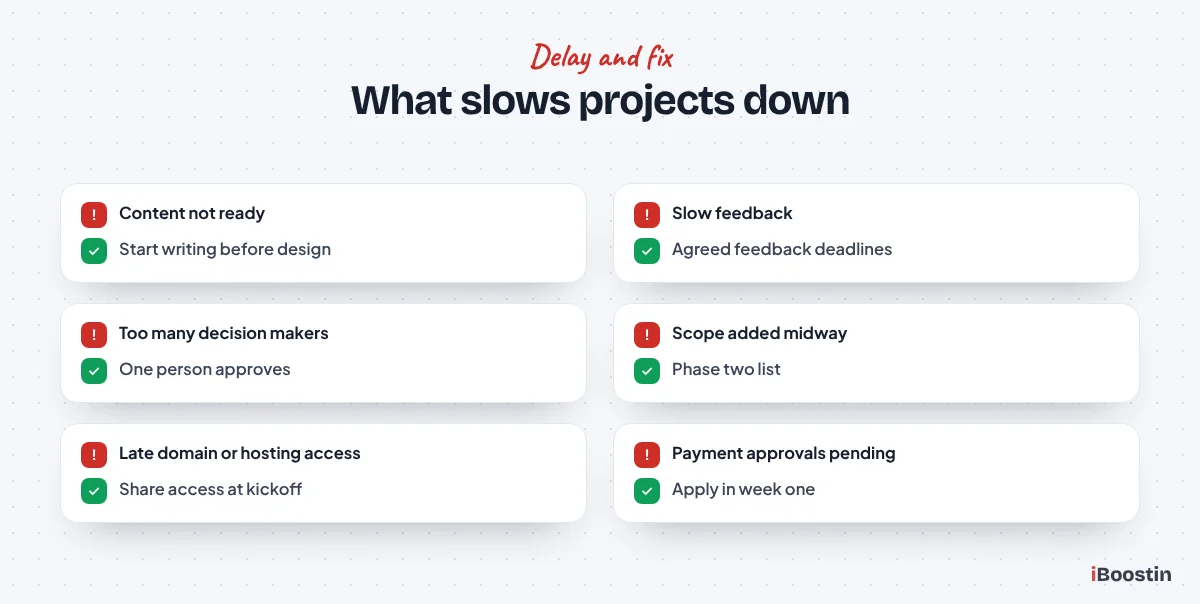
Two websites with the same number of pages can take very different amounts of time. These are the factors that make the biggest difference.
Content Readiness
Content is the single biggest factor. Many projects finish design and development quickly, then wait weeks for page text, photos, team bios, testimonials or product details. Writing good content takes longer than most owners expect.
If you need copywriting, include it in the plan from the start, with its own timeline. If you are writing it yourself, start before design begins.
Scope and Features
The more pages, templates and features a site has, the longer it takes. Booking systems, memberships, multilingual content, custom post types, calculators, CRM integrations and stores all add design, development and testing time.
Scope changes during the project are a major cause of delay. Adding a new section or feature halfway through often means redesigning and retesting parts already finished.
Feedback and Decisions
Every approval point, such as the sitemap, design concepts and the staging review, waits for your feedback. If feedback takes a week each time, those weeks add straight onto the timeline.
Having one decision maker, or a small group that agrees feedback before sending it, keeps projects moving. Conflicting feedback from several people often leads to extra revision rounds.
Third Parties
Some tasks depend on other people: domain transfers, hosting access, payment gateway approvals, email setup, logo files from a designer, or data exports from an old platform. These often take longer than expected and can block launch.
Start third-party tasks early, especially payment account approvals for stores and access to existing domains and hosting. If a former developer or agency controls your domain or hosting, request access at the very start, because recovering accounts can take days.
How Common Features Add to the Timeline
Features are where timelines most often grow. Knowing roughly what each one involves helps you decide what to include at launch and what can wait.
Booking and Appointment Systems
Online booking needs the right plugin or service, your services, staff, availability and rules set up, confirmation and reminder emails written and the whole flow tested on phones. If payment or deposits are taken at booking, payment setup and testing add more time.
For many small businesses, a booking system adds several days to a week or two, depending on how complex the rules are and how many staff calendars are involved.
Multiple Languages
A multilingual site needs a translation plugin, a translated version of every page, menu and form, and settings so search engines show the right language to the right visitors. The translation itself is usually the slowest part.
Plan translated content as its own workstream. If translations are not ready, launching in one language first and adding others later is often the faster route.
CRM, Email and Other Integrations
Connecting forms to a CRM, an email marketing tool, a booking platform or accounting software requires access to those accounts, field mapping and testing to make sure every enquiry arrives correctly. Each integration typically adds a few days.
Delays usually come from waiting for account access or for someone to decide how leads should be tagged and routed. Settle these decisions early and integrations go smoothly.
Example Timeline for a Typical Business Website
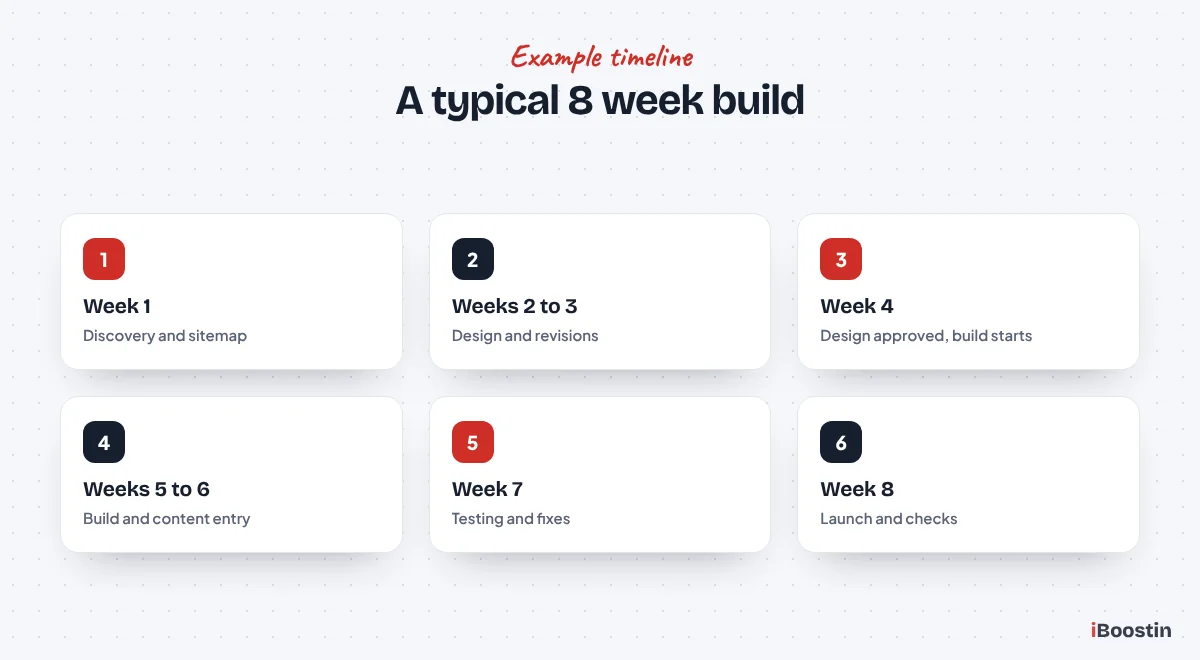
Here is how a custom-designed WordPress website for a small business might run over about eight weeks. Every project differs, but the sequence is similar.
Weeks One to Four
In week one, discovery: goals, audience, competitors, sitemap and content plan agreed. Content writing or gathering starts immediately. In weeks two and three, design: homepage concept first, then inner page designs, with revisions. In week four, design is approved and development begins on staging.
Running content preparation in parallel with design is what keeps this timeline realistic. If content waits until design is finished, the project often stretches by several weeks.
Weeks Five to Eight
In weeks five and six, development: templates, pages, forms, integrations and responsive layouts are built, and content is added as it arrives. In week seven, testing and revisions: review on staging, fix issues, test forms, speed and SEO basics.
In week eight, launch: final approvals, go live, redirects if replacing an old site, sitemap submitted and post-launch checks. After launch, a short support period covers small fixes and questions.
How to Launch Your WordPress Website Faster
You can shorten most timelines without cutting quality. These steps make the biggest difference.
Prepare Before the Project Starts
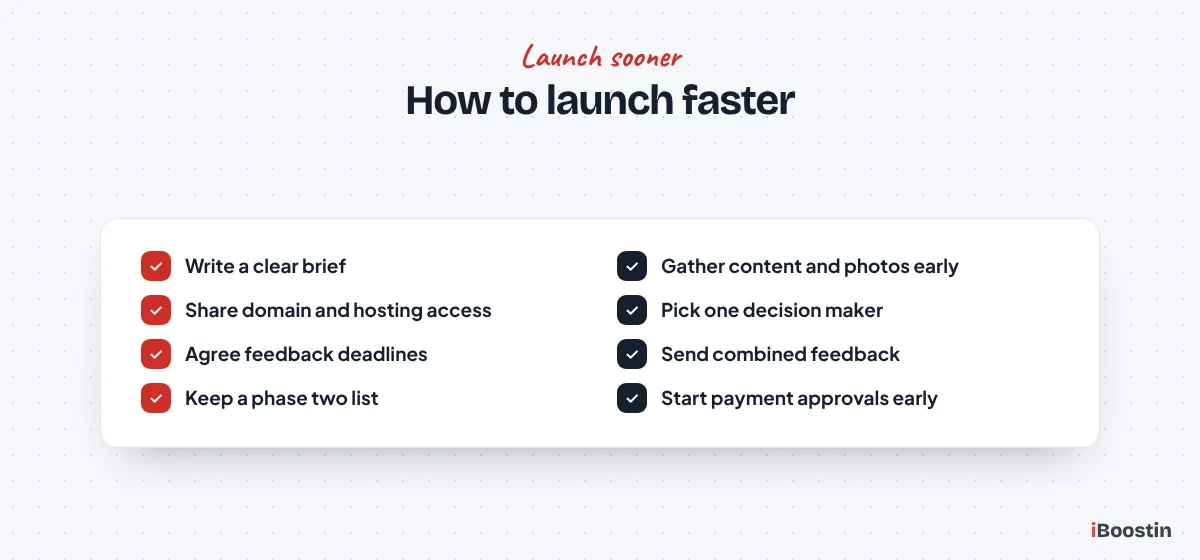
Write a clear brief with your goals, pages and features. Start gathering content, photos, testimonials and logos before kickoff. Make sure you have access to your domain, hosting and any existing website, and start any account approvals, such as payment gateways, straight away.
Collect a short list of websites you like and why, so design starts from clear direction. Decide who will approve work and give feedback. A single decision maker with authority to approve keeps everything moving.
Keep the Project Focused
Launch with the pages and features you need now, and keep a list of “phase two” ideas for after launch. A focused first version goes live sooner, starts bringing in enquiries and gives you real data about what to add next.
Agree feedback deadlines for each milestone and stick to them. Combine feedback into one clear list rather than sending separate messages. If you need guidance on choosing a developer who works this way, our guide on how to hire a WordPress developer lists the questions to ask about process and timelines.
Questions to Ask About Any Timeline
A timeline is only useful if both sides understand what it depends on. These questions help you judge whether a proposed schedule is realistic.
Before You Sign
Ask what the timeline assumes: when content will be delivered, how many feedback rounds are included and how quickly you need to respond at each stage. Ask which phases can run in parallel and which must wait for your approval.
Also ask what happens if something slips on either side. A clear answer shows the developer has thought about risks rather than quoting the best case.
During the Project
Ask for a simple shared schedule with milestones and dates, and a short regular update on progress, what is waiting for you and any risks. Regular updates stop small delays from turning into big ones unnoticed.
If the project is slipping, ask early whether scope can be adjusted to protect the launch date, such as moving a feature to phase two. That is often better than delaying the whole site.
Why Competitor Estimates Vary So Much
If you have read other articles or collected quotes, you have probably seen very different timelines. Understanding why helps you compare them sensibly.
Different Projects, Same Name
Some estimates assume a ready-made theme with your logo, others a fully custom design. Some include content writing, others assume you provide everything. Some include SEO setup, testing and training, others stop at “the site works”. All of them call the result “a WordPress website”.
When comparing estimates, check what is included: number of pages, design approach, content, features, SEO, testing, launch support and training.
Optimistic vs Realistic Timelines
Very short timelines are sometimes quoted to win the project, then stretched once work begins. Others are only possible if content is fully ready and feedback is instant. A realistic timeline includes time for your feedback, content and testing.
Ask any developer how their timeline would change if content arrives late or a feedback round takes longer, and what they need from you each week to stay on schedule. A good one will explain honestly.
DIY vs Professional: How Timelines Compare
Building the site yourself and hiring a professional lead to different timelines, for different reasons.
Building It Yourself
If you build your own WordPress site, the technical setup can be done in a day or two, but learning the tools, designing pages, writing content and fixing problems often takes much longer when it fits around running a business. Many DIY projects take weeks or months, with long pauses.
DIY can work well for simple sites if you are comfortable with technology and have the time. If you are deciding between platforms, our guide on WordPress vs Wix for small business compares how quickly each gets you online.
Hiring a Professional
A professional team works faster because they have done it many times, have proven processes and can run design, development and content in parallel. They also avoid common mistakes that slow DIY projects, such as choosing a heavy theme or forgetting SEO basics.
The time you spend shifts from building to briefing, supplying content and giving feedback, which usually means a faster launch and a more effective site.
Does a Faster Build Mean a Worse Website?
Not necessarily. Speed and quality are not opposites, but cutting the wrong steps to save time almost always costs more later.
Steps You Should Never Skip
Planning, mobile testing, form testing, basic SEO setup, backups and, for redesigns, redirects should never be dropped to hit a date. Skipping them leads to broken enquiries, lost rankings and fixes after launch that take longer than doing it properly in the first place.
If a timeline only works by removing these steps, the timeline is wrong, not the steps.
Where You Can Save Time Safely
You can save time by launching with fewer pages, using a well-built theme or starter layout instead of a fully custom design, keeping features to what you need now and preparing content before the project starts. These choices reduce work without reducing quality.
A focused, well-built site that launches in a month is usually worth more to a business than a perfect site that is still unfinished six months later.
After Launch: The Work Continues
A launched website is not a finished one. The first weeks after launch, and the months that follow, matter just as much.
The First Weeks
Expect small fixes and adjustments in the first couple of weeks as real visitors use the site. Ask friends, staff and a few loyal customers to try it and tell you anything that feels confusing. Monitor forms, Search Console and analytics closely. If you replaced an old site, watch for redirect issues and ranking changes.
Most professional builds include a short support period for these fixes. Make sure you know how long it lasts and what it covers.
Ongoing Maintenance and Growth
After launch, the site needs regular updates, backups and security checks, plus ongoing content and improvements to keep it effective. Plan this from the start so the site keeps working for your business rather than slowly falling behind.
Many owners add the “phase two” features and pages in the months after launch, guided by real data on what visitors use and what brings in enquiries.
Frequently Asked Questions About WordPress Website Timelines
How long does it take to build a WordPress website?
A simple theme-based site can take about a week, a customized theme site two to four weeks, a custom-designed business website six to twelve weeks, a WooCommerce store six to sixteen weeks, and a large or complex site three months or more. Content readiness and feedback speed affect the timeline more than anything else.
Can a WordPress website be built in one day?
A very basic site can be set up in a day if a ready-made theme is used and all content is prepared in advance. A professional business website with planning, custom layouts, SEO setup and testing takes longer, usually at least a week and often several.
What slows down a WordPress website project?
The most common causes are content that is not ready, slow or conflicting feedback, scope changes during the project, extra features added late and delays from third parties such as domain access or payment account approvals.
How long does it take to build a WooCommerce store?
A small WooCommerce store often takes six to ten weeks, while larger catalogs, custom features or complex shipping and payment setups can take three months or more. Product data, photos and payment account approvals are common sources of delay.
How long does a website redesign take?
A redesign usually takes a similar time to a new build of the same size, plus time for a URL inventory, redirects and content migration. For a typical small business site, eight to twelve weeks is common for a custom redesign.
How can I speed up my WordPress website project?
Prepare a clear brief, gather content and photos before the project starts, have one decision maker, give combined feedback quickly, keep the first version focused and start third-party tasks such as domain access and payment approvals early.
Is it faster to build a website with a page builder?
Page builders like Elementor can speed up design and editing, especially for custom layouts, because pages are built visually. The overall timeline still depends mostly on planning, content, feedback and testing rather than the builder itself.
Plan Realistically, Then Launch With Confidence
How long a WordPress website takes depends on what you are building, how it is built and how ready you are. A simple site can be live in days. A custom business website usually takes a couple of months. A store or large site takes longer.
The fastest projects share the same habits: a clear brief, content prepared early, one decision maker, quick feedback and a focused first version. Get those right, and your website will launch on time and start working for your business sooner.