GoHighLevel Calendar Setup Without Double Bookings

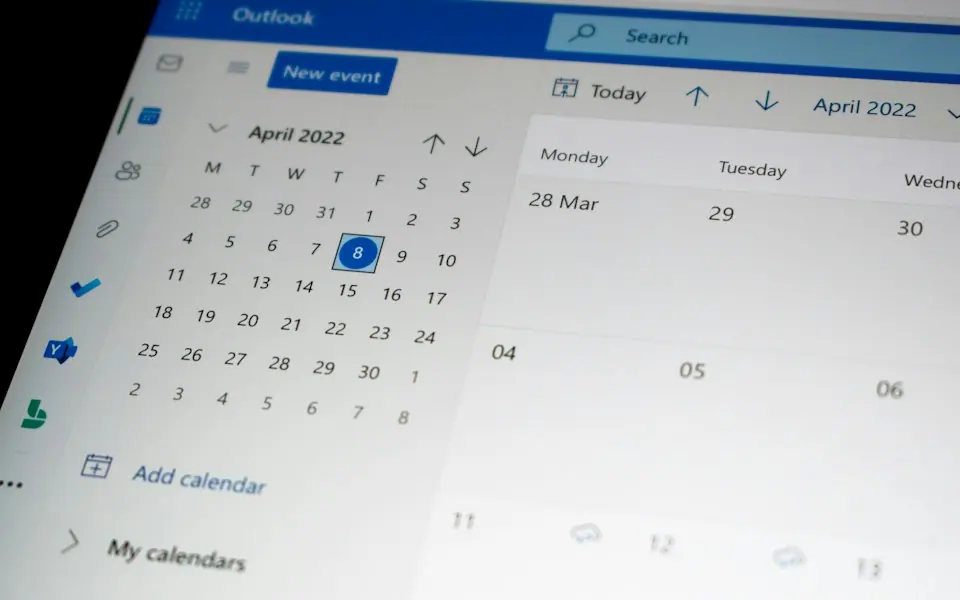
Our GoHighLevel calendar setup gives each service and team member the right availability, buffers and booking rules. We sync Google or Outlook so personal events block open slots, then add confirmations and reminders by SMS and email so more of your booked appointments actually happen.

Get Your Free Proposal

Tell us what you need. We reply within one working day.

Trusted by growing brands


Maribel Flores Beauty Salon logoSignature Technical Services logoLuxury Toys Rent a Car Dubai logoNujum Alrihalat Travel and Tours logo3rd Hand Solutions GoHighLevel agency logoCEO Logistics logoZawya Al Marjan General Trading logoTeaBuster logoVapeSourcing vape shop UAE logoLoop Logistics logo

GoHighLevel Calendar Booking That Fits Your Real Schedule

Calendar problems stay hidden until a customer complains. A rep gets booked during a dentist visit because their Google Calendar was never connected. A 90-minute service gets booked back to back with no travel time between jobs. Both come from settings inside GoHighLevel that nobody checked, and both cost you goodwill with a customer who was ready to buy. A careful GoHighLevel calendar setup catches them before your booking link goes public.

We built booking follow-up in GHL for Luxury Toys Rent a Car in Dubai, where every reservation needs a clear confirmation and timely follow-up. That project taught us to treat the calendar and the follow-up as one system. A booking should create or update the contact, land in the right pipeline stage and start reminders that stop by themselves if the appointment is cancelled or rescheduled.

GoHighLevel Calendar and Booking Setup

GoHighLevel Calendar Setup for Every Booking Type

We pick the calendar type that matches how you take appointments, then set the rules and follow-up around it.

Round Robin Team Calendars

Bookings rotate across your team, either evenly or by priority. Each person keeps their own availability, and the booking goes to whoever is free, so leads are not stuck waiting for one busy rep.

Service and Class Calendars

Service menu calendars let customers pick a treatment or job type, each with its own length. Class calendars accept several attendees in one slot, up to a seat limit that you set.

Availability, Buffers and Limits

We set working hours, buffer time before and after each appointment, minimum booking notice, how far ahead people can book and a daily cap, so your schedule stays workable.

Google and Outlook Sync

GoHighLevel calendar sync with Google or Outlook blocks slots when you have personal events and adds new bookings to the calendar your team already checks. Zoom or Google Meet links can be added automatically.

Booking Widgets on Your Site

We embed the booking widget on your website or funnel and match it to your brand colors. Visitors see open times in their own time zone, and their answers save to custom fields.

Appointment Reminders and Rebooking

Appointment reminders go out by SMS and email at the times you choose. When someone cancels or is marked as a no-show, a workflow sends them a rebooking link right away.

Booking Follow-Up and Workflow Blueprints We Build

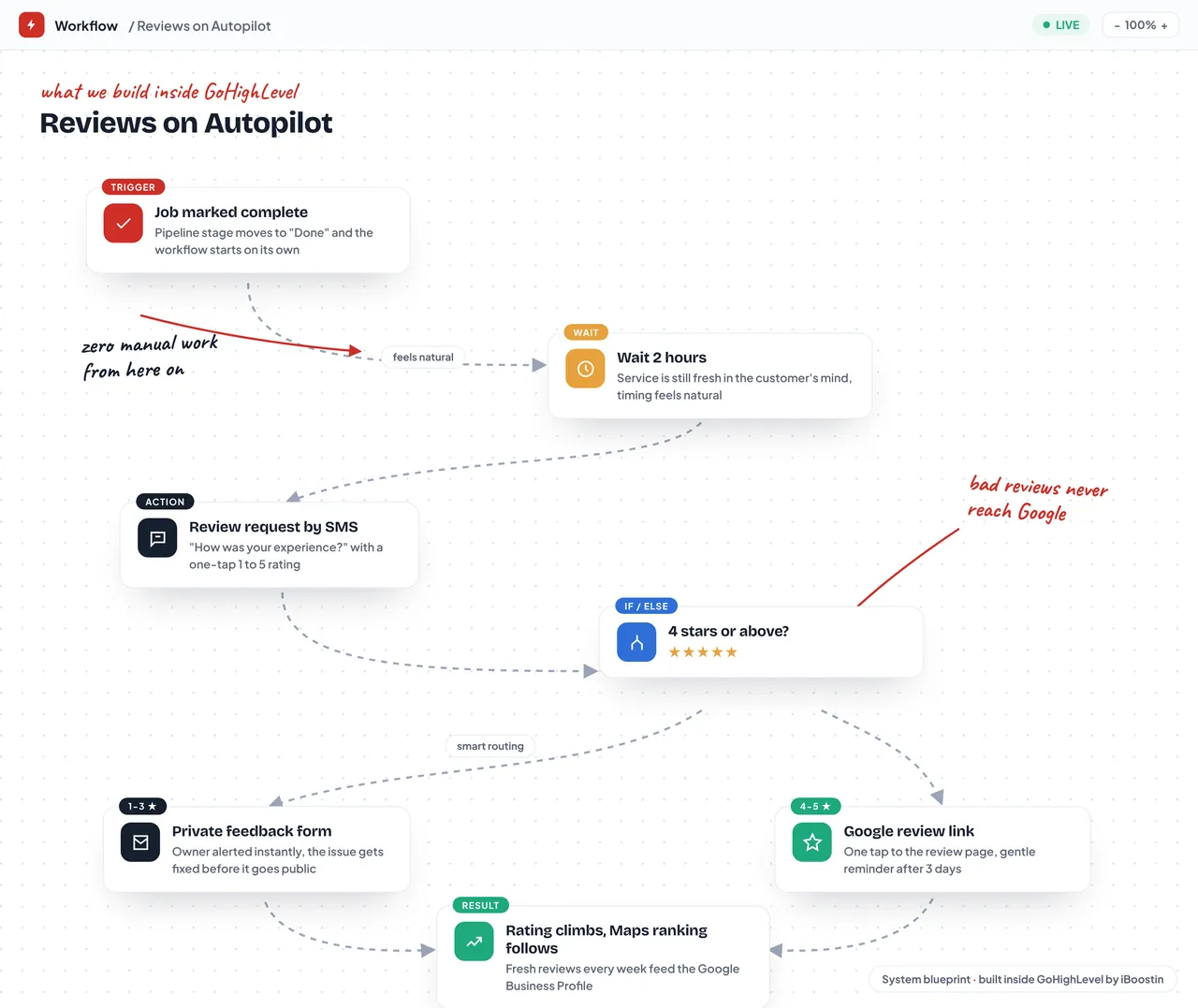
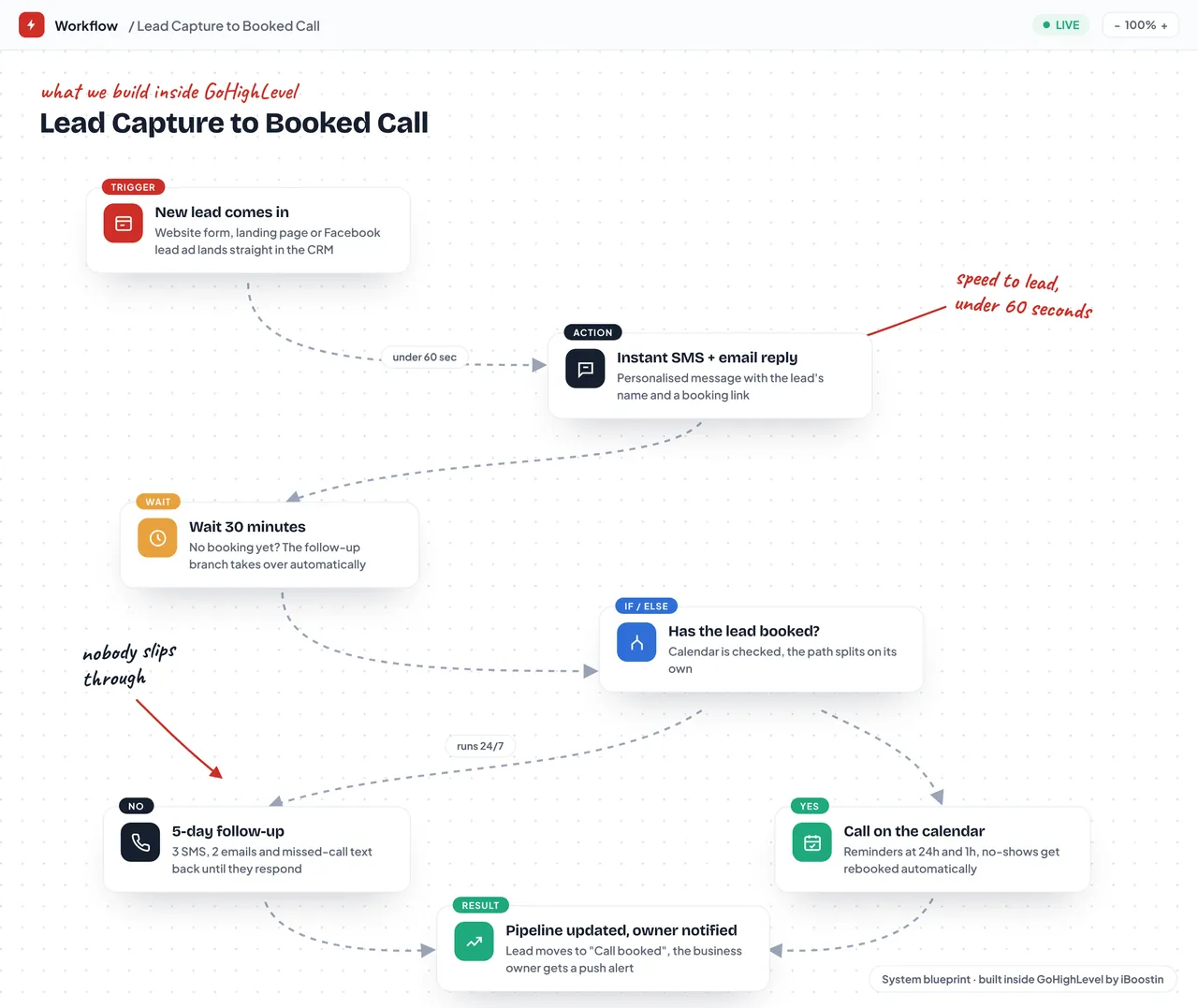
Below are our Lead capture to booked call and Reviews on autopilot blueprints, which plug into GHL calendars, plus the 3rd Hand Solutions site we support monthly.
GoHighLevel workflow
Lead Capture to Booked CallView Full Workflow
01
Lead Capture to Booked CallEvery lead answered in under 60 seconds
GoHighLevel workflow
Reviews on AutopilotView Full Workflow
02
Reviews on AutopilotHappy customers go to Google, unhappy ones reach you first
3rdhandsolutions.com
3rd Hand SolutionsView Full Page
03
3rd Hand SolutionsGoHighLevel agency website we built

Affordable GoHighLevel Expert Pricing

Pick the setup you need. Tap Order on WhatsApp and we map your workflows with you before we build anything.

Single Workflow

Accounts that need one automation built or fixed

$30/workflow
Most popular

Full GHL Setup

Businesses starting GoHighLevel or rebuilding a messy account

$150/one-time

Monthly Management

Teams that want ongoing builds, fixes and reporting

$250/month

Calendar Details That Protect Your Booked Appointments

Small calendar settings decide whether a booked lead actually turns up, so we check each one before launch.

Time Zones Handled

The account, each user and the booking widget can each hold a time zone. We align them, so a customer in another state or country sees correct times and so does your team.

Payments at Booking

Where it suits your business, a calendar can collect a deposit or the full fee through Stripe when the slot is booked, which discourages casual no-shows.

Status Drives Follow-Up

Marking an appointment as showed or no-show starts the right next step. Customers who showed get a thank you and a review request, and no-shows get a rebooking offer.

Clear Booking Pages

The booking page explains what the appointment covers, how long it takes and what to prepare. Fewer surprises usually mean fewer last minute cancellations.

Search impressions earned
0 M+
Websites launched
0 +
Projects delivered
0 +
Growing businesses
0 yrs

How We Set Up Your GHL Calendars and Reminders

We start with how appointments really run in your business, including travel time, prep time and who covers each service.

01

Booking Rules Review

We list your services, appointment lengths, team members, locations and working hours, and note rules that are hard to see from outside, such as no installs on Friday afternoons.

02

Calendar Build

We create the calendars, connect each team member’s Google or Outlook account, set buffers and notice periods and add the booking form questions you need answered before a call.

03

Reminder Workflows

We build confirmation, reminder, cancellation and no-show workflows tied to appointment status, so every message matches what actually happened to the booking and nobody gets a reminder for a cancelled slot.

04

Test Bookings

We book, reschedule and cancel test appointments from a phone and a laptop set to different time zones, then check the contact record, pipeline stage and every message sent.

What Our Clients Say

Zawya Al Marjan logo
Zawya Al MarjanGeneral Trading
★★★★★

You built our whole website and it loads so fast now. We are getting enquiries straight from Google every week, and the team was patient with every change we asked for.

2:18 PM
Luxury Toys logo
Luxury ToysRent a Car Dubai
★★★★★

The GoHighLevel setup changed how we handle bookings. Every enquiry gets followed up automatically now, so we never lose a customer to a slow reply. Huge help for us.

11:07 AM
3rd Hand Solutions logo
3rd Hand SolutionsGoHighLevel · Monthly
★★★★★

We have had iBoostin on a monthly GoHighLevel plan for more than six months now. They build and maintain our funnels, automations and follow up sequences, and our lead flow stays consistent every single month.

10:23 AM

Frequently Asked Questions

Straight answers to what business owners ask us before they start.

Still have a question?

Ask the team directly. We reply with a straight answer, not a sales script.

Our GoHighLevel calendar setup covers choosing the right calendar types, setting availability, buffers and booking limits, connecting Google or Outlook, embedding the booking widget and building confirmation, reminder and no-show workflows. A calendar with reminders is included in our Full GHL Setup at $150 one time, alongside your CRM, pipeline, up to 5 workflows and one funnel or form.

Use a personal calendar when one person takes the bookings. Use round robin when several team members can take the same appointment. Collective calendars need several people free at the same time, which suits joint consultations. Class calendars hold many attendees in one slot, and service menu calendars let customers choose from a list of services with different lengths.

Each user connects their Google or Outlook account in their profile settings. You choose conflict calendars, whose events block availability in GoHighLevel, and a linked calendar, where new GHL bookings are written. If a user never connects, GoHighLevel cannot see their personal events and may offer slots when they are busy, so we check every team member’s connection.

For most service businesses, a confirmation right after booking, a reminder the day before and a short text a couple of hours before is enough. Video calls benefit from one more text with the join link shortly before the start. Too many reminders feel like spam and can lead to opt outs, so we match the number to the value and length of the appointment.

Yes. Confirmation emails and texts can include reschedule and cancel links, so customers change the booking themselves and the slot opens for someone else. We attach a workflow that notifies your team when an appointment moves or is cancelled, and we update the pipeline stage so your reports show what really happened.

Yes, once Stripe is connected in your payment settings. A calendar can charge a fixed amount at booking, either as a deposit or the full price, before the appointment is confirmed. This works well for consultations and services where a no-show is costly. We add clear wording about refunds on the booking page, so customers know the terms before they pay.

Copy the embed code from the calendar settings and paste it into an HTML block on your website, or share the calendar’s booking link directly. On WordPress we place it in an HTML widget, and in GoHighLevel funnels it goes in as a calendar element. We always check the layout on mobile, because embedded calendars often need extra space on small screens.

This usually comes from mismatched time zones. The sub-account, each user profile and the calendar can each hold a different setting, and a staff member’s Google Calendar may use yet another zone. We check all of them, set the widget to show times in the visitor’s own zone and run test bookings from different locations.

Done-for-you marketing team

Hire Your Entire Marketing Team

$1,000$599/month
Save $401 every month

Stop juggling freelancers. A full specialist team works on your brand, led by one project manager. One flat monthly price, one point of contact.

  • 8 specialists working as one team
  • Dedicated project manager included
  • Clear monthly report on every task
Book a CallWe agree your monthly deliverables on the first call.

SEO Expert

On-page, technical and local SEO, keyword strategy and link building that grows organic traffic.

Google Ads Expert

Search, Performance Max and call campaigns with conversion tracking and weekly optimization.

Meta Ads Expert

Facebook and Instagram campaigns with precise targeting, retargeting and pixel tracking.

Social Media Manager

Plans, creates and schedules your content, manages your pages and grows your audience.

Content Writer

SEO blogs, website copy, emails and captions written to rank and convert readers.

WordPress Developer

Site updates, new Elementor pages, speed fixes, plugins and everything technical on WordPress.

GoHighLevel / CRM Expert

Funnels, workflows, pipelines, calendars and automated follow-ups inside your GHL account.

Product Listing & WooCommerce Specialist

Product uploads, SEO titles and descriptions, categories and variations on WooCommerce and Shopify.

More GoHighLevel Services

Every GoHighLevel service from the same remote team. Pick the one that moves your business forward.

Get Your GoHighLevel Calendars Ready for Bookings

Book a free 30-minute call or message us on WhatsApp. Tell us how you take appointments today, and we will suggest the calendar setup that fits.