In this guide
- WordPress vs Shopify: The Quick Answer
- What Is Shopify?
- What Is WordPress With WooCommerce?
- Setup and Ease of Use
- Design and Customization
- SEO and Content
- Speed and Performance
- Payments, Security and Maintenance
- Ownership and Growth
- Which Should You Choose?
- Questions to Ask Before You Choose
- Common Mistakes When Choosing a Store Platform
- Moving Between Shopify and WooCommerce
- Frequently Asked Questions About WordPress vs Shopify
- Choose the Platform That Matches Your Business Model
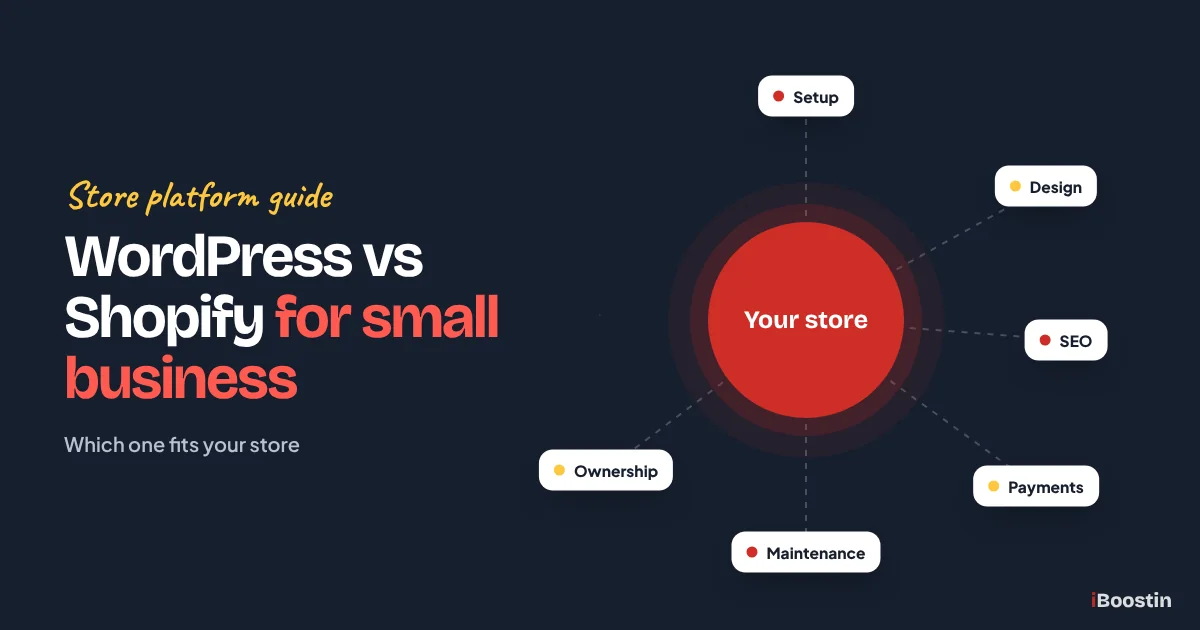
For a small business, Shopify is usually the better choice if selling products online is the core of the business and you want hosting, security and checkout handled for you. WordPress with WooCommerce is usually better if your business is content-led or service-led, you want full control and ownership, or the store is one part of a bigger website.
Owners often reach this question from two directions. A shop owner hears that WordPress is better for SEO and wonders whether Shopify is holding them back. A service business wants to start selling a few products and wonders whether to bolt a store onto WordPress or open a Shopify store next to it. Both are reasonable questions, and the answer depends far more on your business model than on which platform is “best”.
This guide compares WordPress with WooCommerce and Shopify on what actually matters to a small business: setup, design, products and checkout, SEO and content, speed, maintenance, payments, ownership and growth. At iBoostin we build WooCommerce stores and also recommend Shopify when it fits better, and this guide explains exactly when that is. If you are still choosing a platform for a general website, see our guide on WordPress vs Wix for small business as well.
Key takeaways
- Shopify is a hosted e-commerce platform: fast to launch, secure and easy to run, but with less control and ongoing platform fees.
- WordPress with WooCommerce is open-source, very flexible, excellent for content and SEO, but you handle hosting, updates and security.
- Choose Shopify when the online store is the business and you want the simplest possible operations.
- Choose WordPress and WooCommerce when content, services or custom features matter as much as the store, or when ownership is a priority.
- Many businesses get the best of both: a WordPress site for content and services, with a store built in WooCommerce or linked to Shopify.
WordPress vs Shopify: The Quick Answer
The simplest way to think about it: Shopify is a store that can also publish pages and a blog, while WordPress is a website that can also run a store. Which description fits your business tells you most of what you need to know.
Comparing Like With Like
WordPress on its own is not a store. When people compare WordPress with Shopify, they usually mean WordPress plus WooCommerce, the free plugin that adds products, cart, checkout, payments and shipping. That is the combination compared in this guide.
Shopify, on the other hand, is a complete hosted platform. You pay a subscription, and hosting, security, checkout and core store features are included. Extra features come from Shopify apps, many of which have their own subscriptions.
At a Glance
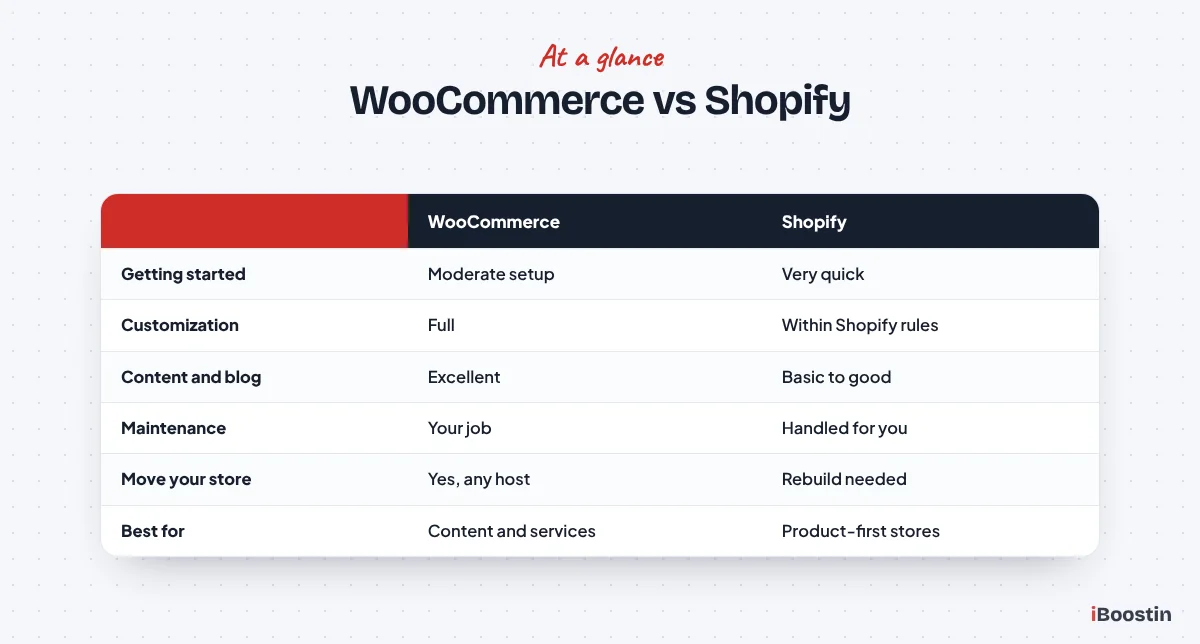
The table below summarizes where each option is stronger. The sections that follow explain each point in more detail and what it means for a small business.
| WordPress + WooCommerce | Shopify | |
|---|---|---|
| Getting started | Moderate setup | Very quick |
| Control and customization | Full | High within Shopify’s rules |
| Content and blogging | Excellent | Basic to good |
| SEO flexibility | Very high | Good, some fixed structures |
| Maintenance | Your responsibility | Handled by Shopify |
| Hosting and security | You choose and manage | Included |
| Ownership and portability | Full | Tied to Shopify |
| Best for | Content-led and service businesses with a store | Product-first online stores |
Use the table as a starting point, not a verdict. A business with a small catalog and big content plans weighs it very differently from a business that sells hundreds of products and never writes a blog post.
What Is Shopify?
Shopify is a hosted e-commerce platform built specifically for selling online. You choose a theme, add products, connect payments and shipping and start selling, without managing servers or software updates.
Where Shopify Shines
Shopify’s biggest strength is how little you need to think about. Hosting, security, checkout, payment processing and platform updates are handled for you. The checkout is fast and familiar to shoppers, and Shopify handles payment card security requirements at platform level, which reduces your compliance burden.
The app store covers most common store needs, from reviews and subscriptions to email marketing and shipping tools. Selling on social channels and marketplaces, point of sale for physical shops and multi-currency selling are all available. For a product business that wants to focus on products and marketing, Shopify removes a lot of technical work.
Where Shopify Limits You
You work within Shopify’s structure. Some URL patterns are fixed, deep customization of checkout and core behavior is limited on standard plans, and features beyond the basics often mean adding paid apps. Monthly costs grow as you add apps and move up plans, and payment-related fees depend on how you take payments.
Content is the other limit. Shopify has a blog and pages, but it is not built for large content libraries, complex service pages or advanced SEO structures. And like other hosted platforms, your store stays on Shopify: you can export products and customers, but not the store itself.
What Is WordPress With WooCommerce?
WooCommerce is a free, open-source plugin that turns a WordPress website into a full online store. It runs on your own hosting, alongside the rest of your WordPress site, and can be extended with thousands of plugins and integrations.
Where WooCommerce Shines
WooCommerce gives you complete control over your store, your data and your website. You can customize product pages, checkout, shipping rules and pricing logic, and connect to almost any payment gateway, CRM or marketing tool. Because it sits inside WordPress, the store lives alongside service pages, guides and blog posts on one site.
That makes WooCommerce especially strong for businesses where content drives sales: shops that rank with buying guides, service businesses that sell a few products, brands that publish a lot and B2B companies with custom pricing. You also own everything and can move hosts whenever you like.
Where WooCommerce Takes More Work
You are responsible for hosting, updates, backups, security and performance. A store with many plugins on cheap hosting can be slow and fragile, and payment and checkout reliability depend on how well the site is maintained. Some features that are built into Shopify need extensions in WooCommerce.
For many owners, the answer is good managed hosting plus a maintenance plan, or a developer who looks after the store. Our WooCommerce development service builds stores with this long-term care in mind.
Setup and Ease of Use
If you want to sell this week with as little setup as possible, Shopify wins. If you are willing to spend a little more time at the start for more control later, WooCommerce is very manageable, especially with help.
Launching a Store
With Shopify, you sign up, choose a theme, add products, connect payments and shipping and publish. Most of the decisions are guided by setup wizards. A simple store can go live in a day or two if your product photos and descriptions are ready.
With WooCommerce, you first need WordPress on good hosting, then install WooCommerce, run its setup wizard, choose a store-friendly theme and configure payments, shipping and taxes. It takes longer the first time, but the result is a store fully integrated with your website. Our guide on how to create a website in WordPress covers the WordPress side step by step.
Running the Store Day to Day
Shopify’s admin is designed only for selling, so orders, products, customers and reports are easy to find. WooCommerce adds store menus to the WordPress dashboard, which feels familiar if you already use WordPress and a little busier if you do not.
For daily tasks like processing orders, updating stock and adding products, both are easy once you are used to them. The real difference is what happens when something needs changing beyond the basics: on Shopify you look for an app, on WooCommerce you can usually configure or build exactly what you need.
Design and Customization
Both platforms offer professional themes and can produce attractive, mobile-friendly stores. The difference is how far you can go and how much it costs to get there.
Themes and Store Design
Shopify themes are polished and built specifically for stores, with a visual editor that makes changes easy. Deeper changes require editing the theme code, which uses Shopify’s own template language, so you need a Shopify-familiar developer for anything custom.
WooCommerce works with WordPress themes and page builders like Elementor, so you can design store pages with the same tools as the rest of your site. Fully custom designs are straightforward for a WordPress developer. Our custom WordPress website design service often includes the store pages.
Products, Options and Checkout
Shopify handles standard products and variants well, with apps for more complex options. Checkout customization is limited on standard plans, which keeps it fast and trusted but restricts unusual flows.
WooCommerce can handle complex products, bundles, subscriptions, bookings, custom fields, wholesale pricing and unusual checkout requirements through extensions or custom work. If your products or pricing are unusual, WooCommerce is often the more practical choice.
SEO and Content
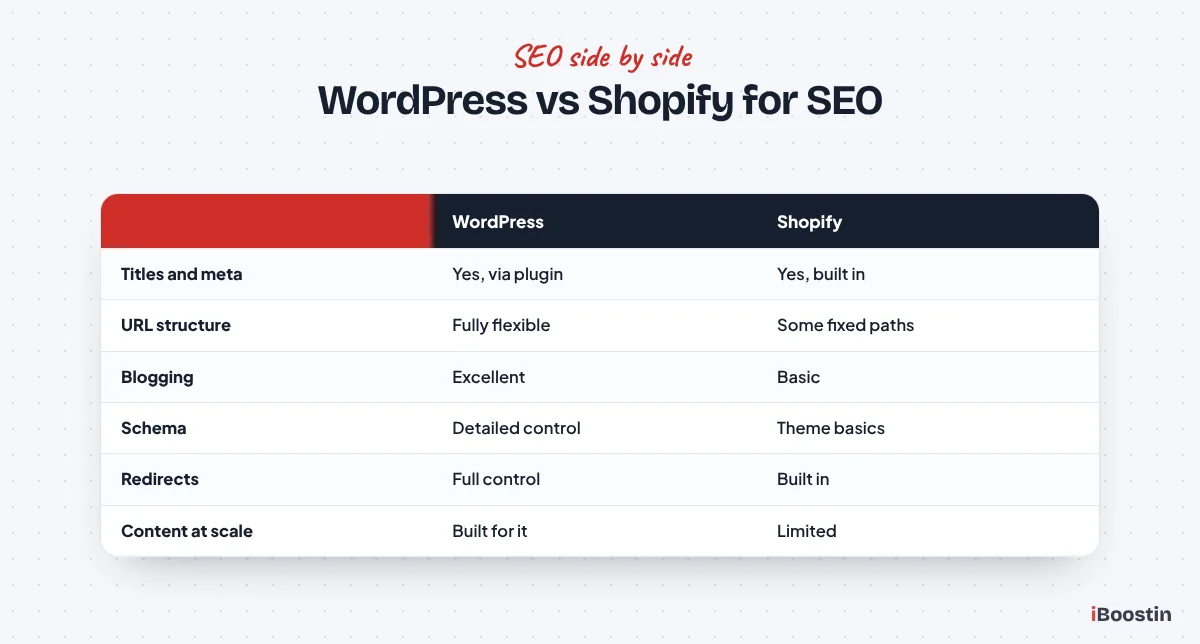
Both platforms can rank in Google. Shopify covers the essentials for product and collection pages. WordPress goes further for content, structure and technical control, which matters most when content is part of how you sell.
SEO on Shopify
Shopify lets you edit titles, meta descriptions, alt text and URLs for products, collections and pages, generates a sitemap, supports HTTPS and includes basic product structured data in most themes. Many Shopify stores rank well for product searches with good product content and collections.
Limits show up in fixed URL patterns, less flexible blogging and fewer options for advanced technical changes without apps or theme edits. For stores that compete mainly on product searches, these limits rarely matter much.
SEO on WordPress and WooCommerce
WordPress with an SEO plugin like Rank Math or Yoast gives detailed control over URLs, schema, redirects, internal linking, categories and technical settings. Content is where it stands out: buying guides, comparisons, how-to articles and service pages all live on the same site and link directly to products.
For a business that wants to win informational and comparison searches as well as product searches, that combination is powerful. Our WordPress SEO services build exactly this kind of content and product structure.
Speed and Performance
Shopify manages speed at platform level, so stores are reasonably fast by default, but heavy themes and many apps can slow them down. WooCommerce speed depends on hosting, theme and plugins, so it can be very fast or very slow.
Keeping a Shopify Store Fast
On Shopify, the main levers are a lightweight theme, optimized images and limiting the number of apps that add scripts to every page. Each app can add code to the storefront, so removing unused apps is one of the most effective speed improvements.
You cannot change Shopify’s hosting or server settings, which keeps things simple but means there is a ceiling to how much you can tune performance yourself.
Keeping a WooCommerce Store Fast
WooCommerce needs good hosting, caching configured for stores, optimized images and a lean set of plugins. Store pages like cart and checkout need special handling so they are not cached incorrectly. Done well, WooCommerce stores load quickly and handle steady traffic comfortably.
If an existing WordPress store feels slow, our guide on why your WordPress site is so slow walks through the usual causes, and our WordPress speed optimization service fixes them.
Payments, Security and Maintenance
This is where Shopify’s all-in-one model is most attractive, and where WooCommerce needs a plan.
Payments and Checkout Security
Shopify includes its own payment processing in many countries and supports many third-party gateways. Card security compliance is handled at platform level, and checkout runs on Shopify’s infrastructure. How much you pay in processing and platform-related fees depends on your plan, your country and which payment option you use, so check current terms in your region.
WooCommerce connects to gateways such as Stripe, PayPal and many regional providers. Most modern gateways handle card details on their side, which reduces your compliance burden, but you are still responsible for keeping the site secure, updated and running on HTTPS.
Who Handles Updates and Security
On Shopify, the platform handles updates, security patches and uptime. Your responsibility is mainly your theme, apps and content. That is a real time saving for small teams.
On WooCommerce, you or your developer handle WordPress, WooCommerce and plugin updates, backups, security monitoring and testing after updates. Stores need more care than brochure sites, because a broken checkout costs sales immediately. Our guide on what is included in website maintenance explains what a good maintenance plan should cover.
Ownership and Growth
The question that matters more over time than at launch is how easily the platform grows with you, and whether you can leave if you need to.
Can You Move Your Store?
With WooCommerce, you own the whole site and its data. You can change hosts, developers or designs without starting over. Your content, products, orders and customer data stay in your own database.
With Shopify, you can export products, customers and orders, but not the store design or the way it works. Moving away means rebuilding the store on a new platform and redirecting old URLs carefully to protect rankings. Many stores never need to move, but it is worth knowing before you start.
Growing Beyond the Basics
Shopify scales very well for growing product businesses, with higher plans for large stores and a broad partner ecosystem. Growth mostly happens within the Shopify model, through apps, themes and higher-tier plans.
WooCommerce scales through better hosting, optimization and custom development. It suits businesses whose growth includes content, services, memberships, B2B features or integrations with tools like CRMs and marketing automation. For those businesses, the flexibility often outweighs the extra maintenance.
Which Should You Choose?
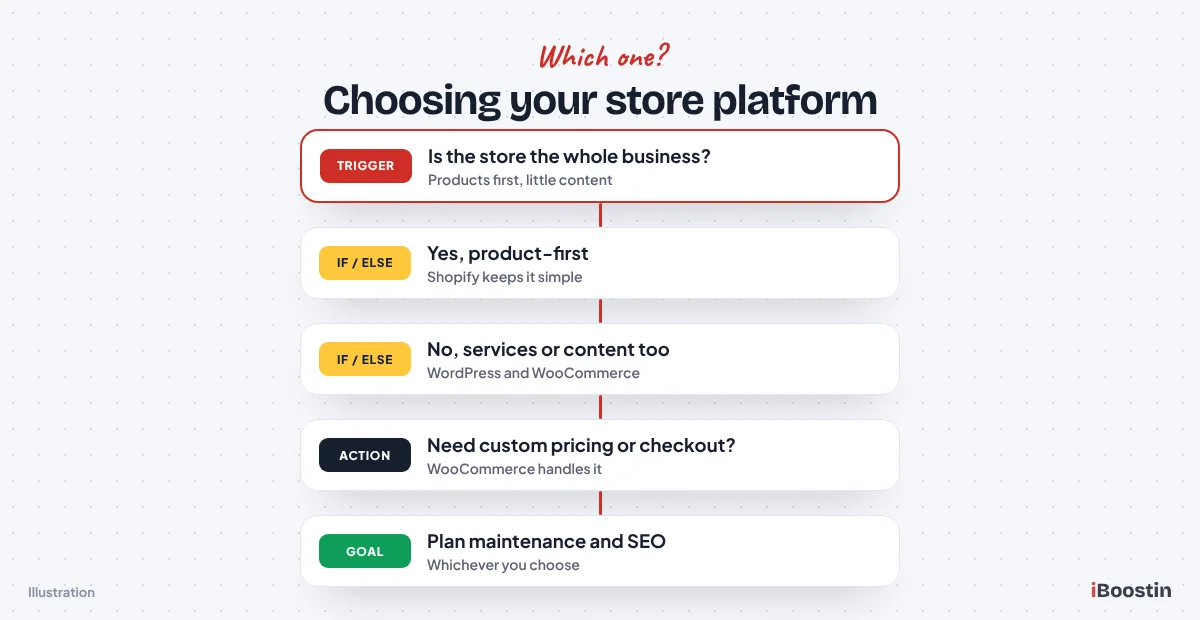
Most small businesses fall clearly into one of three scenarios. Find the one closest to yours.
Choose Shopify If
Choose Shopify if your business is mainly an online store, you sell standard products, you want to launch quickly and you prefer to pay a platform to handle hosting, security and checkout rather than manage them yourself. Product brands, small retailers and drop-shipping businesses often fit here.
Even on Shopify, invest in product descriptions, collection pages and a few buying guides. Good content still drives search visibility, whatever the platform.
Choose WordPress and WooCommerce If
Choose WooCommerce if your business sells services as well as products, content and SEO drive a lot of your sales, you need unusual product or checkout features, or you want full ownership of your website and data. Service businesses adding a shop, content-led brands and B2B sellers often fit here.
If you go this way, hire carefully and plan maintenance from day one. Our guide on how to hire a WordPress developer lists the questions to ask before you choose someone.
Consider Using Both
Some businesses run their main website on WordPress for content and services, and link to a Shopify store for products. This works well when the store is a separate part of the business, but it splits your SEO authority across two sites and means managing two platforms.
For most small businesses, one platform is simpler. If you already have a strong WordPress site, adding WooCommerce usually keeps everything together. If you already sell successfully on Shopify, adding a strong blog there may be enough.
Questions to Ask Before You Choose
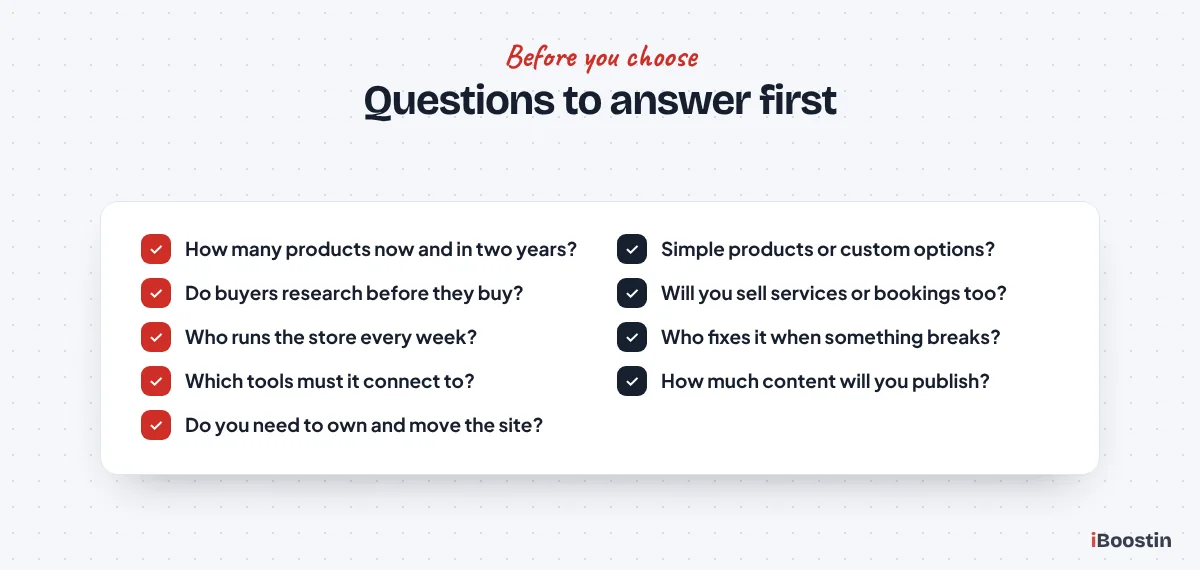
Most platform regret comes from choosing on a feature list instead of on how the business actually works. Before you commit, answer the questions below honestly, ideally with whoever will run the store every day.
Questions About Your Products and Customers
Start with what you sell. How many products do you have now, and how many in two years? Are they simple items with a few sizes and colors, or do they need custom options, bundles, subscriptions, bookings or quotes? Do you sell to consumers, to trade customers with their own pricing, or both?
Then think about how customers find you. If most buyers search for a product name and buy, product pages and collections do most of the work. If buyers research first, reading guides, comparisons and reviews before they decide, content will drive a large share of your sales and the platform needs to support that well.
Questions About Your Team and Time
Who will run the store each week? A founder who wants to spend time on products and marketing usually values Shopify’s hands-off model. A team with a developer or an agency on hand can get far more out of WooCommerce without the maintenance becoming a burden.
Also ask who will fix things when they break. On Shopify, platform problems are Shopify’s job, while theme and app issues are yours. On WooCommerce, almost everything is yours or your developer’s. Neither is wrong, but you should know which model you are signing up for before the store is busy.
Questions About the Next Three Years
Think about where the business is heading. Will you add services, a membership area, a trade portal, a booking system or a lot of content? Will you sell through marketplaces, social channels or a physical shop? Will you need to connect the store to a CRM, an accounting tool or a warehouse system?
The platform that fits the next three years is usually the right choice, even if the other one is a little easier today. Changing platforms later is possible, but it is a project you would rather avoid in the middle of a growth phase.
Common Mistakes When Choosing a Store Platform
We see the same mistakes again and again when small businesses pick a store platform. Avoiding them matters more than which platform you choose.
Choosing on Monthly Cost Alone
Comparing the cheapest plan or the free plugin is misleading. Shopify costs grow with apps and higher plans, and WooCommerce costs grow with hosting, extensions and maintenance time. The fair comparison is the total cost of running the store you actually need, including your own time, over several years.
A store that converts better or ranks for more searches will usually earn back any difference many times over. Choose the platform that helps you sell more, then manage costs within it.
Installing Too Many Apps or Plugins
Both platforms tempt you to add a tool for every small need. On Shopify, each app can add scripts to your pages and another subscription to your bill. On WooCommerce, each plugin adds code to maintain and potential conflicts after updates.
Before adding anything, ask whether the feature is really needed and whether an existing tool already covers it. A lean store is faster, cheaper and easier to keep running smoothly.
Ignoring Content and SEO Until After Launch
Many owners launch with thin product descriptions copied from suppliers, no collection or category content and no plan for guides or articles. The store looks finished but has very little for Google to rank.
Plan your categories, product descriptions and a handful of helpful guides before launch, whichever platform you choose. Structure is far easier to get right at the start than to fix once hundreds of products are live.
Skipping Checkout Testing on Phones
Most shoppers buy on their phones, and small checkout problems lose sales silently. A coupon field that confuses people, a shipping rate that does not show, a payment option that fails on one browser: each one costs orders you never see.
Place real test orders on several phones before launch and after every significant change. It takes less than an hour and protects the most important page on your site.
Moving Between Shopify and WooCommerce
Businesses sometimes outgrow their first choice. Moving in either direction is possible, but it is a project that needs planning to protect sales and rankings.
What a Migration Involves
Products, customers and order history are exported and imported, the store design is rebuilt on the new platform, and payment, shipping and tax settings are configured again. Every old product, collection and page URL needs a redirect to its new equivalent.
Plan the timing for a quiet sales period, test checkout thoroughly on phones before switching, and keep the old store available until you are sure everything works. Our guide on how long it takes to build a WordPress website includes typical timelines for store builds.
Protecting Rankings During the Move
Collect every indexed URL from the old store, map each one to the new store, set up 301 redirects and keep product titles and descriptions at least as strong. After launch, submit the new sitemap in Search Console and watch for crawl errors and drops in the first weeks.
Our WordPress development services include store migrations with redirects, SEO checks and checkout testing, so customers and Google both find you after the move.
Frequently Asked Questions About WordPress vs Shopify
Is Shopify or WordPress better for a small business?
Shopify is better when the online store is the business and you want hosting, security and checkout handled for you. WordPress with WooCommerce is better when content or services matter as much as products, when you need custom features, or when you want full ownership. The right choice depends on your business model.
Is WooCommerce cheaper than Shopify?
WooCommerce itself is free, but you pay for hosting, any premium themes and extensions, and possibly maintenance. Shopify charges a subscription plus any paid apps and payment-related fees. The total depends on your store’s needs, so compare the full cost of the features you will actually use over a few years.
Is WordPress better than Shopify for SEO?
WordPress offers more control over URLs, structure, schema and content, which helps content-led stores and competitive markets. Shopify covers the SEO basics well for products and collections and many Shopify stores rank strongly. For stores that rely on guides and articles to attract buyers, WordPress usually has the edge.
Can I use WordPress and Shopify together?
Yes. Some businesses run their main website on WordPress and link to a Shopify store, or embed Shopify products on WordPress pages. It works, but it splits your site authority and means managing two platforms. Most small businesses find one platform simpler, using WooCommerce on WordPress or a blog on Shopify.
Is Shopify easier than WooCommerce?
Yes, especially at the start. Shopify handles hosting, security, updates and checkout, and its admin is built only for selling. WooCommerce needs WordPress hosting, setup and ongoing maintenance, but offers more control and flexibility. With a good developer and maintenance plan, WooCommerce is also easy to run day to day.
Can I move from Shopify to WooCommerce?
Yes. Products, customers and orders can be exported and imported, the design is rebuilt in WordPress and old URLs are redirected to their new pages. With careful redirects and testing, you keep your rankings and sales. Plan the move for a quieter period and test checkout thoroughly first.
Which platform is better for selling services and products together?
WordPress with WooCommerce is usually better for businesses that sell both services and products, because service pages, bookings, content and the store can all live on one site with shared SEO authority. Shopify is designed around products first, so service-heavy businesses often find it less flexible.
Choose the Platform That Matches Your Business Model
Shopify and WooCommerce are both excellent at what they are designed for. Shopify is the simplest way to run a product-first online store. WordPress with WooCommerce is the more flexible choice when content, services, custom features or ownership matter. Decide which description fits your business, and the right platform usually becomes obvious.
If WooCommerce fits, we can build your store, configure payments and shipping, test checkout on every device and set up SEO from day one, so you start selling without the usual setup headaches.