In this guide
- What Is Website Maintenance?
- The Complete Website Maintenance Checklist
- How Often Should Each Task Happen?
- What Is Usually Not Included
- Extra Maintenance for WordPress and WooCommerce Sites
- How Maintenance Protects Your SEO
- Building Your Own Maintenance Routine
- Website Maintenance vs Website Management
- How Maintenance Plans Are Usually Structured
- Questions to Ask Before Choosing a Maintenance Plan
- DIY Maintenance or Professional Help?
- What to Expect From a Good Maintenance Provider
- Signs Your Current Maintenance Is Not Working
- Frequently Asked Questions About Website Maintenance
- Maintenance Protects the Investment You Already Made
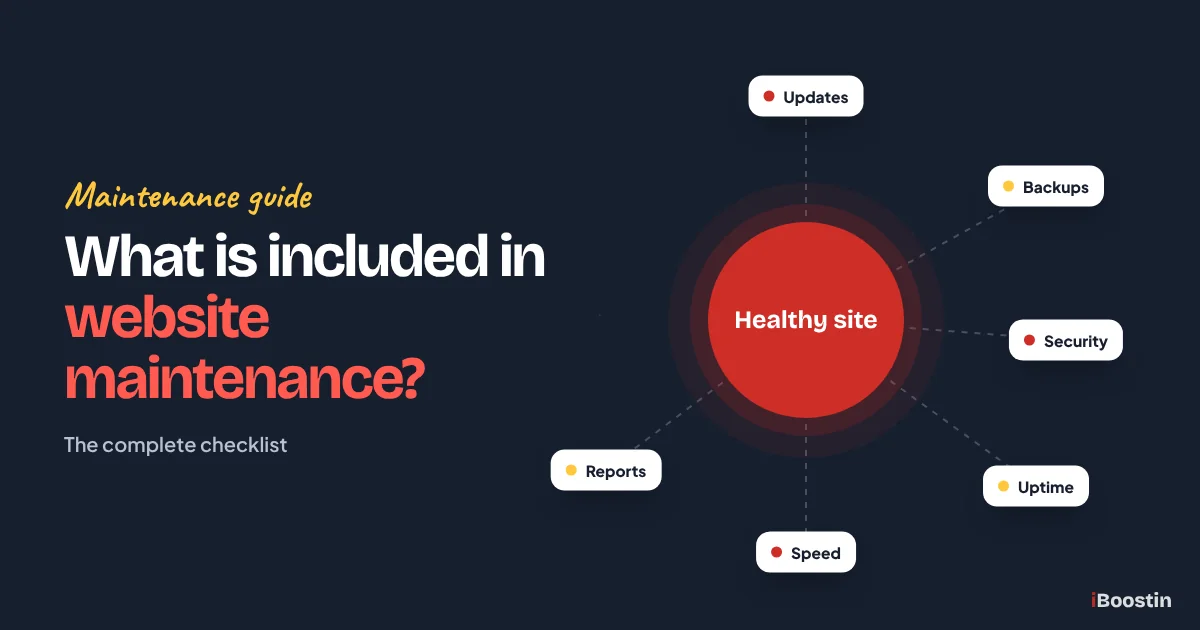
Website maintenance usually includes software updates (WordPress core, theme and plugins), regular backups stored off the server, security monitoring and malware scans, uptime monitoring, speed and performance checks, broken link and form testing, database cleanup, small content changes, and a monthly report. Good plans also include a set response time when something breaks and help restoring the site if it goes down or is hacked.
Many business owners pay for a maintenance plan without knowing exactly what they are getting. Others skip maintenance altogether because the site “seems fine”, until an update breaks the layout, a form stops sending enquiries or the site is hacked. The truth is that a website is software, and like any software it needs regular care to stay secure, fast and working.
This guide explains what website maintenance includes, how often each task should happen, what is usually not included, how maintenance differs from website management and the questions to ask before you choose a plan. It focuses on WordPress, which powers a large share of small business websites, but most of the checklist applies to any site. It is written by the iBoostin team, who maintain WordPress sites for small businesses every month.
Key takeaways
- Core maintenance covers updates, backups, security, uptime monitoring, performance checks, functionality testing and reporting.
- Some tasks happen daily (backups, uptime and security monitoring), others weekly, monthly or quarterly.
- Updates should be tested, ideally on a staging copy, with a backup taken first so nothing is lost if something breaks.
- Content changes, new pages, redesigns and major fixes are often outside basic plans, so check the scope.
- Ask about response times, backup storage, who owns the accounts and what happens if the site is hacked.
What Is Website Maintenance?
Website maintenance is the ongoing work that keeps a website secure, working, fast and up to date after it launches. It is the website equivalent of servicing a car: routine checks and small repairs that prevent bigger, more expensive problems later.
Why Websites Need Ongoing Care
WordPress, themes and plugins are updated regularly to fix bugs, close security holes and stay compatible with newer server software and browsers. If these updates are skipped, the site gradually becomes more vulnerable and more likely to break when something finally is updated.
Hosting environments change too. Hosts upgrade PHP versions, change server settings and retire old software. Third-party services your site depends on, such as payment gateways, email delivery, maps and booking tools, change their requirements. Without someone keeping an eye on all of this, small changes add up to broken features.
What Happens Without Maintenance
The most common problems we see on neglected sites are security breaches, contact forms that silently stop sending, broken layouts after an automatic update, expired SSL certificates, slow loading and missing backups when they are needed most.
The cost is rarely just technical. A form that has not worked for weeks means lost enquiries. A hacked site can be flagged by Google and browsers, scaring visitors away and damaging trust. If you are planning a new site, factor maintenance in from the start; our guide on how to create a website in WordPress covers the setup choices that make later maintenance easier. Prevention is almost always cheaper than recovery. Our guide on what to do if your WordPress site is hacked shows how disruptive that recovery can be.
The Complete Website Maintenance Checklist
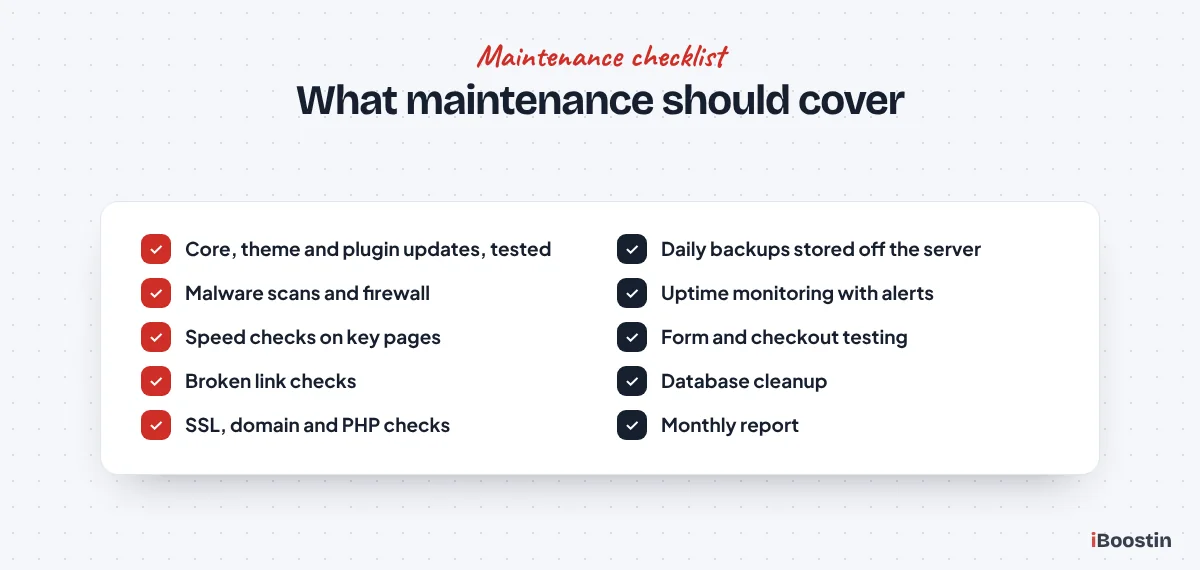
Here is what a thorough maintenance plan should cover. Not every site needs every item at the same frequency, but every site needs most of them.
Software Updates
Updates to WordPress core, the theme and every plugin are the backbone of maintenance. They fix security vulnerabilities, bugs and compatibility issues. Good maintenance does not just click “update all”. It reviews what each update changes, takes a backup, applies updates (ideally on a staging copy first) and checks the site afterwards.
Major updates, such as a new major version of WordPress, a page builder or WooCommerce, deserve extra care. They are more likely to cause conflicts, so they should be tested properly before being applied to the live site.
Backups
Backups are your safety net. A good plan takes automatic backups at least daily for active sites, stores them away from your hosting server, keeps several versions so you can go back further if a problem is discovered late, and includes both files and the database.
Keep at least one recent backup somewhere you control, such as your own cloud storage, so you are never fully dependent on a single provider or host. Just as important, backups should be tested. A backup that cannot be restored is not a backup. Ask your provider how often restores are tested and how quickly they can restore your site if needed.
Security Monitoring
Security work includes malware scanning, a firewall to block malicious traffic, login protection against brute force attacks, checking user accounts for unknown administrators and monitoring file changes. Strong passwords and two-factor authentication for admin accounts should be in place.
Security monitoring should also watch for warnings from Google Search Console and blacklist services, so problems are found before customers see a warning in their browser.
Uptime Monitoring
Uptime monitoring checks your site every few minutes and alerts someone if it goes down. Without it, you might only find out your site is offline when a customer tells you, or not at all.
Monitoring should check more than the homepage. Key pages such as contact, booking or checkout can fail while the homepage still loads, so it helps to monitor those too. A good provider responds to downtime alerts quickly, investigates the cause (hosting issue, plugin error, expired domain or SSL certificate) and keeps you informed until it is resolved.
Performance Checks
Sites slow down over time as content, plugins and data build up. Regular speed tests on key pages, image optimization, cache management and database cleanup keep performance steady.
Performance work should include checking Core Web Vitals in Search Console and investigating any pages that slip. Our guide on why your WordPress site is so slow explains the most common causes maintenance should watch for.
Functionality Testing
After updates, someone should check that the things that matter still work: contact forms send and arrive, booking tools accept bookings, the checkout processes orders, menus open on phones and key pages display correctly.
Forms deserve special attention. They often fail silently because of email delivery problems, so regular test submissions confirm enquiries are actually arriving in the right inbox.
Database and Housekeeping
The WordPress database collects post revisions, spam comments, expired temporary data and leftovers from deleted plugins. Regular cleanup keeps it lean and quick.
Housekeeping also includes removing unused plugins and themes, reviewing user accounts, checking SSL certificate and domain renewal dates and keeping the PHP version current and supported.
Reporting
A monthly report shows what was done: updates applied, backups completed, security scans, uptime, speed results and any issues found and fixed. It gives you confidence that the work is happening and a record if anything goes wrong.
Good reports are short and clear, highlighting anything that needs your attention rather than filling pages with technical detail. Over time, reports also become a useful history of the site, showing when plugins were added, when problems occurred and how speed and uptime have changed.
How Often Should Each Task Happen?
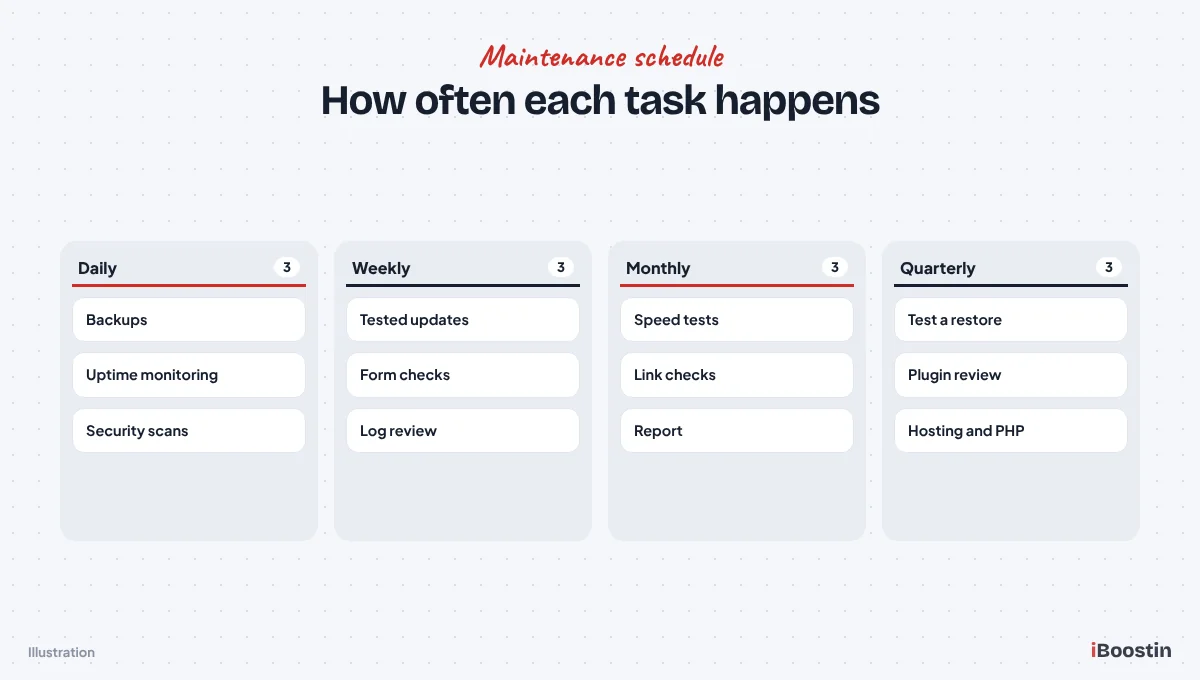
Different tasks need different frequencies. This cadence works well for most small business WordPress sites.
Daily and Weekly Tasks
Daily tasks are mostly automated: backups, uptime monitoring and security scanning, with alerts sent to whoever is responsible. Busy stores and sites that change often may also need more frequent backups.
Weekly tasks include reviewing and applying updates after testing, checking security and uptime logs, testing key forms and reviewing any alerts. Security updates for actively exploited vulnerabilities should be applied as soon as possible, not left for the weekly cycle.
Monthly and Quarterly Tasks
Monthly tasks include speed tests on key pages, broken link checks, database cleanup, reviewing Search Console for errors and security issues, and sending a report. This is also a good time to make small content updates.
Quarterly tasks include a deeper review: testing a full backup restore, reviewing plugins and removing ones that are no longer needed, checking PHP version and hosting performance, reviewing user accounts and planning improvements for the next quarter.
What Is Usually Not Included
Maintenance plans vary a lot, and misunderstandings about scope cause most frustration. Check what is excluded before you sign.
Work That Often Costs Extra
Basic plans often exclude content writing, new pages, design changes, new features, redesigns, SEO campaigns and fixing problems caused by changes someone else made. Hack cleanup may or may not be included, so ask specifically.
Some plans include a small number of support hours each month for content edits and minor changes. Others charge for every change. Neither is wrong, but you should know which you are buying.
Hosting, Licenses and Third-Party Services
Hosting may or may not be included in a maintenance plan. Premium plugin and theme licenses, email services, CDN and security service subscriptions are often separate. Clarify who pays for and manages each one.
Make sure the domain, hosting and key licenses are registered in your name, even if your provider manages them. That way you stay in control if you ever change providers.
Extra Maintenance for WordPress and WooCommerce Sites
WordPress sites share the same basic needs as any website, but the plugin ecosystem and the way WordPress is hosted add a few specific tasks worth knowing about.
Plugin Hygiene
Every plugin is code written by a different developer, updated on a different schedule. Good maintenance reviews the plugin list regularly: removing plugins that are no longer used, replacing ones that have been abandoned by their developers and checking that premium licenses are active so updates keep arriving.
It also means watching for plugins that overlap. Two plugins doing similar jobs, such as two security tools or two caching tools, often conflict and slow the site down. Keeping a lean, well-chosen plugin set is one of the most effective ways to keep a WordPress site stable.
PHP and Hosting Compatibility
WordPress runs on PHP, and hosts gradually retire older versions. Maintenance should keep the site on a current, supported PHP version, testing first to make sure the theme and plugins work with it. Running on an outdated version is slower and less secure.
Hosting checks also belong here: disk space, memory limits, error logs and server resource usage. Problems in these areas often show up as slow pages or random errors long before the site actually goes down.
WooCommerce Stores Need More
Stores carry more risk, because a broken checkout means lost sales straight away. Store maintenance should include test orders after updates, checking payment gateway connections, reviewing failed orders and confirming order emails reach customers.
WooCommerce databases also grow faster, with orders, customers, sessions and logs. Regular cleanup and more frequent backups, sometimes in real time, are sensible for busy stores. Our WooCommerce development team looks after stores with exactly these needs.
How Maintenance Protects Your SEO
Maintenance is usually sold as protection, but it also directly supports your search rankings. Many SEO problems start as maintenance problems.
Uptime, Errors and Crawling
When a site is down, Google’s crawler cannot reach it. Short outages rarely matter, but repeated or long downtime can lead to pages being dropped from results. Broken pages and server errors also waste crawl time and frustrate visitors.
Uptime monitoring, fixing broken links and watching the Pages and Crawl Stats reports in Search Console catch these issues early, before they affect rankings.
Speed and Security Signals
Page experience, including loading speed and responsiveness, is part of how Google evaluates pages. Sites that slowly gain weight through new plugins, scripts and images lose ground over time. Regular speed checks keep performance steady.
Security matters even more. A hacked site can be flagged with warnings in search results and browsers, and spam pages injected by hackers can damage your rankings for months. Proper security monitoring and fast cleanup protect the visibility you have worked to build.
Building Your Own Maintenance Routine
If you decide to handle maintenance yourself, a simple, repeatable routine is far better than occasional bursts of activity.
The Tools You Need
At minimum, you need a reliable backup tool that stores copies off the server, a security plugin or service with malware scanning and a firewall, an uptime monitor that sends alerts and access to Google Search Console. A staging site, which many hosts provide, makes testing updates much safer.
Keep all logins in a password manager and switch on two-factor authentication for the WordPress admin, hosting account and domain registrar.
A Simple Monthly Hour
Set aside an hour each month. Confirm backups are running, take a fresh backup, apply updates on staging and then live, test forms and key pages on your phone, run a speed test on two or three important pages and check Search Console for errors or security issues.
Write down what you did and anything unusual you noticed. Over time, these notes help you spot patterns, such as a plugin that breaks something after every update.
Website Maintenance vs Website Management
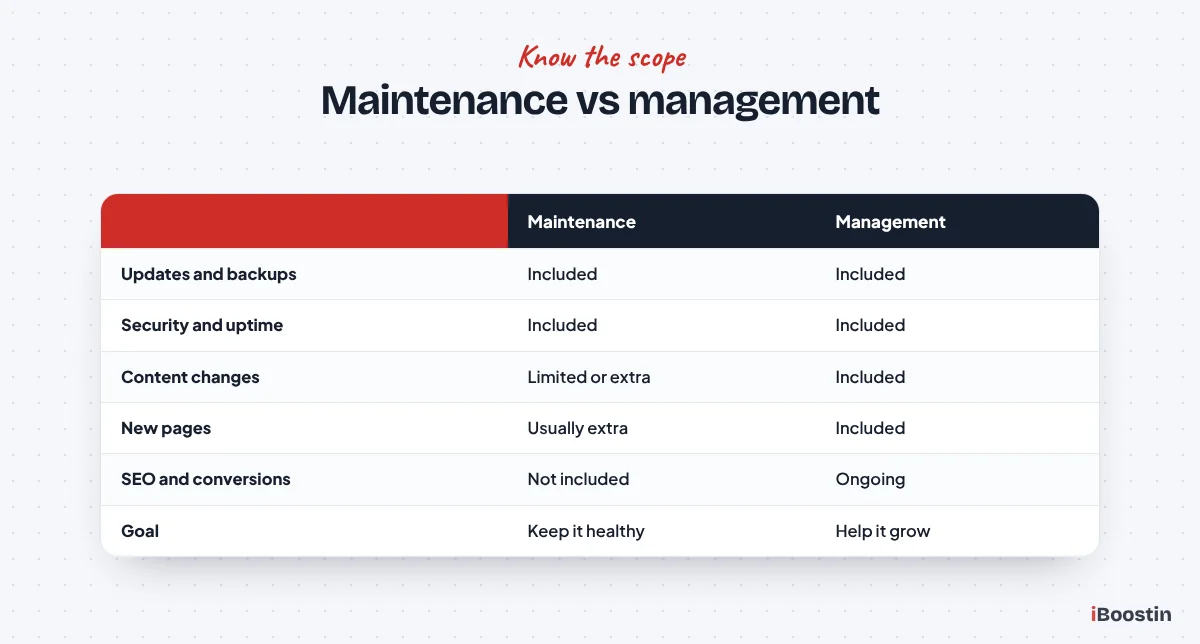
The terms are often used interchangeably, but they usually mean different levels of service.
Maintenance Keeps the Site Healthy
Maintenance is about protection and stability: updates, backups, security, uptime, performance checks and fixing things that break. Its goal is to keep the site working exactly as it should.
For a simple brochure site that rarely changes, maintenance alone may be enough.
Management Helps the Site Grow
Website management includes maintenance and adds ongoing improvement: content updates, new pages, landing pages, design tweaks, conversion improvements, SEO work and support with marketing tools. It treats the website as a growing business asset rather than a finished project.
Businesses that rely on their website for leads or sales often benefit from management, because the site keeps improving rather than slowly falling behind. Our WordPress website management service combines both.
How Maintenance Plans Are Usually Structured
Providers package maintenance in different ways. Understanding the common structures helps you compare offers fairly and pick the one that matches how your business uses its website.
Plans by Site Type
Many providers offer tiers based on the type of site. A basic tier usually suits simple brochure sites that rarely change: updates, backups, security and uptime monitoring with a monthly report. A middle tier often adds more frequent backups, performance work and some time for content changes. Higher tiers are aimed at stores and business-critical sites, with faster response times, real-time backups, checkout testing and more support hours.
Choose the tier based on what downtime or a broken form would cost your business, not just on the size of the site. A small site that brings in most of your leads deserves stronger care than its page count suggests.
Monthly Plans vs Pay as You Go
Monthly plans give you predictable care and someone responsible for the site at all times. Pay-as-you-go arrangements, where you call a developer only when something breaks, can look cheaper but usually mean problems are found late and fixed under pressure.
For most businesses that rely on their website, a monthly plan is the safer choice. Pay as you go suits sites that are rarely used or are about to be replaced. Whatever you choose, make sure backups and updates are actually happening in between.
Questions to Ask Before Choosing a Maintenance Plan
Maintenance plans can look similar on paper. These questions reveal the real differences.
About the Work Itself
Ask how updates are handled: are they tested on staging first, how quickly are security updates applied and what happens if an update breaks something? Ask how often backups run, where they are stored, how many versions are kept and when a restore was last tested.
Ask whether they monitor your domain and SSL certificate renewal dates as well, since an expired domain or certificate can take a site offline just as effectively as a server failure. Ask what security measures are in place, what is monitored and how quickly they respond to downtime or a security alert. A clear response time, sometimes called a service level agreement, tells you what to expect in an emergency.
About Support and Ownership
Ask what support is included: how many changes or hours each month, how requests are made and how quickly they are handled. Ask whether hack cleanup and restores are included or charged separately.
Finally, confirm you will keep admin access, that the domain and hosting stay in your name and how you get your backups if you decide to leave. Our guide on how to hire a WordPress developer covers more ownership questions worth asking.
DIY Maintenance or Professional Help?
Some owners maintain their own sites. That can work for simple sites, if the routine is followed consistently.
When DIY Can Work
If your site is small, uses few plugins, is not a store and you are comfortable with WordPress, you can handle basic maintenance yourself with a reliable backup plugin, a security plugin and a monthly routine. Use a staging site from your host to test updates when possible.
The key is consistency. Set a recurring reminder, follow the same checklist every time and keep notes of what you changed.
When Professional Help Is Worth It
Professional maintenance is worth it when the site generates leads or sales, runs WooCommerce, has many plugins, or when nobody on the team has the time or confidence to fix problems. The cost of a few hours of downtime or a hack usually outweighs the cost of a plan.
A professional also brings experience: they have seen the same problems on many sites and know how to fix them quickly and safely. If your site was built by us or by someone else, our WordPress development services team can take over its care after a short audit.
What to Expect From a Good Maintenance Provider
If you hire someone to maintain your site, the first few weeks tell you a lot about how the relationship will work.
An Onboarding Audit
A good provider starts by auditing your site: WordPress, theme and plugin versions, PHP version, hosting setup, existing backups, security status, speed and any errors. They should share what they find and fix urgent issues first, such as missing backups or known vulnerabilities.
They should also document access to the hosting, domain, WordPress admin and any third-party services, and confirm that ownership of each sits with you.
Clear Communication
You should know how to request help, how quickly you will hear back and who is responsible for your site. Monthly reports should arrive on time and be easy to read, and you should be told promptly about any incident, such as downtime or a security alert, along with what was done about it.
The best maintenance relationships feel uneventful. Problems are caught early, changes are made quickly and you rarely have to think about the technical side of your website at all.
Signs Your Current Maintenance Is Not Working
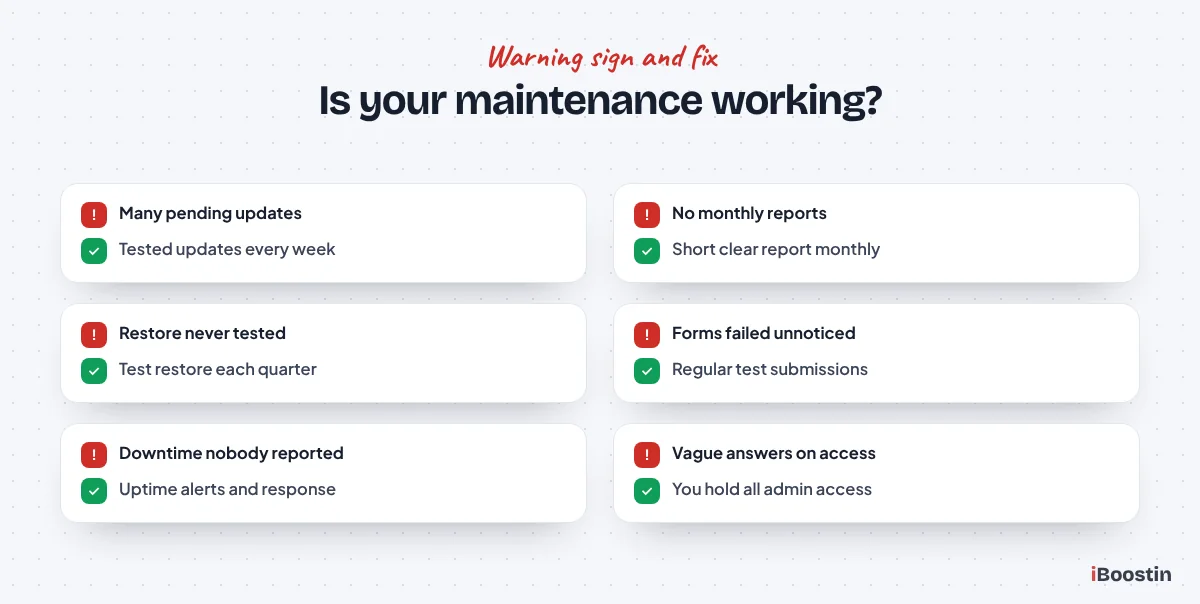
If you already pay for maintenance, check whether it is actually protecting your site.
Warning Signs to Look For
Be concerned if your dashboard shows many pending updates, you never receive reports, nobody can tell you when the last backup was tested, forms have stopped working without anyone noticing, or the site has been hacked or gone down without you being told.
Slow responses to support requests and vague answers about what was done each month are also warning signs. Maintenance should be visible through reports and quick responses, not invisible.
What to Do Next
Ask your provider for a recent report, the date of the last tested restore and a list of current plugins and their update status. If the answers are unclear, it may be time to review the plan or switch providers.
When switching, make sure you have full admin access, hosting and domain access and a recent backup before the old provider’s access ends.
Frequently Asked Questions About Website Maintenance
What does website maintenance include?
Website maintenance usually includes updates to WordPress, the theme and plugins, regular off-site backups, security scanning and firewall protection, uptime monitoring, speed checks, form and link testing, database cleanup and a monthly report. Many plans also include a set response time for problems and some time for small changes.
How often should a website be maintained?
Backups, uptime and security monitoring should run daily. Updates and form checks are usually weekly, with urgent security updates applied immediately. Speed checks, link checks, database cleanup and reports are typically monthly, and a deeper review with a test restore is done quarterly.
Is website maintenance necessary?
Yes, for almost every site. Without updates, backups and monitoring, sites become vulnerable to hacking, break after server or plugin changes, slow down over time and can stop sending enquiries without anyone noticing. Regular maintenance prevents these problems and is cheaper than fixing them later.
What is the difference between website maintenance and website management?
Maintenance keeps the site secure, updated and working. Management includes maintenance and adds ongoing improvements such as content updates, new pages, design changes, conversion improvements and SEO support. Businesses that rely on their site for leads usually benefit from management.
Can I maintain my WordPress website myself?
Yes, if the site is simple and you follow a consistent routine: back up first, update carefully, test forms and key pages, check security and review speed. Stores and business-critical sites usually benefit from professional maintenance, because problems cost more and need faster fixes.
Does website maintenance include hacked site cleanup?
It depends on the plan. Some maintenance plans include malware cleanup and restoration, while others charge separately. Ask specifically before signing, along with how quickly they respond to a security incident.
What should a website maintenance report include?
A good report lists updates applied, backups completed, security scan results, uptime, speed results for key pages, any issues found and fixed, and anything that needs your attention. It should be short, clear and sent every month.
Maintenance Protects the Investment You Already Made
Your website took time and money to build, and it is often the first thing customers see. Regular maintenance keeps it secure, fast and working, so it keeps bringing in enquiries rather than quietly costing you business.
Whether you handle it yourself or use a provider, make sure the essentials are covered: tested updates, off-site backups, security and uptime monitoring, performance checks, functionality testing and clear reports.