In this guide
- Why Your Website Matters More Than It Used To
- 12 Signs You Need a New Website
- How to Score Your Website in 30 Minutes
- Quick Improvements While You Decide
- Fix or Rebuild: How to Decide
- What a New Website Should Do Better
- Questions to Ask Before You Rebuild
- How to Plan a New Website Without Losing What Works
- The Hidden Cost of Waiting Too Long
- Who Should Be Involved in the Decision
- How Often Should a Business Website Be Replaced?
- Frequently Asked Questions About Needing a New Website
- Take the Signs Seriously Before They Cost You More
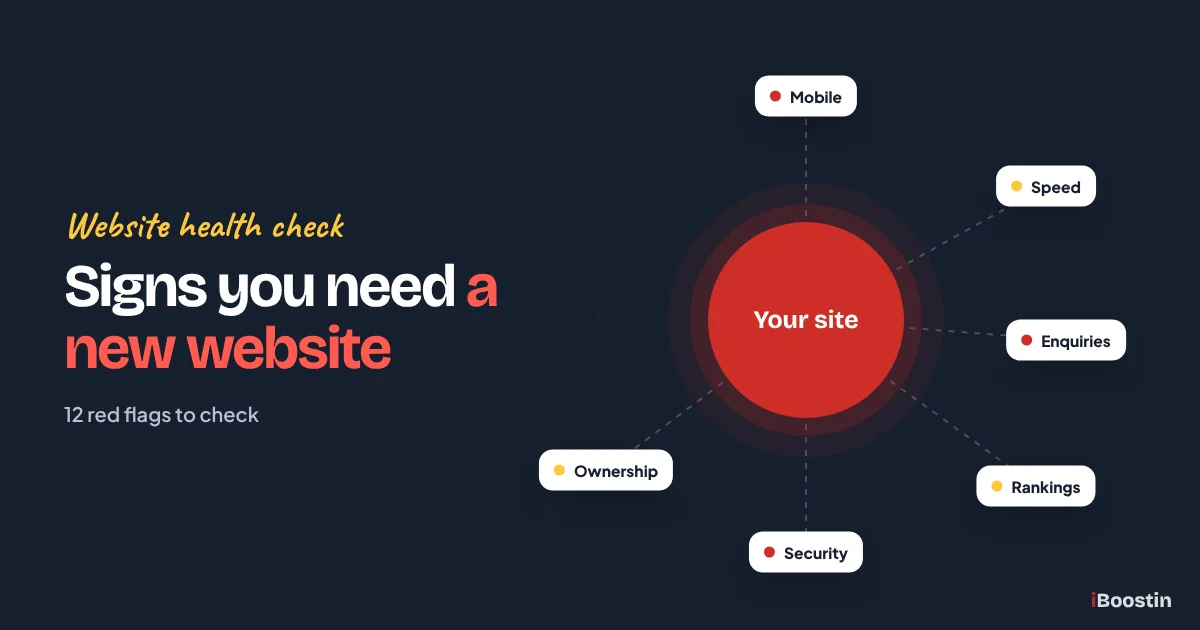
You probably need a new website if your current one is slow, hard to use on a phone, difficult to update, not bringing in enquiries, ranking poorly, built on outdated or unsupported software, or no longer reflects what your business does today. One or two of these problems can often be fixed. Several together usually mean a rebuild is the better investment.
Most business owners do not decide to replace a website on a particular day. It happens slowly. Enquiries drop a little, a competitor launches a better site, a customer mentions the site is hard to use, and the developer who built it has moved on. By the time the problem is obvious, the site may have been costing leads for a long time.
This guide gives you twelve clear signs, each with a quick self-check you can do in a few minutes without technical knowledge. It then helps you decide whether to fix your current site or rebuild it, and what a new site should do better. It is written by the iBoostin team for business owners who want an honest answer, not a sales pitch. If you decide to rebuild, our guide on how to create a website in WordPress explains how a new site comes together.
Key takeaways
- The biggest warning signs are poor mobile experience, slow loading, falling enquiries, weak search visibility and a site you cannot easily update.
- Security and software age matter: an outdated, unsupported site is a risk to your business and your customers.
- Use the quick self-checks in this guide to score your site honestly before deciding anything.
- One or two problems can usually be fixed. Many problems together, or a weak foundation, usually make a rebuild better value.
- A new website should be planned around your goals, content and SEO, with redirects so you keep the rankings you already have.
Why Your Website Matters More Than It Used To
For most small businesses, the website is the first place customers check before they call, book or buy. Even people who hear about you from a friend usually look you up first. If the site looks outdated or is hard to use, many of them quietly move on to a competitor.
Your Website Works Even When You Do Not
A good website answers common questions, shows proof that you do good work and makes it easy to get in touch at any time of day. It filters out poor-fit enquiries and gives serious buyers the confidence to contact you.
A weak website does the opposite. It creates doubt, hides important information and makes contacting you harder than it should be. Because you never see the visitors who leave, the cost is easy to underestimate.
Expectations Keep Rising
Customers compare your site with the best sites they use every day, not just with your direct competitors. Fast loading, clear navigation, easy forms and a site that works perfectly on a phone are now basic expectations.
Search engines have moved in the same direction. Google looks at mobile usability, page experience and helpful content when deciding what to show. A site built years ago to older standards can fall behind even if nothing on it has changed.
12 Signs You Need a New Website
Work through these signs one by one and be honest with yourself. Each includes a quick self-check you can do today.
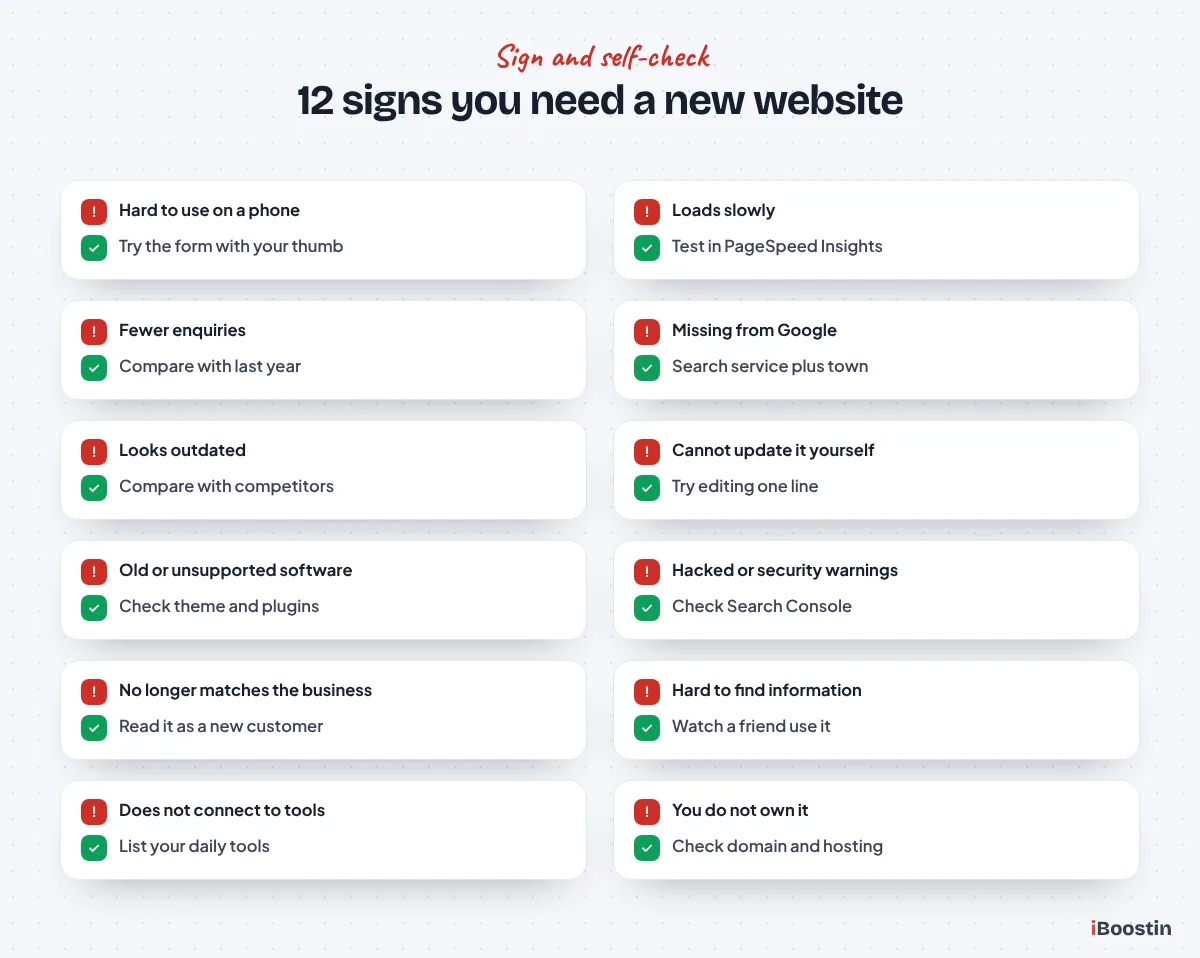
1. It Is Hard to Use on a Phone
Most visitors now arrive on a phone. If text is tiny, buttons are hard to tap, menus are awkward or parts of the page run off the screen, many of those visitors leave before reading anything.
Self-check: open your site on your own phone and try to find your services, read one page and submit the contact form using only your thumb. If anything is frustrating, your customers feel it too.
2. It Loads Slowly
Slow pages lose visitors and can hurt rankings. Speed problems usually come from heavy images, too many plugins or scripts, poor hosting or an outdated build.
Self-check: run your homepage and one service page through Google PageSpeed Insights on mobile. Poor scores and a long wait before the main content appears are warning signs. Some speed issues can be fixed without a rebuild, which our guide on why your WordPress site is so slow explains.
3. Enquiries and Sales Have Dropped
If calls, form submissions or online sales have fallen while the business itself has not changed much, the website may be part of the reason. Visitors may not trust what they see, or may struggle to find how to contact you.
Self-check: compare the number of enquiries from the website over the last few months with the same period a year earlier. Check whether contact forms still deliver to the right inbox by sending a test.
4. You Do Not Show Up in Google
If people cannot find you when they search for your services in your area, a large share of potential customers never see your business. This often happens when a site has thin pages, poor structure or technical problems.
Self-check: search for your main service plus your town or city in a private browser window. If competitors appear and you do not, and Google Search Console shows few clicks, your site is not doing its job in search.
5. It Looks Outdated
Design trends change, but the real problem with an old design is trust. Dated layouts, stock photos that look generic and cluttered pages make a business look less established than it is.
Self-check: put your homepage next to the sites of your three strongest competitors. If yours looks noticeably older or less professional, visitors will notice too, often within seconds.
6. You Cannot Update It Yourself
If changing a phone number, adding a photo or publishing a news post means waiting for a developer, your site will fall out of date quickly. Many older sites were built in ways that make simple edits risky or impossible for owners.
Self-check: try to change one line of text on a service page. If you cannot do it confidently in a few minutes, the site is holding you back.
7. It Is Built on Outdated or Unsupported Software
Old WordPress versions, abandoned themes and plugins no longer maintained by their developers are a security risk. They can also stop working with newer PHP versions on your hosting, causing errors or broken pages.
Self-check: log in to WordPress and look at the dashboard for update notices. If the theme or key plugins have not been updated by their makers for a long time, or updates cannot be applied without breaking the site, the foundation is ageing.
8. It Has Been Hacked or Shows Security Warnings
A site that has been hacked once is often hacked again if the underlying problems are not fixed. Browser warnings, unexpected redirects, spam pages in Google or messages from your host are serious signs.
Self-check: search Google for site:yourdomain.com and look for pages you did not create. Check Search Console for security issues. If you are dealing with a hack right now, follow our guide on what to do if your WordPress site is hacked.
9. It No Longer Matches Your Business
Businesses change. You may have added services, dropped others, moved location, changed your pricing approach or started serving a different type of customer. If the site still describes the business you were years ago, it attracts the wrong enquiries and confuses the right ones.
Self-check: read your homepage and main service pages as if you were a new customer. Does it describe what you do today, who you serve and why someone should choose you?
10. Visitors Cannot Find What They Need
Confusing menus, buried contact details and pages that do not answer common questions make visitors work too hard. Most will not.
Self-check: ask a friend who does not know your business to find a specific service and how to request a quote. Watch without helping. Every hesitation shows a problem with structure or navigation.
11. It Does Not Connect to Your Tools
Modern businesses rely on CRMs, booking systems, email marketing, payment tools and analytics. If your site cannot connect to them, you end up copying enquiries by hand and losing track of leads.
Self-check: list the tools you use every day and check whether the website sends information to them automatically. If not, you are doing work the site should be doing.
12. You Do Not Fully Own or Control It
Some sites are tied to a former developer, a proprietary platform or an agency that holds the domain or hosting. If you cannot access everything, you cannot easily improve or move the site.
Self-check: confirm you have admin access to the website, the hosting account and the domain registrar, all in your own name. If any of these are missing, fix ownership before anything else.
How to Score Your Website in 30 Minutes
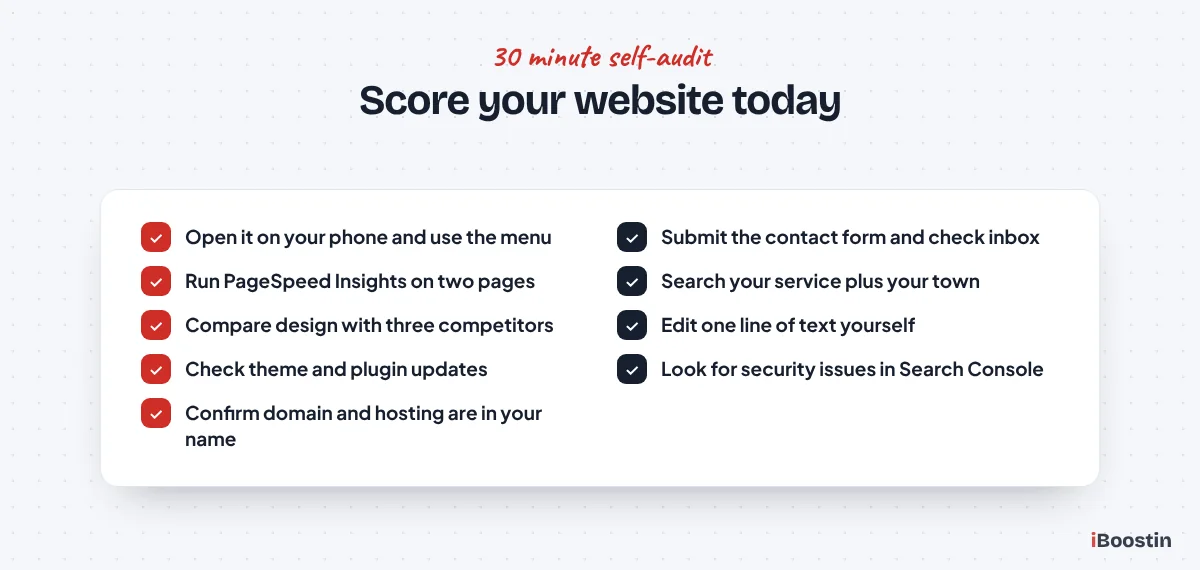
Use this quick audit to turn the signs above into a clear picture. You do not need technical knowledge, just a phone, a computer and honest answers.
Run the Checks
Go through each of the twelve signs and mark it as fine, minor problem or major problem. Use your phone for the mobile and form checks, PageSpeed Insights for speed and a private browser window for search checks. Note anything specific you find, such as a broken form or a missing service page.
If you have access to Google Analytics and Search Console, look at traffic and clicks over the last year. A steady decline, especially from search, is an important signal.
Read the Results
If most signs are fine and only one or two show minor problems, your site probably needs targeted improvements rather than a rebuild. If several show major problems, or the problems are in the foundation such as outdated software, poor structure or no ownership, a new site is usually the better investment.
The next section explains how to make that decision in more detail.
Quick Improvements While You Decide
Planning a new website takes time. In the meantime, a few small changes can recover some lost enquiries and make the eventual rebuild easier.
Fix the Contact Path First
Make sure your phone number or contact button is visible at the top of every page on mobile, that every form delivers to an inbox someone checks daily and that you reply quickly. These changes cost little and often have the biggest immediate effect on enquiries.
Also check that your opening hours, address and service area are correct everywhere, including your Google Business Profile. Inconsistent details confuse both customers and search engines.
Update the Pages That Matter Most
Look at the few pages that get the most visits, usually the homepage and your main service pages. Update outdated information, add recent photos and reviews, and make the next step clear on each one.
Remove pages for services you no longer offer, or redirect them to the closest current service. Visitors landing on outdated pages lose trust quickly, and tidying them up now gives you a cleaner starting point for the new site.
Fix or Rebuild: How to Decide
Not every problem needs a new website. Some issues are cheaper and faster to fix. The key question is whether the foundation is sound.
When Fixing Makes Sense
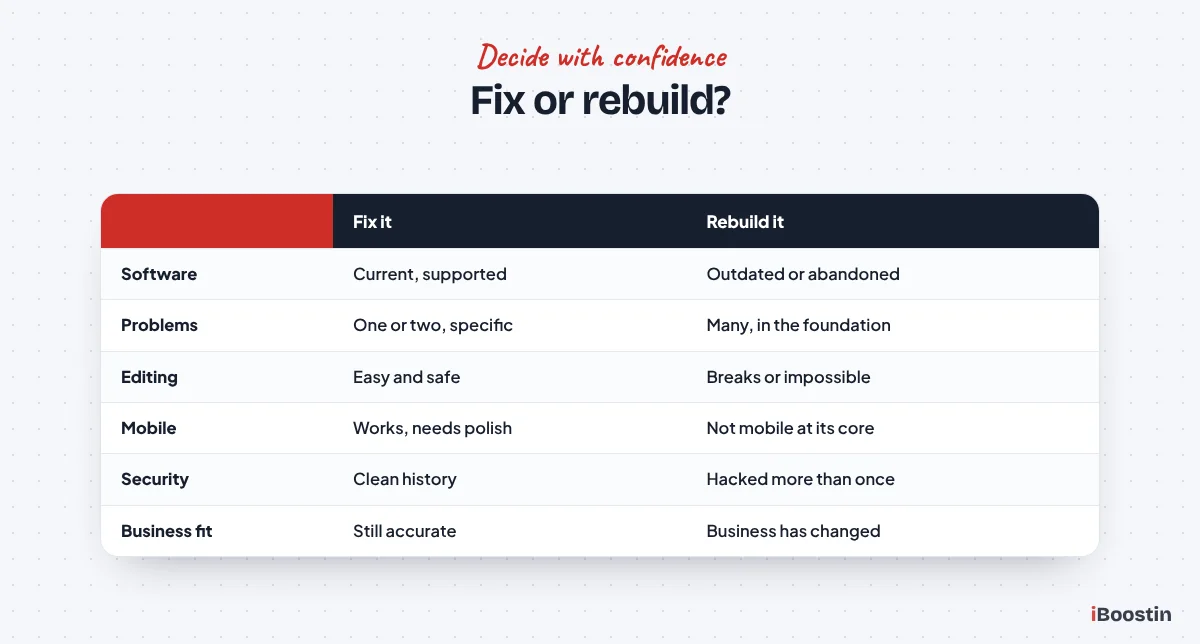
Fixing is usually right when the site is built on a current, well-supported platform, the design is reasonably modern and the problems are specific: slow images, a few missing pages, weak copy, broken forms or missing SEO basics.
In these cases, speed optimization, content improvements, a refreshed homepage and better calls to action can transform results without the time and disruption of a full rebuild.
When Rebuilding Makes Sense
Rebuilding is usually better when the site uses outdated or unsupported software, cannot be edited without breaking, is not mobile-friendly at its core, has been hacked repeatedly or needs a completely different structure to match the business today.
Patching a weak foundation often costs more over a couple of years than starting fresh. A new build also gives you the chance to plan content, structure and SEO properly from the start. Our custom WordPress website design service is built for exactly this situation.
What a New Website Should Do Better
A new website should not just look newer. It should solve the problems that made you replace the old one and help the business grow for years.
Built Around Your Goals and Customers
Start with what the site needs to achieve: more calls, more quote requests, more bookings or more sales. Then plan pages around the questions customers ask before they buy. Each service should usually have its own page that explains it clearly and makes the next step obvious.
Proof matters too. Real photos, reviews, case studies and clear information about how you work all help visitors trust you before they get in touch.
Fast, Mobile-First and Easy to Manage
A new site should load quickly on a phone, use a lightweight theme or builder, keep plugins to the essentials and run on good hosting. It should also be easy for you to update without breaking the design.
Plan maintenance from day one: updates, backups and security checks. Our guide on how to hire a WordPress developer includes the questions to ask about speed, security and support before you choose who builds it.
Questions to Ask Before You Rebuild
Once you are leaning toward a new site, a few questions help you plan it properly and avoid repeating the old site’s mistakes.
What Must the New Site Achieve?
Write down two or three measurable goals, such as more quote requests from the website, more calls from mobile visitors or more bookings without phone calls. Clear goals guide every decision about pages, design and features, and they give you a way to judge whether the new site is working.
Avoid vague goals like “look more modern”. Looking modern matters, but only because it helps visitors trust you and take action.
What Content Do You Already Have, and What Is Missing?
List the pages, photos, reviews, case studies and documents you can reuse. Then list what is missing: services without their own page, questions customers ask that the site does not answer, or proof of your work that is not shown anywhere.
Content is usually the biggest factor in how long a new website takes. Starting early on missing content keeps the project on schedule. Our guide on how long it takes to build a WordPress website explains why.
Who Will Look After It After Launch?
A new site starts to age the day it launches unless someone looks after it. Decide who will handle updates, backups, security checks and small content changes, and agree it before launch rather than after the first problem.
That single decision is often the difference between a website that stays effective for years and one that needs replacing again far too soon.
How to Plan a New Website Without Losing What Works
The biggest risk with a new website is losing rankings and enquiries you already have. Careful planning prevents that.
Start With What You Already Have
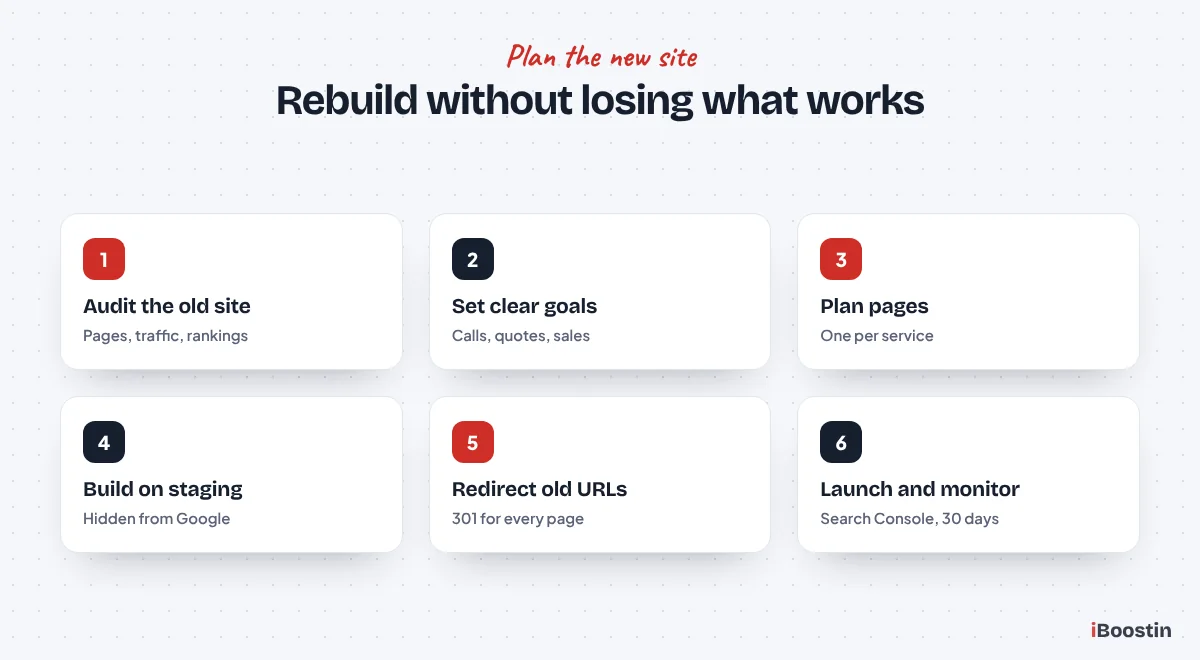
Before anything is designed, list every page on the current site, which ones get traffic from Google and which ones bring in enquiries. Note the searches you already rank for. These pages and their content need to be kept, improved and redirected correctly.
Also collect what customers like and dislike about the current site. Your team often knows which questions come up again and again, and those answers belong on the new site.
Protect Rankings at Launch
Build the new site on a staging copy, keep it hidden from search engines until launch and map every old URL to its new equivalent with 301 redirects. After launch, submit the new sitemap in Search Console and monitor for errors for at least a month.
Our step-by-step guide on how to redesign a website without losing SEO covers this process in detail.
The Hidden Cost of Waiting Too Long
Many owners delay a new website because the current one “still works”. It loads, the phone number is there and nothing is obviously broken. The cost of an underperforming site is quiet, which is exactly why it is easy to ignore.
Leads You Never See
Every visitor who leaves without calling is invisible. You do not get a message saying “I chose your competitor because your site was confusing on my phone”. You simply get fewer enquiries than you should, and the gap grows as competitors improve their own sites.
Think about how many people search for your services each month and how many of them land on your site. Even a small improvement in how many of them get in touch can make a real difference over a year. That difference is the true cost of keeping a site that underperforms.
Problems That Get Harder to Fix
Technical problems compound. An outdated plugin becomes incompatible with a newer PHP version, the host upgrades its servers, and suddenly parts of the site break. A site that has not been updated for years is also more likely to be hacked, and cleaning up after a hack is far more disruptive than planned improvements.
Content problems compound too. As the business changes, the site drifts further from reality, and the job of updating it grows. Acting early, while changes are smaller, is almost always easier and less stressful.
Who Should Be Involved in the Decision
Replacing a website affects more of the business than most owners expect. Involving the right people early leads to a better site and fewer surprises.
Your Team and Your Customers
The people who answer the phone and reply to emails know which questions customers ask again and again, which services are most profitable and where people get confused. Their input shapes the pages and content that matter most.
If you can, ask a few loyal customers how they found you, what nearly stopped them getting in touch and what they looked for on the site. Their answers often reveal problems you would never spot yourself.
Your Developer or Agency
Bring in a developer before you have decided everything. A good one will review your current site, your analytics and your goals, then recommend whether to fix or rebuild and explain why. Our WordPress development services start with exactly this kind of review.
Make sure whoever you work with understands SEO and redirects, not just design. A beautiful new site that loses your rankings can set the business back for months.
How Often Should a Business Website Be Replaced?
There is no fixed rule, but many business websites need a significant update or rebuild every few years as technology, design standards and the business itself change.
Regular Updates Extend a Website’s Life
A site that is maintained, updated and improved regularly can stay effective for much longer than one left untouched. Updating content, adding pages, improving speed and refreshing key sections keeps it competitive without a full rebuild.
The sites that need replacing soonest are usually the ones nobody has looked after since launch. A short monthly routine of updates, backups and content checks, plus a quarterly review of speed, enquiries and search performance, is usually enough to keep a well-built site working hard for your business for a long time.
Watch the Signs, Not the Calendar
Rather than rebuilding on a schedule, review your site against the signs in this guide once a year. If several problems appear, or the business has changed significantly, it is time to plan a new site.
That way, you invest when it makes a real difference, not just because a certain number of years have passed.
Frequently Asked Questions About Needing a New Website
How do I know if my website needs to be redesigned?
Look for poor mobile experience, slow loading, falling enquiries, weak search visibility, an outdated look, difficulty updating content, old or unsupported software, security problems and a site that no longer matches your business. If several of these apply, a redesign is likely worth it.
How often should a business website be redesigned?
Many business websites need a significant update every few years, but the right timing depends on how well the site has been maintained and how much the business has changed. Review it once a year against clear signs rather than rebuilding on a fixed schedule.
Is it better to fix my website or build a new one?
Fix it if the platform is current, the design is reasonably modern and the problems are specific, such as slow images or weak content. Rebuild if the software is outdated, the site cannot be edited safely, it is not mobile-friendly at its core or the structure no longer fits your business.
Will a new website hurt my Google rankings?
It can if old pages disappear or are not redirected. With a proper plan, including a list of existing URLs, 301 redirects, preserved content and a new sitemap submitted in Search Console, a new website usually keeps its rankings and often improves them over time.
What are the signs of a bad website?
Common signs include pages that are hard to use on a phone, slow loading, confusing navigation, hidden contact details, outdated design, broken forms or links, thin content, security warnings and few enquiries compared with the traffic it gets.
Can an outdated website lose customers?
Yes. Visitors often judge a business by its website within seconds. An outdated, slow or confusing site creates doubt and makes it harder to contact you, so many potential customers choose a competitor instead without ever telling you why.
What should a new business website include?
A clear homepage, a page for each main service, an about page with real photos, proof such as reviews or case studies, easy contact options on every page, fast mobile performance, SEO basics like titles and a sitemap, and a maintenance plan to keep it secure and up to date.
Take the Signs Seriously Before They Cost You More
A website rarely fails overnight. It slowly falls behind until enquiries drop and competitors take the customers who should have found you. Checking your site against these twelve signs once a year helps you catch problems early, while they are still easy to fix.
If your site shows several signs at once, a planned rebuild is usually the smartest move. Done properly, it protects what already works and gives your business a site that brings in enquiries for years.