In this guide
- How Google Decides Which Businesses Rank on Maps
- Step 1: Claim, Verify and Set Up Your Profile Correctly
- Step 2: Choose the Right Categories
- Step 3: Complete Every Part of Your Profile
- Step 4: Build a Steady Flow of Genuine Reviews
- Step 5: Keep Your Business Details Consistent Everywhere
- Step 6: Strengthen Your Website for Local Search
- Ranking on Google Maps With More Than One Location
- Google Maps and AI Search
- How to Track Your Google Maps Rankings
- Common Mistakes That Hurt Google Maps Rankings
- How Long Does It Take to Rank Higher on Google Maps?
- Frequently Asked Questions About Ranking Higher on Google Maps
- Win the Map One Signal at a Time
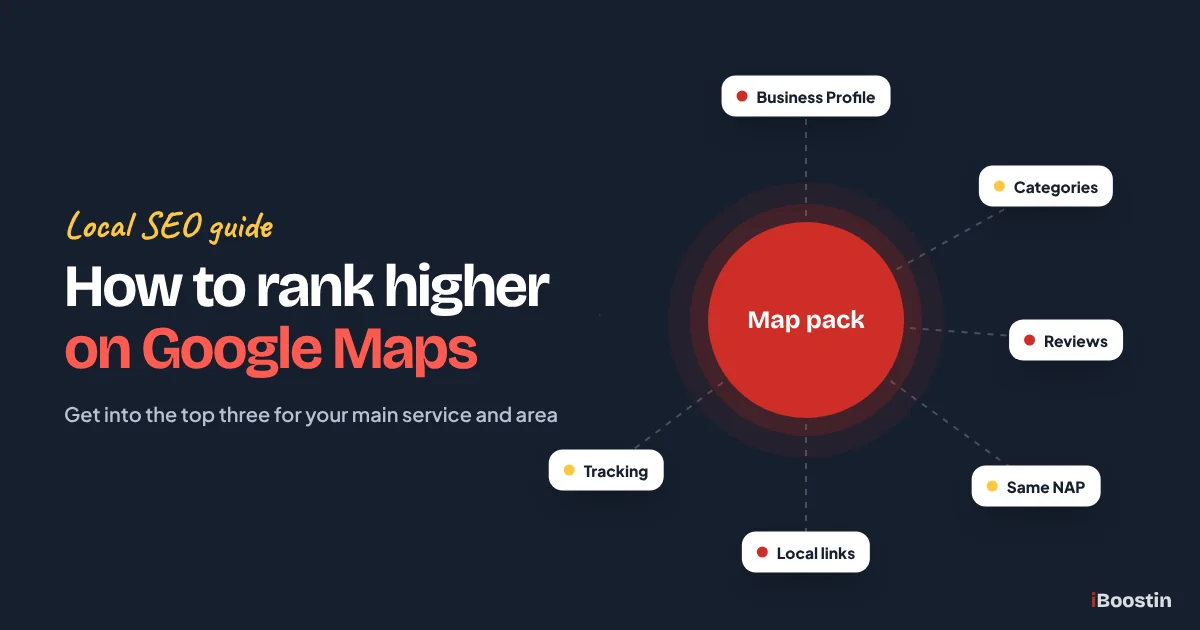
To rank higher on Google Maps, claim and verify your Google Business Profile, choose the most accurate primary category, fill in every field, add real photos, collect steady genuine reviews and reply to them, keep your business details identical across the web and support the profile with a strong website and local links. Google ranks map results mainly on relevance, distance and prominence.
For local businesses, the map results are where most calls start. Someone searches “dentist near me” or “AC repair in Dubai Marina”, sees three businesses on the map with their star ratings and calls one of them. If you are not in those three, many people never scroll far enough to find you, however good your website is. And the businesses that are there are often not better than you. They have simply sent Google clearer signals.
This guide walks through the steps we use at iBoostin to move small businesses up in Google Maps, from setting up the profile correctly to reviews, local signals, tracking and the mistakes that get profiles suspended. It works for storefront businesses and for service area businesses that visit customers. For the wider SEO plan your map ranking sits within, see our guide to SEO for small business.
Key takeaways
- Google ranks local results on relevance, distance and prominence. You cannot change distance, but you can improve the other two.
- Your primary category is one of the strongest relevance signals. Choose the most specific one that matches your main service.
- Reviews matter for both ranking and clicks: ask every happy customer, reply to every review and never buy or incentivize them.
- Identical business details across your website and directories, plus links from local sites, build prominence.
- Keywords in your business name, fake addresses and fake reviews can get your profile suspended. Stay within Google’s guidelines.
How Google Decides Which Businesses Rank on Maps
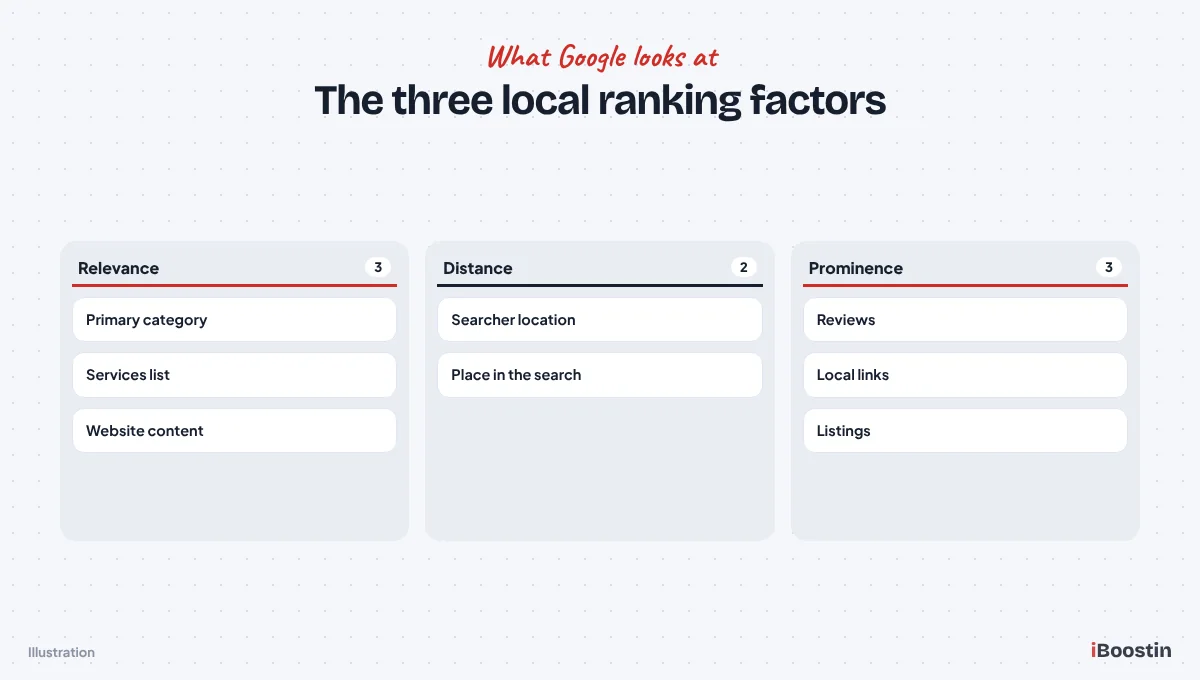
Google has said that local results are based mainly on three things: relevance, distance and prominence. Every step in this guide improves one of them. Understanding them stops you wasting time on tactics that do not move the needle.
Relevance
Relevance is how well your profile matches what someone searched. Google looks at your categories, the services and products you list, your business description, your website content and what customers say in reviews. A plumber whose primary category is “Plumber”, who lists “emergency plumbing” as a service and whose reviews mention emergency callouts is highly relevant to “emergency plumber”.
Many businesses lose ground here without knowing it, by choosing a broad category, leaving the services list empty or having a website that never clearly names their services. Relevance is fully within your control, which makes it the best place to start.
Distance
Distance is how far your business is from the searcher, or from the location in the search, such as “dentist in Downtown Dubai”. You cannot change where you are, and this is why the map results look different depending on where the searcher stands. A business is unlikely to rank for searchers far away from it, however strong its profile.
Do not try to work around distance with fake addresses or virtual offices. Google’s guidelines do not allow them, and they are a common cause of suspensions. Instead, maximize relevance and prominence so you win more of the searches within your natural area.
Prominence
Prominence is how well known and trusted your business is. Google looks at your reviews, how many there are, how recent and how positive, your listings across the web, links to your website and mentions in articles and directories. Businesses that are well established offline tend to be prominent online too.
Prominence takes the longest to build, but it is also what separates businesses that are relevant and nearby from the one that actually appears first. The review and local link steps later in this guide are all about prominence.
Step 1: Claim, Verify and Set Up Your Profile Correctly
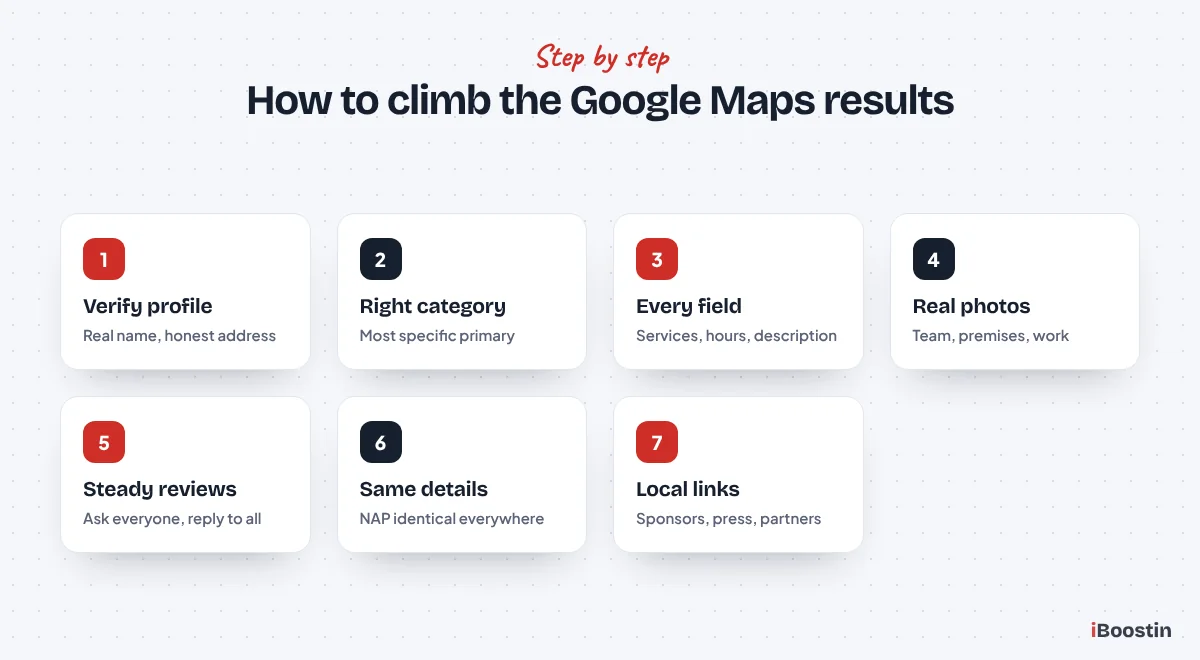
Everything starts with a verified Google Business Profile that follows Google’s guidelines. A profile set up wrongly can rank poorly or be suspended later, undoing months of work.
Claim and Verify Your Business
Search for your business on Google Maps. If a profile already exists, claim it. If not, create one through Google Business Profile. Google will ask you to verify that you own the business, and the method varies, often a video recording, phone, email or postcard. Your profile only appears publicly once it is verified.
If you find duplicate profiles for your business, for example from an old address, ask Google to merge or remove them. Duplicates split your reviews and confuse both Google and customers, and they are surprisingly common for businesses that have moved or rebranded.
Use Your Real Business Name
Use your business name exactly as it appears on your signage, website and documents. Do not add keywords or locations, like “Smith Plumbing Best Emergency Plumber Leeds”. It might seem to help briefly, but it breaks Google’s guidelines, can trigger a suspension and competitors can report it.
If your legal or trading name genuinely includes a service word, that is fine. The rule is simply that the name on your profile should match the name customers see in the real world.
Storefront or Service Area Business
If customers visit your premises, show your address. If you travel to customers and do not serve them at your address, set yourself up as a service area business, hide your address and list the areas you serve. Some businesses do both, such as a shop that also offers home visits.
Choose honestly. Showing a home address as a storefront when customers never visit can lead to problems, and so can listing a large number of service areas you do not really cover. Service area settings define where you want to be found, but distance from your actual location still affects how high you rank.
Step 2: Choose the Right Categories
Your primary category is one of the strongest relevance signals in your whole profile. Getting it right can move your ranking more than any other single setting.
Pick the Most Specific Primary Category
Choose the most specific category that describes your main business, not the broadest. “Emergency locksmith service” may suit better than “Locksmith” if that is your main work, and “Dental implants periodontist” may beat “Dentist” for a specialist clinic. Look at what the top three businesses in your area use as their primary category; it is often visible on their profile or through browser tools.
Your primary category should match the searches that bring your most valuable customers. If you offer several services, put the one you most want to rank for as the primary, and cover the rest with secondary categories and the services list.
Add Relevant Secondary Categories
Add secondary categories for other genuine parts of your business. A plumbing company that also installs boilers might add a heating category. Only add categories that truly apply, because unrelated categories can dilute relevance and may be removed by Google.
Review your categories every few months. Google adds new categories over time, and a more specific one may appear that fits your business better than the one you chose originally.
Step 3: Complete Every Part of Your Profile
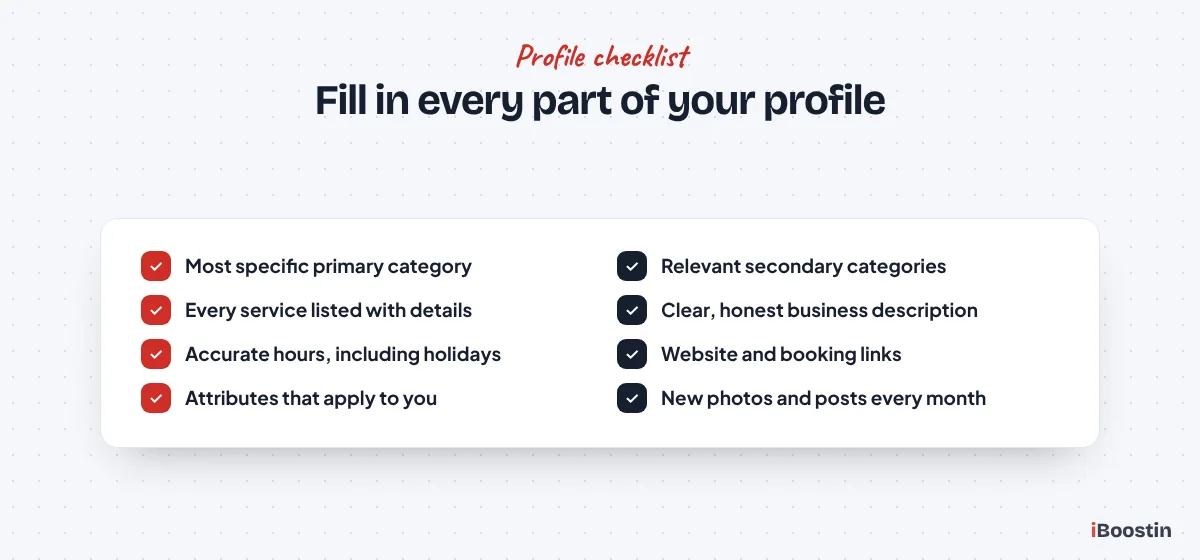
A complete profile gives Google more information to match against searches and gives customers more reasons to choose you. In our audits, most small business profiles leave half the available fields empty.
Services, Products and Description
List every service you offer, using the words customers search, with a short description for each where the option exists. If you sell products, add them with photos. Write a business description that explains what you do, who you serve and where, in plain language. Keep it accurate and avoid stuffing it with keywords.
These fields feed relevance directly. When someone searches a specific service, Google can match it to your services list even if it is not your category. Our guide on how to do keyword research for small business helps you find the words customers actually use.
Hours, Contact Details and Attributes
Set accurate opening hours, including special hours for holidays. Add your phone number, website and, where relevant, a booking or appointment link. Fill in attributes that apply, such as wheelchair access, online appointments or languages spoken. Some attributes are shown to searchers and help them choose you.
Link your profile to the most relevant page on your website, usually your homepage or a location page for multi-location businesses. Make sure that page clearly matches your profile details.
Photos and Updates
Add real photos: your premises inside and out, your team, your vehicles and examples of your work. Add new photos regularly. Profiles with real, recent photos look active and trustworthy, and they get more engagement from searchers. Avoid stock images and heavily edited pictures.
Post updates on your profile when you have news, offers, events or seasonal advice. Posts show that the business is active and give searchers another reason to contact you. A simple monthly rhythm is enough for most small businesses.
Step 4: Build a Steady Flow of Genuine Reviews
Reviews influence both your ranking and whether people click on you. Among three businesses on the map, the one with more recent, positive, detailed reviews usually gets the call.
Ask Every Happy Customer
Build asking into your routine. After every finished job or appointment, send a short message with a direct link to leave a review. Most satisfied customers are happy to help when asked at the right moment and when it takes them less than a minute.
A steady flow matters more than a sudden burst. A few new reviews every week look natural and keep your profile fresh. A large spike followed by nothing can look suspicious and does less for you over time.
Reply to Every Review
Reply to every review, positive or negative. Thank happy customers and mention the service where it fits naturally. For negative reviews, stay calm, acknowledge the issue and offer to resolve it offline. Future customers read your replies and judge how you handle problems.
Replies also add context about your services and show that the business is active. Never argue publicly, and never share private customer details in a reply.
Never Buy or Incentivize Reviews
Do not buy reviews, write fake ones, review your own business or offer discounts or gifts in exchange for reviews. Google’s policies forbid it, consumer protection rules in many countries do too, and fake reviews can be removed in bulk along with a penalty to your profile.
Also avoid review gating, where you only send the review link to customers you expect to be happy. Ask everyone. A few honest negative reviews among many positive ones actually look more trustworthy than a perfect score.
Step 5: Keep Your Business Details Consistent Everywhere
Google cross-checks your business information across the web. When your name, address and phone number match everywhere, Google can trust them. When they differ, it is less sure which details are right.
Fix Your Name, Address and Phone Number
Your business name, address and phone number, often called NAP, should be identical on your website, Google Business Profile, social profiles and every directory. Small differences, like an old phone number, a previous address or different abbreviations, create doubt.
Search for your business name and old addresses or phone numbers to find outdated listings. Update or remove them. If you have moved, this is especially important: old listings at your former address can compete with your current profile.
List Your Business on the Right Directories
Add your business to the main directories in your country, such as Bing Places and Apple Business Connect, plus the review sites and directories in your industry and local business listings like your chamber of commerce. Each consistent listing adds a little to your prominence.
Choose quality over quantity. A few dozen relevant, well maintained directories are worth far more than hundreds of low quality ones. Our small business SEO checklist includes the listing checks we use for every client.
Step 6: Strengthen Your Website for Local Search
Your website supports your Google Business Profile. The page your profile links to, and your site as a whole, help Google confirm what you do, where and how trustworthy you are.
Clear Service and Location Information
Make sure your website clearly names your services, the areas you serve and your contact details, matching your profile exactly. Each main service should have its own page. If you serve several distinct areas, a service area page or genuinely local location pages can help.
Add LocalBusiness schema to your homepage or contact page with your name, address, phone number, hours and website. Embedding a Google map on your contact page is useful for visitors, though there is little evidence that it improves rankings on its own.
Local Links and Mentions
Links from local websites strengthen prominence: your chamber of commerce, local news sites, community organizations, sponsorships, local partners and suppliers. These links show Google that your business is part of the local community.
Our guide on how to get backlinks for a new website lists the safest ways to earn them. For local businesses, sponsorships, events and local press are often the easiest place to start.
Ranking on Google Maps With More Than One Location
Businesses with several branches face extra questions: how many profiles to create, how to avoid them competing with each other and how to support each one from the website. The rules are simple once you know them.
One Profile for Each Real Location
Each genuine location where customers are served, with its own staff and opening hours, can have its own Business Profile. Use the same business name across all of them, with the correct address, phone number and hours for each branch. Do not create profiles for places where you have no real presence, such as a mailbox or a desk in a shared office you never use.
Collect reviews for each location separately and reply from each profile. A branch with its own steady reviews can rank strongly in its area, while a branch that relies on the brand name alone usually struggles against local competitors.
Location Pages That Support Each Profile
Link each profile to its own location page on your website rather than to the homepage. That page should show the branch address, phone number, hours, a map, the services offered there and genuinely local details such as the team, parking, landmarks and areas covered. Add LocalBusiness schema for that branch.
Link the location pages from a clear locations section or menu, and from relevant service pages. This gives Google a clean connection between each profile and the matching page, which strengthens relevance for searches in that area.
Google Maps and AI Search
Your Business Profile no longer only feeds the map. AI features such as Google AI Overviews, AI Mode and assistants like ChatGPT often draw on business listings and reviews when people ask for local recommendations.
Your Profile Feeds AI Answers
When someone asks an AI tool for a good dentist or plumber in their area, the answer often reflects the same information Google Maps uses: categories, services, reviews, ratings and how consistently the business is described across listings. A complete, active profile with specific reviews makes your business easier to recommend.
Reviews that mention specific services and situations are especially useful, because they tell AI tools what you are good at. That is one more reason to ask customers to describe what they needed help with when they leave a review.
Keep Every Listing Consistent
AI tools cross-check information from Google, Bing, Apple Maps and industry directories. If your details differ between them, they may describe you incorrectly or leave you out. The consistency work in Step 5 helps here as much as it helps your map ranking.
Our guide on getting your business mentioned in ChatGPT covers the AI side in detail, including how to check what AI tools currently say about your business.
How to Track Your Google Maps Rankings
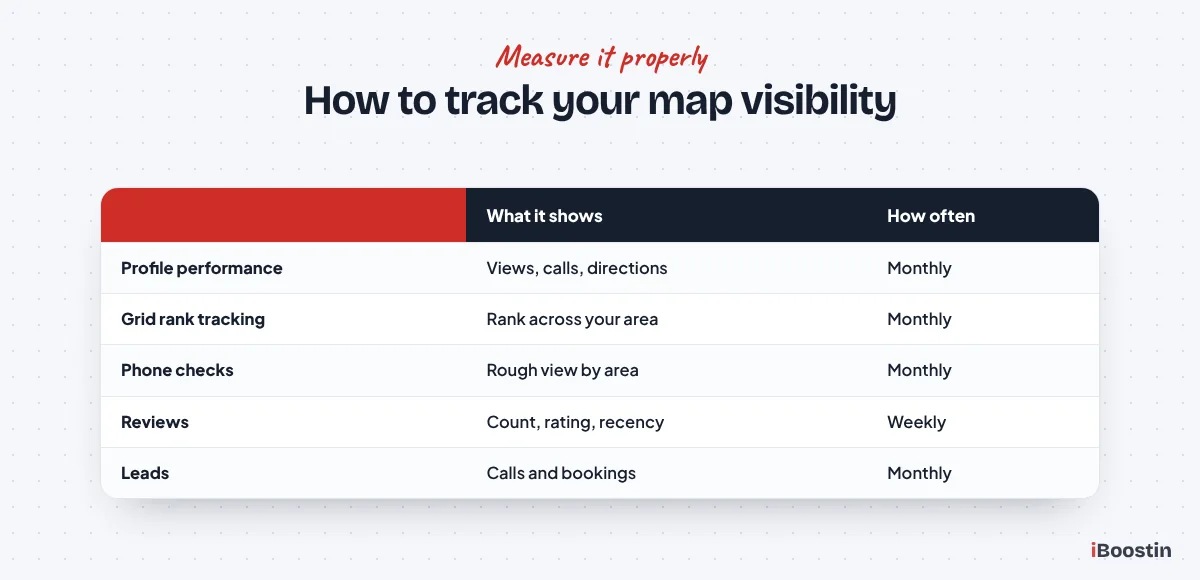
Map rankings change depending on where the searcher is, so checking from your own office does not tell you the full story. A business can be first one street away and invisible two miles away.
Use Your Profile Performance Report
Your Google Business Profile has a performance section showing how many people viewed your profile, which searches found you, and how many called, requested directions or visited your website. Check it monthly and compare with the previous month and the same month last year.
These numbers matter more than any single ranking. A profile that gets more calls and direction requests month after month is working, even if the exact position for one keyword moves up and down.
Check Rankings Across Your Area
Local rank tracking tools check your position from many points across your area, often shown as a grid on a map. This shows where you rank well, where you are weak and how far your visibility reaches. Check the same keywords and grid every month to see trends.
Without a tool, you can get a rough picture by searching your main keywords on your phone from different parts of your area, or by asking friends in other neighborhoods to search and send screenshots. It is less precise, but it shows whether you appear where your customers are.
Common Mistakes That Hurt Google Maps Rankings
These are the problems we fix most often when a business is missing from the map pack, or has been suspended.
Breaking Google’s Guidelines
Adding keywords to your business name, using a virtual office or someone else’s address, creating multiple profiles for the same business and posting fake reviews are the most common reasons profiles get suspended. A suspension can remove you from Maps entirely until it is resolved.
If your profile is suspended, read the reason, fix everything that breaks the guidelines and request reinstatement with evidence of your real business. It is far easier to stay within the rules from the start than to recover afterward.
Neglecting the Profile After Setup
Many businesses set up a profile once and never touch it again. Hours go out of date, photos age, reviews go unanswered and new services are never added. Meanwhile, competitors who keep their profiles active pull ahead.
Treat your profile like a shop window. A few minutes each week, replying to reviews, adding a photo or posting an update, keeps it current and signals to Google and customers that the business is active.
Ignoring Spam From Competitors
Sometimes competitors rank above you because they break the rules, for example with keyword-stuffed names or fake listings. You can suggest edits to incorrect business information on Maps, and Google provides a form for reporting businesses that break its guidelines.
Report clear violations with evidence, then keep focusing on your own profile. Reporting spam can help, but the lasting gains come from your own relevance and prominence.
How Long Does It Take to Rank Higher on Google Maps?
Many businesses see movement within one to three months of fixing their profile, especially if it was incomplete or miscategorized before. Competitive areas and industries take longer, and reviews and local links keep building your position over the following months. Our guide on how long SEO takes explains the wider timeline.
What Moves Fastest
Correcting the primary category, completing missing fields, adding services and fixing inconsistent business details can bring improvements within weeks. These remove problems that were holding your profile back.
Reviews and local links take longer, because they build up over time. A business that adds genuine reviews every week and earns a few local links each month usually keeps climbing steadily for the first six to twelve months.
Getting Help
Most of these steps can be done by the business owner. Where help pays off is in competitive areas, multi-location businesses, suspended profiles and the ongoing work of listings, reviews and local links.
Our local SEO services handle profile optimization, listings cleanup, review systems and local link building, with map ranking tracking across your area. For a complete plan that includes your website, see our SEO services.
Frequently Asked Questions About Ranking Higher on Google Maps
How do I get my business to the top of Google Maps?
Verify your Google Business Profile, choose the most specific accurate primary category, fill in every field including services and hours, add real photos and keep your details identical everywhere. Then build a steady flow of genuine reviews, reply to all of them and earn links from local websites. Distance from the searcher always affects results.
Do reviews help you rank higher on Google Maps?
Yes. Reviews are part of prominence, one of the three main local ranking factors. The number, recency and quality of reviews all matter, and they strongly influence whether searchers click on you. Ask every happy customer, reply to every review and never buy or incentivize reviews.
Can I pay Google to rank higher on Google Maps?
No. You cannot pay to rank higher in the organic map results. Google offers paid ads that can appear in Maps and local search, and Local Services Ads in some countries and industries, but these are labeled as sponsored and are separate from the organic ranking of your Business Profile.
Why is my business not showing up on Google Maps?
Common reasons are an unverified or suspended profile, a recent edit under review, the wrong primary category, an incomplete profile or simply being too far from the searcher. Check your profile status first, then your category and details. Our guide on websites not showing on Google covers the website side.
Does adding keywords to my business name help on Google Maps?
It may appear to help briefly, but it breaks Google’s guidelines. Competitors can report it, and it can lead to your profile being edited or suspended. Use your real business name and put keywords in your categories, services and description instead.
How long does it take to rank higher on Google Maps?
Fixes like the right category, a complete profile and consistent details often show results within a few weeks to three months. Reviews and local links build prominence over six to twelve months. Competitive cities and industries take longer, and distance always limits how far your visibility reaches.
Does my website affect my Google Maps ranking?
Yes. Google uses your website to confirm what you do and where, and links to your website add to your prominence. A site with clear service pages, matching business details, LocalBusiness schema and local links supports your Business Profile and helps it rank higher.
Win the Map One Signal at a Time
Ranking higher on Google Maps is not about tricks. It is about giving Google the clearest possible picture of your business: the right category, a complete profile, honest reviews, consistent details and a trusted presence in your local community. Each signal adds to the others, and businesses that keep them current keep climbing.
Start with the profile settings this week, then build the review routine and local links month by month. If you want a team to handle it, or your profile is stuck despite your efforts, we can audit it, fix the gaps and track your rankings across your whole area.