In this guide
- What Is A2P 10DLC in Plain Words?
- Who Needs A2P 10DLC in GoHighLevel, and What Happens Without It?
- Brand vs Campaign Registration: What Is the Difference?
- Sole Proprietor vs Standard Brand: Which One Should You Pick?
- What to Prepare Before You Start
- How to Choose the Use Case and Write the Campaign Details
- How Do You Submit A2P 10DLC Registration in GoHighLevel?
- The Most Common Rejection Reasons and the Exact Fix for Each
- How to Resubmit a Rejected A2P Campaign
- How to Stay Compliant After Approval
- Should You Register A2P Yourself or Get Help?
- Frequently Asked Questions About A2P 10DLC in GoHighLevel
- Get Your Number Approved and Your Texts Delivered
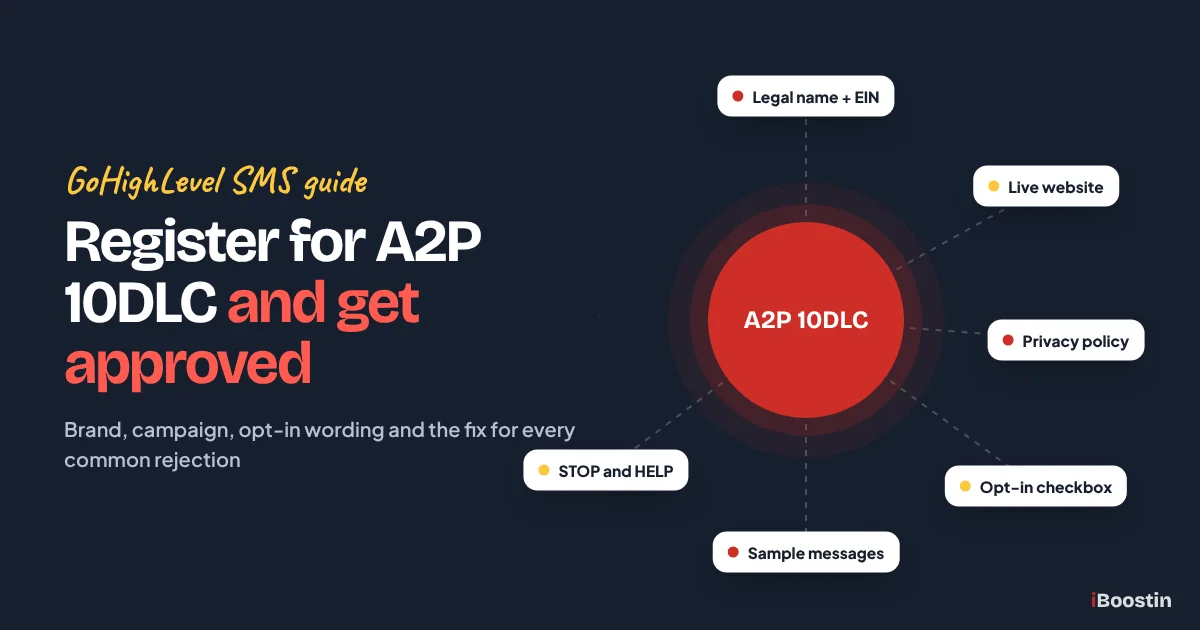
To register for A2P 10DLC in GoHighLevel, go to Settings, then Phone System, then Trust Center, and click Start Registration on the A2P Messaging card. You register your brand (your legal business details) and then a campaign (what you will text and how people opted in). Carriers make the final call, so your website, policies and opt-in wording must line up before you submit.
Here is the scene we see most weeks. A business buys a local number, builds a lovely follow-up workflow, and the first batch of texts never arrives. Or the owner fills in the A2P form in ten minutes, waits, and gets a rejection that says the “call to action could not be verified.” They change one word, resubmit, and get rejected again. Every round costs days of missed leads, and nobody explains what the carriers actually want to see.
This guide walks you through the whole process in plain words: what A2P 10DLC is, which brand type fits you, what to fix on your website before you start, how to write the campaign description and sample messages, the exact clicks in the Trust Center, and the fix for each common rejection. It comes from the iBoostin team’s hands-on builds, where A2P is part of almost every account we set up. New to the platform? Start with what GoHighLevel is and how it works.
Key takeaways
- A2P 10DLC is the carrier registration that lets a business text US numbers from a normal 10-digit local number. Unregistered messages get blocked.
- You register two things in the Trust Center: a brand (who you are) and a campaign (what you send and how people agreed to it).
- Most rejections come from mismatches: a legal name that differs from IRS records, a website that does not match the brand, or opt-in wording that is missing disclosures.
- Fix your website, privacy policy, terms and form checkboxes before you open the registration form, not after the first rejection.
- Approval is decided by carriers, not by HighLevel or any agency. Good preparation raises your odds, but nobody can promise approval.
What Is A2P 10DLC in Plain Words?
A2P 10DLC is the system US mobile carriers use to decide whether a business is allowed to send text messages from a normal local phone number. Before your texts reach a customer’s phone, the carriers want to know three things: who is sending, what kind of messages they send, and how each person agreed to receive them. Registration is how you answer those three questions on paper.
If you answer them clearly and your website backs up what you say, your number gets approved for business texting. If something does not match, the campaign is rejected and you get a list of required fixes.
What the letters actually mean
A2P stands for application to person. It means messages sent from software, such as a GoHighLevel workflow, a booking reminder or a bulk campaign, rather than one person texting another from their own phone. Even when you type a reply by hand in the Conversations inbox, the message still travels through a business platform, so it counts as A2P traffic.
10DLC means 10-digit long code, which is just a normal local US number with an area code. Carriers created this route so businesses could use local numbers that customers recognize, as long as the business is registered. Toll-free numbers and short codes have their own separate approval processes, which we cover further down.
Who reviews your registration
Three parties touch your application. The Campaign Registry (usually called TCR) is the central database that stores brand and campaign registrations for the US carriers. Your messaging provider, which is LC Phone if you use HighLevel’s built-in phone system, collects your details and submits them for you. The carriers and their vetting partners then review the submission and approve or reject it.
That is why HighLevel’s own help docs say plainly that passing the checks in the Trust Center does not guarantee approval. HighLevel can check formats and flag obvious gaps, but the decision belongs to the carriers. Any person or company that promises you guaranteed approval is promising something they do not control.
Who Needs A2P 10DLC in GoHighLevel, and What Happens Without It?
If your GoHighLevel sub-account sends SMS or MMS to people with US phone numbers from a local 10-digit number, you need A2P 10DLC. That covers nearly every service business and agency client that texts leads, sends appointment reminders or runs follow-up workflows.
Who needs to register
You need registration if you send any of these from a local US number: replies to web leads, missed call text back messages, appointment confirmations and reminders, review requests, promotions, or AI replies from a chatbot. It does not matter if you send ten texts a month or ten thousand. Volume changes which option you pick, not whether you need to register.
Agencies need one registration per client business, not one for the whole agency. Each sub-account is a separate business with its own legal name, tax ID, website and customers, and carriers expect each one to be registered under its own identity. We cover how agencies should handle this in the brand types section.
What happens if you skip it
Carriers block texts sent from unregistered 10DLC numbers to US recipients. In practice, the message shows as failed or undelivered in the conversation, and your workflow keeps running as if nothing went wrong. The lead never sees your reply, your reminder never arrives, and the no-show rate climbs without anyone noticing why.
We often find this during audits of accounts that “work fine.” The owner sees messages leaving in the workflow history but never checks the delivery status on the contact. If you see repeated failed texts with an error about an unregistered number, A2P is the first thing to check. For other reasons a workflow may look broken, see our guide on why a GoHighLevel workflow is not triggering.
What A2P 10DLC does not cover
Phone calls are not part of A2P 10DLC, so you can make and receive calls on your number while registration is pending. Email is a separate channel with its own rules around sending domains, so your email workflows keep working. Facebook Messenger, Instagram and other social channels in the Conversations inbox are not affected either.
Toll-free numbers do not use A2P 10DLC registration. They go through a separate toll-free verification process, which HighLevel also handles in the Trust Center. Short codes are a different product again. If you only use a toll-free number, you need toll-free verification instead, not a brand and campaign registration.
LC Phone vs your own Twilio account
Most GoHighLevel accounts today use LC Phone, the built-in phone system that HighLevel runs on its own carrier connections. If your sub-account uses LC Phone, you register in the Trust Center inside GoHighLevel, and everything in this guide applies to you directly.
Some older accounts, and some agencies, still connect their own Twilio account instead. In that case the registration lives in your Twilio console, under Trust Hub and A2P Messaging, not in the GoHighLevel Trust Center. The data you need is the same: legal name, tax ID, website, use case, description, samples and opt-in proof. The screens and field names are different, so follow Twilio’s flow for the clicks and use this guide for what to write.
Businesses outside the US
You do not need a US company to text US numbers through GoHighLevel. The Trust Center asks where your business is registered and lets you use your own country’s registration or tax number: the first nine digits of the Business Number in Canada, the numeric part of the VAT number in Europe, the ABN in Australia, the NZBN in New Zealand, or your main registration or tax ID elsewhere.
The sole proprietor option only works with a US or Canadian address. If your business has no tax ID and no US or Canadian address, brand registration is not available, and HighLevel points you to a verified toll-free number instead. Non-US brands can also face extra vetting, so allow more time and make sure your website clearly shows the same company name and country you register.
Brand vs Campaign Registration: What Is the Difference?
A2P registration has two layers, and most confusion comes from mixing them up. The brand is your business identity. The campaign is the specific type of messaging you plan to send. You need both approved, and the number must be linked to the approved campaign, before texts go through.
| Brand registration | Campaign registration | |
|---|---|---|
| Answers the question | Who is sending? | What are you sending, and how did people agree? |
| Main data | Legal name, tax ID, address, industry, authorized contact | Use case, description, sample messages, opt-in method, policy links |
| Checked against | Government and tax records | Your website, forms and consent wording |
| Common reason for rejection | Name or tax ID does not match records | Opt-in or website does not prove consent |
| How many you need | One per business | One per type of messaging, linked to your numbers |
Two details catch people out. First, an approved brand on its own does not let you send texts; HighLevel’s help docs say plainly that brand approval does not approve messaging, it only unlocks the campaign step. Second, once a brand is approved you cannot edit it yourself in the Trust Center, and changes go through HighLevel support, so it pays to get the legal details right the first time.
Think of the campaign as a promise you make to the carriers: you will only text people who opted in through the method you described, about the topics you described, with a way to stop. The reviewer visits your website to check that promise is true, which is why the campaign is where most rejections happen. If your real messages later drift far from it, the campaign can be suspended even after approval.
Sole Proprietor vs Standard Brand: Which One Should You Pick?
The Trust Center asks one question that decides your brand type: does your business have a tax ID? If it does, you register a standard brand. If it does not, you register a sole proprietor brand. You do not pick the label yourself, your answers set it.
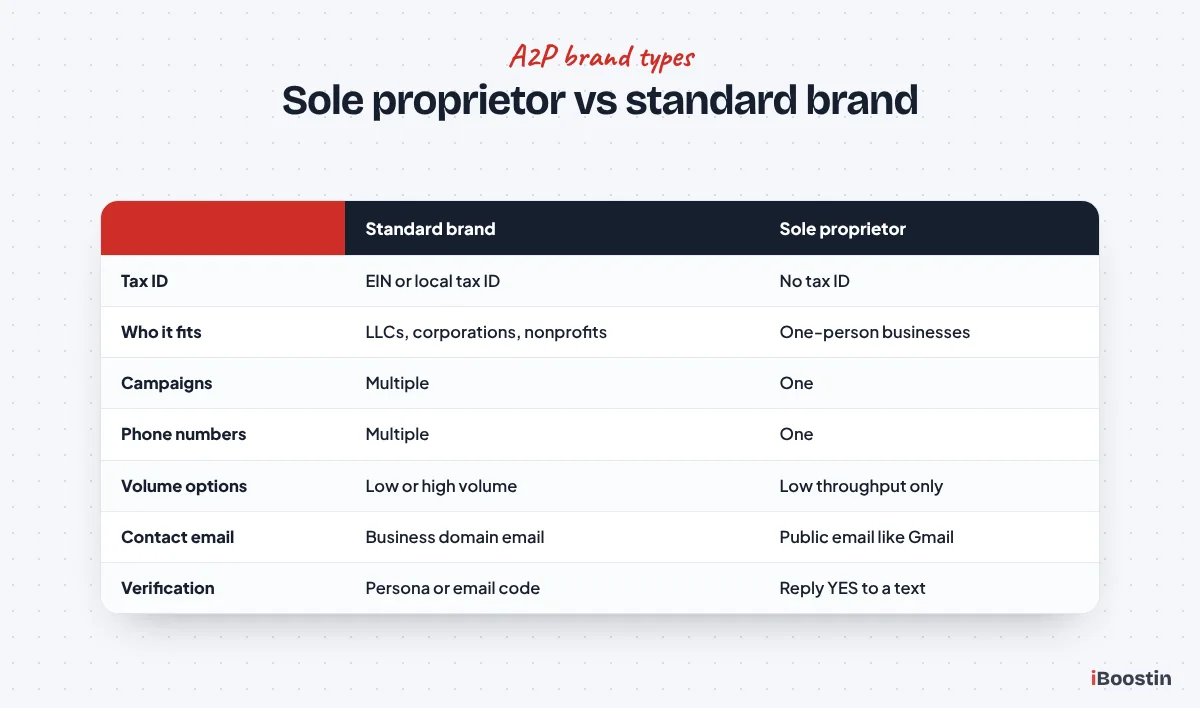
Standard brand (you have an EIN)
If your business has a US EIN, you register a standard brand. This is the right choice for LLCs, corporations, partnerships, nonprofits and any sole proprietor who has applied for an EIN. You enter the legal business name and EIN exactly as the IRS has them, plus business type, industry and registered address.
HighLevel lets you upload your IRS CP 575 letter on the business details step, which fills in the legal name, EIN and address for you. We use this every time a client has the letter, because it removes typing mistakes. Two warnings from the help docs: a DUNS number is not accepted for US registration, and a very new EIN (less than about 15 days old) may be rejected because it has not reached the verification databases yet. If your EIN is brand new, wait a little before you submit.
Low volume vs high volume standard
Standard brands then choose a messaging volume. Low Volume Standard is meant for businesses that send modest daily volumes; HighLevel’s help docs currently describe it as suited to up to about 6,000 message segments a day. High Volume Standard allows much higher daily throughput and includes extra vetting. The two options carry different fees, so check current pricing in your account before you choose.
For most local service businesses we set up, such as clinics, contractors, salons and law firms, Low Volume Standard is enough. Pick High Volume only if you genuinely plan large broadcast campaigns to big lists. Choosing a higher tier does not make approval easier, and the limits can change, so read the current description on the screen when you register.
Sole proprietor brand (no tax ID)
The sole proprietor path is for individuals or one-person businesses with no EIN or other business tax ID. It has tight limits: one campaign, one phone number, and low throughput. You also need a US or Canadian mobile number that can receive a verification text, and you confirm the registration by replying YES to that message. VoIP numbers, Google Voice style numbers and the LeadConnector number you bought in GoHighLevel are not accepted for this step.
There are a few rules that trip people up. The business name must not include LLC, Inc or any other term that implies a company. The contact email must be a public email such as Gmail or Yahoo, not a business domain. And one mobile number can only be used for a limited number of sole proprietor registrations. If your business has an EIN, do not use this path. Carriers check, and a company registered as a sole proprietor gets rejected.
Registering A2P for a client as an agency
When you register for a client, every detail must belong to the client: their legal name, their EIN, their address, their website, and an authorized representative who works for the client business. Do not register client campaigns under your agency’s brand or EIN. Carriers reject campaigns that mix brands, and reusing one EIN for many unrelated brands causes its own rejections.
In our builds, we collect the client’s details with a short intake form before we open the Trust Center: CP 575 or EIN letter, exact legal name, registered address, website URL, the person who will act as authorized representative, and their business email. The representative needs to be reachable, because carriers or HighLevel may contact them to verify the registration.
What to Prepare Before You Start
Most first-time rejections could have been avoided before the form was opened. The reviewer checks your website, your policies and your opt-in form, so those need to be correct first. Use this list as your preparation checklist.
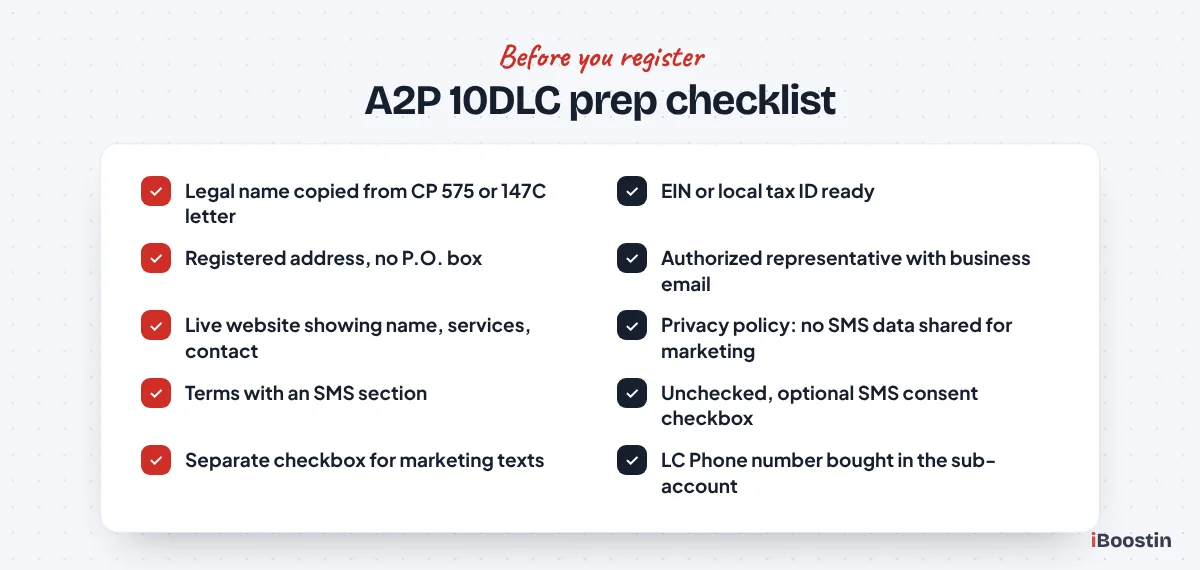
Legal name and EIN exactly as on IRS records
Find your CP 575 (the letter the IRS sent when your EIN was issued) or a 147C letter, which you can request from the IRS if the original is lost. Copy the legal name exactly as printed, including punctuation and suffixes like Inc or LLC. If the name runs over several lines above the address on the letter, HighLevel’s guidance is to enter all of those lines as the legal name.
Do not use the name from a W-9, a bank statement, your logo or your Google Business Profile. Those often differ slightly from the IRS record, and the difference is enough to fail the brand. If you trade under a different name, you will add the DBA separately, which we explain in the campaign section.
Business address and authorized representative
The address must match the registered address of the business, not a branch, a home office you moved from or a virtual mailbox. HighLevel’s current help docs say not to use a P.O. box. Using an address that differs from official records can lower your trust score or fail the brand outright.
The authorized representative is a real person at the business: an owner, director or manager who can answer questions about the registration. Use their real name, job title, reachable phone number and a business email on your own domain for a standard brand. A gmail address on a standard brand, or a contact who does not work for the business, are both listed rejection reasons.
A live website that matches the brand
You need a public, working website on a normal domain that shows the same business name you register, what you do, and how to contact you. Pages that need a login, “coming soon” pages, sites that are only a single form, and broken links are all rejection reasons. A free subdomain or a funnel URL with no business information can also fail.
The website should mention your text messaging in some way, usually in the privacy policy, the terms and next to the opt-in form. In the accounts we set up, we make sure the footer of every page links to the privacy policy and terms, so the reviewer never has to hunt for them.
Privacy policy with SMS wording
Your privacy policy needs a short section about text messaging. The single most important sentence says you do not share mobile numbers or SMS consent with third parties for marketing. Without it, campaigns are rejected even when everything else is perfect. A version we use, adjusted for each client, reads like this:
We do not share mobile phone numbers or text messaging opt-in data and consent with third parties or affiliates for marketing or promotional purposes. Information may be shared with service providers who help us deliver messages, but never for their own marketing.
Common mistake: a generic privacy policy template that says “we may share your information with partners for marketing purposes.” That one sentence contradicts your SMS section and is enough for a rejection. Read the whole policy, not just the part you added.
Terms and conditions with an SMS section
Add a messaging section to your terms, or a separate SMS terms page linked from the footer. It should name the program and the business, describe what messages people will get, say that message frequency varies, state that message and data rates may apply, explain that they can reply HELP for help and STOP to cancel, and give a support contact such as an email address.
Keep the wording consistent with what you will write in the campaign. If your terms say “appointment reminders only” and your campaign says “marketing,” the reviewer sees a mismatch. It also helps to add that carriers are not liable for delayed or undelivered messages, which is standard wording in most SMS terms.
Opt-in checkbox language on every form
Every form that collects a phone number and leads to texts needs an SMS consent checkbox that is unchecked by default and not required to submit the form. The person must be able to submit the form without agreeing to texts. Pre-ticked boxes and consent hidden inside “I agree to the terms” are both rejection reasons.
Next to the checkbox, show the full disclosure. A pattern that works well for most service businesses:
I agree to receive text messages from Bright Path Dental about appointments, reminders and account updates at the phone number provided. Message frequency varies. Message and data rates may apply. Reply HELP for help or STOP to opt out. Consent is not a condition of purchase. See our Privacy Policy and Terms.
If you also want to send promotions, add a second, separate unchecked checkbox for marketing messages. Carriers want marketing consent collected separately from service messages. This is now one of the most common rejection reasons we see in accounts that come to us after a failed attempt.
How to Choose the Use Case and Write the Campaign Details
The campaign step is where you describe your messaging. The use case, description, sample messages and opt-in details must all tell the same story, and that story must match your website. Reviewers reject campaigns where these pieces point in different directions.
Choosing the right use case
In the current Trust Center flow, the default Chat Widget Setup path asks you to pick a messaging use case from three options: Marketing / Promotional, Informational / Non-Marketing, or Mixed. Picking Mixed sets the campaign use case to Low Volume Mixed and adds two separate, unchecked consent boxes to the widget, one for informational texts and one for marketing.
If you choose Switch to manual setup, you pick a campaign use case from the standard list, which typically includes Marketing, Customer Care, Account Notification, Delivery Notification, Two-Factor Authentication, Mixed and Low Volume Mixed. The list you see can vary slightly. For a typical local business that sends lead replies, reminders and the occasional offer, Low Volume Mixed is usually the honest fit. If you never send promotions, pick a non-marketing use case and say so in the description.
Pro tip: choose the use case that matches what you will really send in six months, not just in week one. HighLevel’s help docs note that the use case may not be editable after submission, and changing it later can mean creating a new campaign.
Chat Widget Setup vs manual setup
The Chat Widget Setup path is HighLevel’s recommended route. You install the GoHighLevel chat widget on your live website, and the widget becomes your SMS opt-in method. The Trust Center then auto-fills the use case description, two sample messages, the opt-in description and the opt-in message for you. You still need to read and correct every auto-filled field.
There is a catch: the widget must be the only SMS opt-in form on the page where it is installed. Do not place it on a page that also has a contact form, lead form or booking form. Manual setup is the better choice when your real opt-in happens through your existing website forms, funnels, paper forms, QR codes or in person, because it lets you describe those exact methods.
Writing the campaign description
The description answers four questions: who is sending, who receives the messages, what the messages are about, and how people opt in. Write it in plain English, two to four sentences, specific to your business. Vague descriptions such as “we send texts to customers” are a listed rejection reason.
An example for a home services business:
Summit Air Heating and Cooling LLC sends text messages to customers and website leads who opt in through the SMS consent checkbox on the quote request form at our website. Messages include replies to quote requests, appointment confirmations and reminders, technician arrival updates, review requests after service, and occasional seasonal maintenance offers to contacts who separately agreed to marketing messages. Contacts can reply STOP at any time to opt out.
If you register with your EIN but trade under a different name, HighLevel suggests adding a line such as “We are doing DBA as [Business Name]” to the description. Your website, privacy policy, terms and checkbox wording must then show that DBA name.
Writing sample messages
Sample messages show the reviewer exactly what your customers will receive. Each sample must name your business, read like a real message, and at least one must include opt-out wording. Use plain brackets for personal details, such as [First Name], never HighLevel custom value codes. Make each sample different; identical or copy-pasted samples are rejected.
For a mixed campaign, include one service message and one marketing message:
Summit Air: Hi [First Name], your AC tune-up is confirmed for [Date] at [Time]. Reply C to confirm or call us to reschedule. Reply STOP to opt out.
Summit Air: Hi [First Name], fall furnace checks are now booking. Reserve a slot at https://www.[yourdomain].com/book and pick a time. Reply STOP to unsubscribe.
Use full https links on your own domain. Public link shorteners like bit.ly are a listed rejection reason. If your messages will contain links or phone numbers, tick the matching boxes in Additional Message Details so your samples and settings agree.
The opt-in method, opt-in flow and opt-in message
In manual setup you choose how contacts opt in: website forms, paper forms, lead forms, QR codes, kiosks or verbal consent, and you describe the flow step by step. Say where the person enters their number, what text they see beside the checkbox, and that ticking it is optional. If you list more than one method, describe every one, because listing methods you do not explain is a separate rejection reason.
You also give an Opt-in Form URL, the public page where the reviewer can see the checkbox. If the form is behind a login or on paper, provide a public link to an image or screenshot instead. The opt-in message is the confirmation text sent right after someone subscribes. It should name the business, describe the program, state frequency and rates, and give HELP and STOP instructions.
Opt-out and HELP keywords and replies
Carriers expect standard keywords to work. STOP, and common variants such as UNSUBSCRIBE, must stop messages. HELP must return a reply with your business name and a way to contact you. In HighLevel, when a contact replies with an opt-out keyword, the system turns on Do Not Disturb for SMS on that contact, so your workflows skip them automatically.
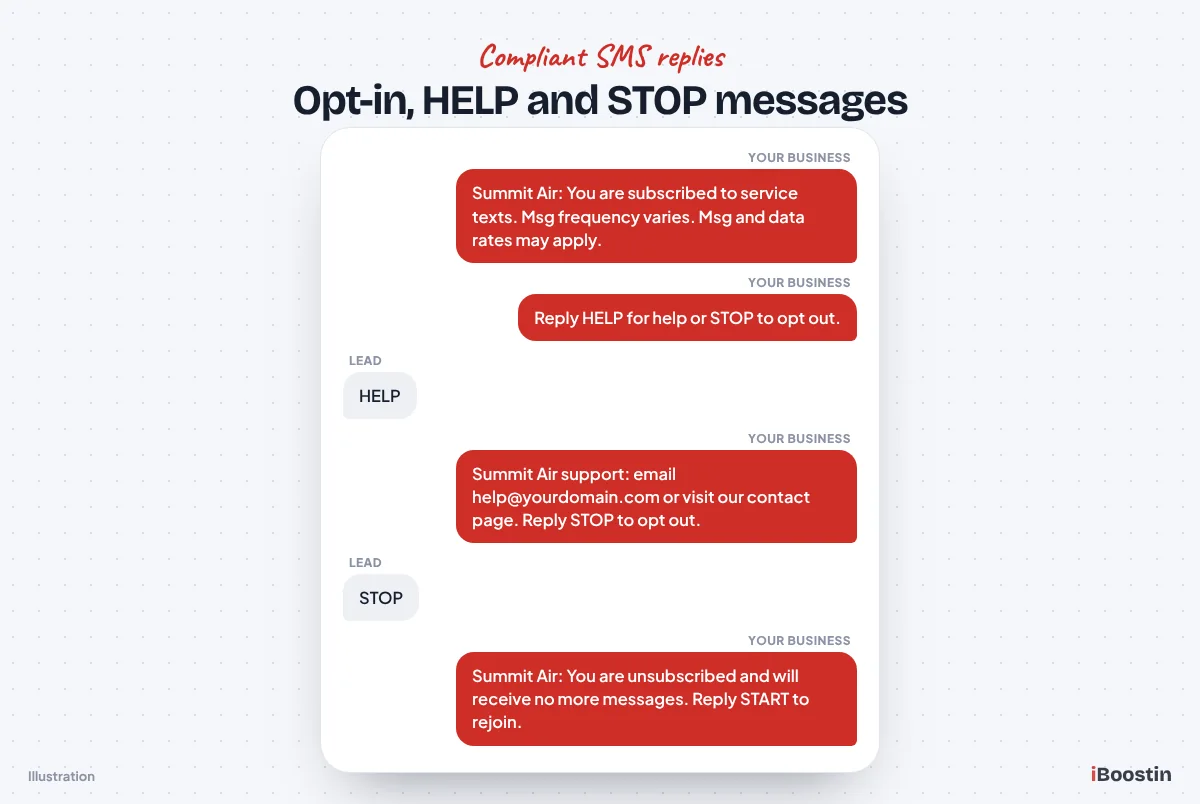
Your STOP reply should confirm the request, name the business, and say no more messages will be sent. Your HELP reply should name the business and give a support email or contact page. Make sure your own workflows never re-subscribe someone who opted out. A contact who sent STOP should only be texted again after they opt back in, for example by replying START.
How Do You Submit A2P 10DLC Registration in GoHighLevel?
With your website, policies and wording ready, the submission itself is straightforward. HighLevel rebuilt the Trust Center into a guided flow with panels for Business Profile, Brand, Campaign and Consent, and each panel unlocks once the one before it passes validation. Menu names can differ slightly in white-labeled accounts and older layouts, but the steps below match HighLevel’s current help docs.
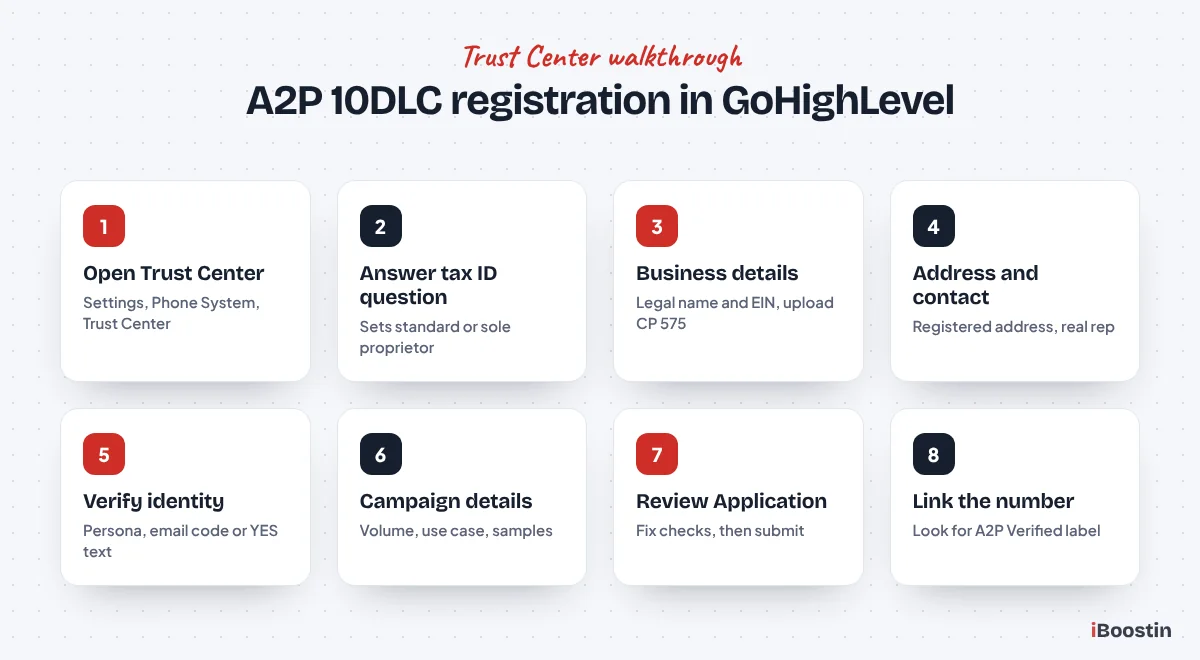
Step 1: Open the Trust Center in the right sub-account
Log in to the sub-account for the business you are registering, not the agency view. Then follow this path:
- Click Settings in the left menu.
- Under Business Services, open Phone System.
- Click the Trust Center tab.
- On the A2P Messaging (SMS) card, click Start Registration.
If a brand already exists and you only need a new campaign, click Brand & Campaigns on the same card, open the Campaigns tab and click Create Campaign. Before starting, make sure the sub-account already has a phone number from LC Phone, because you will link it to the campaign at the end.
Step 2: Answer the get started questions
The first screen asks where your business is registered and whether it has a tax ID. Choose your country carefully, because it changes which tax number formats are accepted. Then answer yes if you have an EIN or other business tax ID, or no if you do not.
Your answer decides the brand type. Yes leads to a standard brand. No leads to a sole proprietor brand with its one-number limit. If you are an LLC or corporation, answer yes even if you have never used your EIN for anything else, because a company registered as a sole proprietor will be rejected.
Step 3: Enter the business details
For a standard brand, enter the legal business name, business type, industry, registration ID type, registration number (your EIN in the US), business email and region of operations. If you have your CP 575 letter, upload it here so the name, EIN and address fill in automatically.
Check every character before moving on. Small differences, such as “Co.” versus “Company” or a missing comma before “LLC,” are exactly the kind of mismatch that fails a brand. For a sole proprietor brand, the form is shorter: your business name or full name, industry, and the mobile number that will receive the verification text.
Step 4: Add the address and authorized representative
Enter the registered business address: country, state, street, city and ZIP code. No P.O. box, and no branch address unless it is the registered one. Then add the authorized representative: first name, last name, email, phone number, job position and job title.
Use a person who can answer questions from carriers, and a phone number and email that are actually monitored. HighLevel’s guidance is that the representative’s phone number should not be reused across many brands. For agencies, this is the client’s owner or manager, not someone on your team.
Step 5: Complete identity verification
Depending on your account, you may be asked to complete identity verification through Persona, which confirms the identity of the person registering and is usually done once per sub-account. You may also get an email one-time code sent to the contact email. HighLevel’s docs say this is typically triggered for business email domains older than 45 days. You get three attempts to enter the code and two resends before you have to restart.
Sole proprietor brands verify differently. The carrier registry sends a text to the mobile number you entered, and you must reply YES to confirm. If that text is ignored, the registration stalls. Tell your client in advance that a verification text is coming, so they do not delete it as spam.
Step 6: Choose the messaging volume and setup path
Once the brand details are in, you move to Campaign Details. Standard brands choose Low Volume Standard or High Volume Standard here. If you registered without a tax ID, you are limited to the single-number option.
Next, choose your setup path. Chat Widget Setup opens by default. To describe your own forms instead, click Switch to manual setup. You can switch back later from the Campaign details panel. Pick the path that matches how people really opt in on your website, because that is what the reviewer will check.
Step 7: Fill in the campaign and consent fields
In manual setup, complete each field using the wording you prepared: Campaign Use Case, Website URL, Use Case Description, the two Sample Messages, Additional Message Details, Opt-In Method, Opt-in Form URL, Description of Opt-In Flow, Opt-in Message, Privacy Policy URL and Terms & Conditions URL.
In Chat Widget Setup, choose your messaging use case, enter your website URL, click Copy code and install the widget on your site, then review the auto-filled fields. Either way, paste full https URLs that open without a login, and open each link yourself in a private browser window before continuing.
Step 8: Review the application and submit
Complete the website checklist, then click Review Application. HighLevel runs a compliance check on your answers. If anything fails, fix it and click Review Again. You cannot submit until all the required checks pass. The Submission Review screen then shows a read-only summary with quick links back to each field.
Read the summary once as if you were the reviewer. Does the name on the website match the legal name? Does the description match the samples? Does the opt-in page show the checkbox and disclosures you described? Then submit. Registration fees apply at this stage, and they differ by brand type and volume, so check current pricing in your account.
Step 9: Link your number and confirm A2P Verified
After approval, go to Settings, then Phone System, then Phone Numbers. Each sending number should show a green A2P Verified label. If it does not, link the number to the approved campaign from the number’s settings, following HighLevel’s article on linking a phone number to an approved A2P campaign.
Repeat this check every time you add a new local number to the sub-account. HighLevel’s docs also note that carrier systems can take several business days to fully receive updated registration details after approval, so send a few test texts to your own phones before turning on high-volume workflows.
What you can and cannot do while registration is pending
While your brand or campaign shows Pending, you can make and take phone calls, send emails, reply on Facebook, Instagram and other connected channels, and keep building your workflows, calendars and pipeline. This is the best time to finish the rest of your account. Our guide on how to set up GoHighLevel from scratch lists the order we follow so nothing waits on A2P.
What you should not do: do not create a second campaign or resubmit the same one because it feels slow. HighLevel tells users to wait for the review to finish, because duplicate submissions cause confusion and can slow things down. Do not start sending SMS campaigns from the number, and keep SMS steps in your workflows in draft or tested only on your own phone. HighLevel does not publish a fixed timeline; its docs describe standard brands as often taking several business days, sole proprietor reviews as often faster, and manual reviews as taking longer. Campaign review times vary with carrier workload and with how complete your application is.
The Most Common Rejection Reasons and the Exact Fix for Each
When a campaign is rejected, open Settings, then Phone System, then Trust Center, click Brand & Campaigns, open the Campaigns tab and click View required fixes on the rejected campaign. One campaign can have several reasons, so open every one. These are the rejections we see most often, with the fix that resolves each.
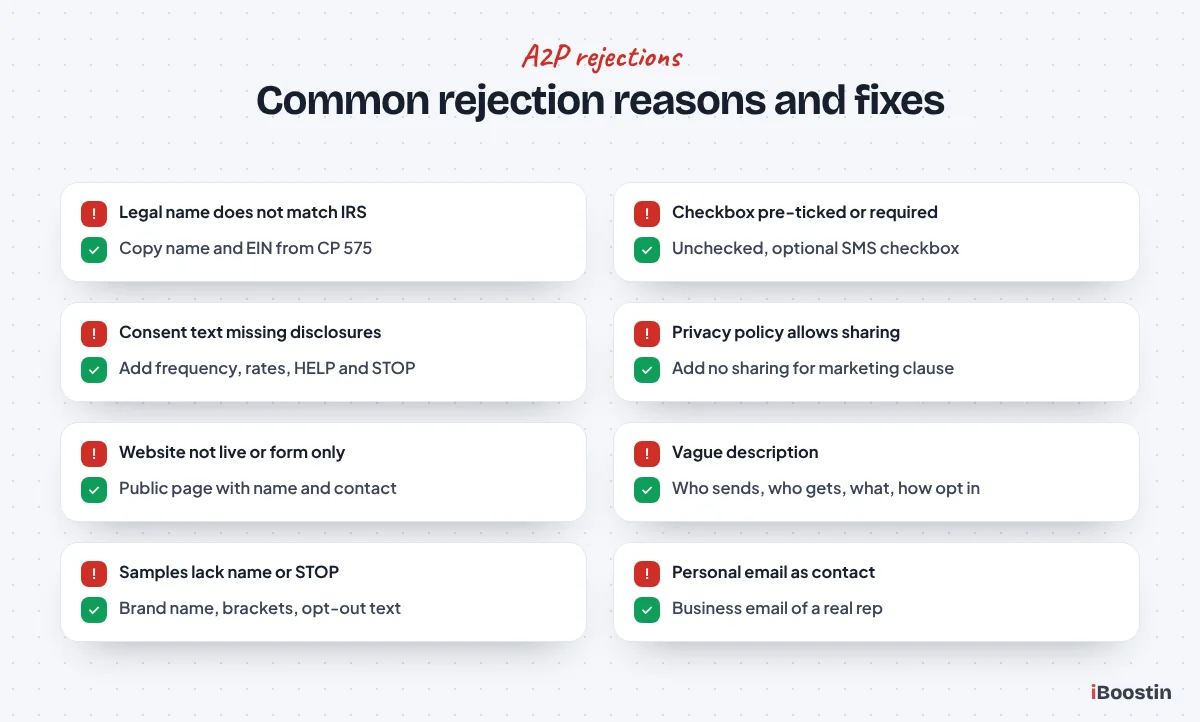
The legal name or EIN does not match official records
This is a brand failure, and it usually comes from typing the name the business uses in daily life rather than the IRS name. “Smith Plumbing” is not the same as “Smith Plumbing Services LLC.” Repeated failures can end in the message “Maximum 3 tries exhausted,” which blocks further automatic attempts.
The fix is to copy the name and EIN from the CP 575 or 147C letter, character for character, and resubmit. If you have hit the attempt limit, contact HighLevel support with your CP 575 and business registration documents, and they can submit the brand for manual review. For a brand new EIN, wait until it has had time to reach the verification databases.
The opt-in checkbox is missing, pre-checked or required
Reviewers reject forms where SMS consent is ticked by default, bundled into “I agree to the terms,” or required to submit the form. They also reject forms where one button grants every permission at once. The person must be able to say no to texts and still use your form.
The fix is a separate SMS checkbox, unchecked by default, not marked as required in the form builder. In GoHighLevel forms, check the field settings so the consent field is optional, then test the form in a private window. If you also send marketing, add a second unchecked checkbox just for promotional texts.
The consent wording is missing disclosures
Even with a correct checkbox, the text beside it can fail if it leaves out required details. The usual gaps are the business name, the type of messages, the frequency, “message and data rates may apply,” and the STOP instruction.
The fix is to use the full disclosure pattern from the preparation section, directly next to the checkbox, not in a link or popup. Include links to your privacy policy and terms right there as well. Then make sure the opt-in message you entered in the campaign repeats the same details.
The privacy policy allows sharing for marketing
A privacy policy that permits sharing personal information with partners or affiliates for marketing is a direct conflict with SMS rules. The reviewer reads the full policy, and one generic paragraph can sink an otherwise perfect campaign.
The fix is to add the “no sharing of mobile information or SMS consent with third parties for marketing” sentence, and to remove or rewrite any clause that says the opposite. Then link the policy from the footer of every page and from the opt-in form itself.
The website is not live, is login-only or is just a form
Reviewers reject URLs that do not load, show “under construction,” require a login, or show nothing but a form with no business information. Funnel pages often fail here because they were built to convert, not to explain the business.
The fix is a public page that shows your business name, what you do, how to contact you, and links to the privacy policy and terms. If your opt-in form is on a funnel page, add a short business intro, contact details and footer links to that page. If the site is genuinely pre-launch, say so in the description and supply screenshots, but expect more scrutiny.
The website or name does not match the brand
If the website says “Bright Smile” and the brand says “BSD Holdings LLC,” the reviewer cannot connect them. The same happens when screenshots or opt-in pages show a different company, or when one campaign mentions several brands.
The fix is to add the DBA to the brand registration where needed, mention it in the description (“We are doing DBA as Bright Smile”), and make sure the website, policies and checkbox use the same name. Agencies managing several brands for one owner should register a separate campaign for each brand.
The description is vague or the use case does not match
“We send updates to customers” tells the reviewer nothing. A description that says “appointment reminders” while the samples include promotions is a mismatch. Another common one: choosing a lead generation style use case when you only message your own existing leads, or the reverse.
The fix is to rewrite the description with the four parts: who sends, who receives, what the messages cover, and how people opt in. Then pick the use case that matches the samples. If the use case field is locked on resubmission and is wrong, you may need to create a new campaign rather than edit the old one.
The sample messages are weak or break the rules
Samples get rejected when they do not include the business name, when none of them has opt-out wording, when two samples are identical, when they use HighLevel custom value codes instead of brackets, or when they contain link shorteners or plain http links.
The fix is two distinct, realistic samples that each start with your business name, use [First Name] style placeholders, include “Reply STOP to opt out” in at least one, and use full https links on your own domain. For a mixed campaign, one sample should be service-related and one should be promotional.
The contact email or representative is wrong
Standard brands are rejected when the contact uses a personal email domain, when the support email is invalid, or when the contact person is not an authorized representative of the business. Agencies often trigger this by putting their own staff member as the contact.
The fix is to use a real person at the business with a business email on the company’s own domain. Make sure the inbox works and that the person knows the registration is in progress, in case anyone reaches out to verify it.
The content is restricted or not allowed
Some content is not eligible for standard resubmission at all. HighLevel groups these as SHAFT content (sex, hate, alcohol, firearms, tobacco), disallowed categories such as cannabis and CBD, prescription drugs, loan marketing, third-party debt collection, debt reduction, credit repair, gambling, sweepstakes, crypto and third-party lead generation, and high-risk patterns such as phishing or deceptive marketing.
The fix here is not a better description. Do not resubmit the same campaign. If you believe the rejection is a mistake, HighLevel’s docs say to contact support with a subject line in the format “10DLC Campaign Appeal for [your business name or number].” If you send any age-restricted content, tick the age-gated option in the campaign and add a working age gate to the website and opt-in flow, because a missing age gate is its own rejection reason.
How to Resubmit a Rejected A2P Campaign
A rejection is not the end. Most rejections can be fixed and resubmitted from the same Trust Center screen. The mistake people make is fixing only the first reason they read, then resubmitting and getting rejected again for the second one.
The resubmission process step by step
Follow this order every time:
- Open the rejected campaign and click View required fixes for every listed reason, not just the first.
- Fix each issue at the source first: the website, the form, the privacy policy or the terms.
- Update the campaign fields that relate to the fixes: description, samples, opt-in flow, URLs.
- Read the whole campaign again for consistency, because carriers often raise new issues on a second review.
- Run Review Application again and resubmit once all checks pass.
Resubmission may take additional review time, so do it once, carefully, rather than several times quickly. In our experience, the second submission succeeds when the business fixes the website and policies before touching the form fields. Fixing only the wording in the campaign while the website still shows the old checkbox rarely works.
When to create a new campaign or contact support
Some fields, such as the use case and the opt-in message, may not be editable after submission. If one of those is the problem, you may need to create a new campaign instead of editing the rejected one. Brand-level problems, such as a wrong legal name on an approved brand, must go through HighLevel support because approved brands cannot be edited directly.
Contact support when you hit “Maximum 3 tries exhausted,” when the rejection is in a category that is not eligible for resubmission and you believe it is wrong, or when you have fixed everything and keep getting rejected for reasons you cannot see on your site. Include your sub-account (location) ID, the campaign name and screenshots of your opt-in page so they can act on it quickly.
How to Stay Compliant After Approval
Approval is not a one-time pass. Carriers can still filter messages or suspend a campaign if your real texting moves away from what you registered. Keeping compliant is mostly about discipline in your workflows.
Keep your messages inside what you registered
If you registered appointment reminders and service updates, do not start sending promotional blasts from the same campaign. If your business adds a new kind of messaging, update the registration or create a new campaign first. Keep the business name at the start of your messages, just like in your samples.
This matters most when you add automation later. A new Conversation AI bot in GoHighLevel that replies to texts, or a reactivation campaign to old leads, should fit the use case and consent you registered. Old leads who never ticked an SMS consent box should not be bulk texted, even if their number is in your CRM.
Respect opt-outs and keep proof of consent
Never remove Do Not Disturb from a contact who replied STOP unless they opt back in. Build your workflows so they check DND status and do not try to work around it. If you import contacts from another system, import their opt-out status too.
Keep proof of consent for every contact you text: the form they submitted, the date and the wording they agreed to. GoHighLevel stores form submissions on the contact, which helps, but if you change your consent wording, keep a copy of the old version. This is your evidence if a carrier or a customer ever questions a message. For legal questions about consent under laws such as the TCPA, speak to a lawyer, because registration approval is not legal advice.
Update registration when the business changes
If the business changes its legal name, gets a new EIN, moves its registered address or changes its website domain, the registration needs updating. Because approved brands cannot be edited in the Trust Center, contact HighLevel support with the new details.
The same applies when your website is redesigned. We have seen approved campaigns suffer after a site rebuild removed the privacy policy link or replaced the checkbox form with a new one that lacked the disclosure. After any redesign, check that the opt-in pages and policy pages still say what your campaign says.
Link every new number and watch delivery
Every new local number you add must be linked to the approved campaign and show A2P Verified. A number that is not linked behaves like an unregistered number, even when the campaign is approved. Make this part of your checklist whenever someone buys a number for a new location or a new team member.
Check failed message reports in the Conversations area and on contact records every week or two. A sudden rise in failures often means a number lost its link, a message template triggered carrier filters, or a workflow is texting people who opted out. Catching it early is far easier than recovering a suspended campaign.
Should You Register A2P Yourself or Get Help?
You can complete A2P registration yourself. The Trust Center flow is clearer than it used to be, and a business with a clean website, a correct EIN letter and a simple use case often gets through on the first try. The hard part is not the form, it is everything the form points to.
| Do it yourself | Get expert help | |
|---|---|---|
| Best for | One business, simple messaging, website you can edit easily | Agencies with many clients, past rejections, complex or mixed messaging |
| What you handle | Website fixes, policies, wording, submission, follow-up | Review and approval of the final wording |
| Main risk | Rejection rounds that cost days of missed texts | Choosing a provider who promises approval they cannot control |
| What you end up with | Knowledge of your own registration | A prepared, consistent registration and a linked, tested number |
Doing it yourself makes sense if you have time to edit your website, you are comfortable writing policy wording, and a delay of a week or two will not hurt your business. Getting help makes sense when leads are already coming in, when you have been rejected before, when you run an agency and need repeatable client registrations, or when your website is on a platform you cannot easily edit.
If you hire someone, ask them to show you the exact wording they will use before they submit, keep the registration inside your own sub-account, and walk away from anyone who says approval is guaranteed. Our GoHighLevel A2P 10DLC registration service prepares the website wording, policies and campaign details and handles resubmissions, and our wider team of GoHighLevel experts can build the workflows that rely on SMS once the number is verified.
Frequently Asked Questions About A2P 10DLC in GoHighLevel
How long does A2P 10DLC approval take in GoHighLevel?
HighLevel does not publish a fixed timeline. Its help docs describe standard brand reviews as often taking several business days, sole proprietor reviews as often faster, and manual reviews or extra verification as taking longer. Campaign review time varies with carrier workload and how complete your application is. A rejection and resubmission adds another review cycle, which is why preparing everything first saves the most time.
Can I send texts while my A2P registration is pending?
Not reliably to US numbers from a local 10-digit number. Carriers block or filter texts from numbers that are not linked to an approved campaign. While you wait, you can still make and take calls, send emails, use social messaging channels and build your workflows. Test SMS steps only on your own phone, and turn on SMS automations after your number shows A2P Verified.
Can I register for A2P 10DLC without an EIN?
Yes, through the sole proprietor brand, if you are an individual or one-person business with no business tax ID and a US or Canadian address. It allows one campaign and one phone number with low throughput, and you verify by replying YES to a text on a personal mobile number. If your business is an LLC or corporation with an EIN, you must register as a standard brand instead.
What is the difference between A2P brand and campaign registration?
The brand identifies your business: legal name, tax ID, address and authorized contact, checked against official records. The campaign describes your messaging: use case, description, sample messages, opt-in method and policy links, checked against your website. You need an approved brand before you can submit a campaign, and you need an approved campaign linked to your number before texts go through.
Why was my A2P campaign rejected in GoHighLevel?
Most rejections come from opt-in problems (missing, pre-checked or required checkboxes, missing disclosures), website problems (not live, no business details, no privacy policy) or mismatches between your legal name, website and campaign. Open the campaign in the Trust Center and click View required fixes for every reason listed. Fix the website and policies first, then update the campaign and resubmit once.
Do toll-free numbers need A2P 10DLC registration?
No. Toll-free numbers use a separate toll-free verification process instead of A2P 10DLC brand and campaign registration. They still need to be verified before texting works reliably, and the reviewer still checks your opt-in and website. HighLevel handles toll-free verification in the Trust Center too. Toll-free can be an option for businesses outside the US or Canada that have no tax ID.
Can an agency register A2P for a client in GoHighLevel?
Yes, but every detail must belong to the client. Register inside the client’s sub-account using the client’s legal name, EIN, address, website and an authorized representative who works for the client. Do not use your agency’s EIN, brand name or staff as the contact. Each client business needs its own brand and campaign, because carriers reject campaigns that mix brands.
Do I need A2P if I use my own Twilio account with GoHighLevel?
Yes. A2P 10DLC applies to any business texting US numbers from local numbers, whichever provider you use. The difference is where you register. If you use LC Phone, you register in the GoHighLevel Trust Center. If your sub-account is connected to your own Twilio account, you register in the Twilio console under Trust Hub, using the same business details and wording.
Get Your Number Approved and Your Texts Delivered
A2P 10DLC registration rewards preparation. When your legal name matches the IRS letter, your website clearly shows who you are, your policies say the right things about SMS, and your checkbox gives people a real choice, the Trust Center form becomes the easy part. Most of the rejections we fix were caused by one mismatch that could have been caught in ten minutes before submitting.
Carriers decide every registration, so nobody can promise approval. What you can control is giving them nothing to question. If you would rather have that preparation done for you, the iBoostin team prepares and submits A2P registrations inside your own GoHighLevel account and then builds the SMS workflows that depend on it.