In this guide
- Small Business SEO Steps at a Glance
- What Is SEO for Small Business?
- Why Does SEO Matter for a Small Business?
- The Small Business SEO Plan in Priority Order
- Step 1: Fix the Foundations So Google Can Find You
- Step 2: Find the Keywords Your Customers Actually Use
- Step 3: Build the Pages That Bring Calls
- Step 4: On-Page SEO for Every Important Page
- Step 5: Local SEO and Your Google Business Profile
- Step 6: Earn Authority With Links and Mentions
- Step 7: Get Found in AI Search
- SEO for a New Business: Your First 90 Days
- Free SEO Tools Every Small Business Should Use
- How Do You Measure Small Business SEO Results?
- How Long Does SEO Take for a Small Business?
- Common SEO Mistakes Small Businesses Make
- How Much Does SEO Cost for a Small Business?
- Is SEO Worth It Compared With Paid Ads?
- Doing SEO Yourself vs Getting Help
- Frequently Asked Questions About SEO for Small Business
- Start With the Step That Is Holding You Back
SEO for small business is the work of making your website, Google Business Profile and online reputation easy for search engines to find, understand and trust, so that people searching for what you sell find you instead of a competitor. It covers technical setup, the right pages, local signals, links and, now, visibility inside AI answers.
Picture a plumber, a dental clinic or a small accounting firm with a good website that nobody visits. The owner paid for the design, shared it on social media and waited. Three months later, Search Console shows a few hundred impressions, almost no clicks and an average position somewhere on page six. Meanwhile, two competitors with older, uglier websites take every call from Google. That gap is almost never about design. It is about the signals Google and AI tools use to decide who deserves to be shown.
This guide is the plan we follow when a small business comes to the iBoostin team with that exact problem. It puts the work in the order that pays off fastest, shows you how long each part takes, and explains where AI search fits in. Every section links to a deeper guide, so you can go step by step or hand parts of it to someone else. If you only want to know whether the effort pays back for a business your size, start with is SEO worth it for small business and come back here.
Key takeaways
- Small business SEO is won by doing a few things in the right order: foundations, keywords, service pages, local signals, then authority.
- Most small sites stuck on page five or six do not have a content problem. They have weak authority and pages that do not match what buyers search.
- Google Business Profile, reviews and consistent business details decide most local “near me” results, not your blog.
- AI tools like ChatGPT and Google AI Mode recommend businesses that are clearly described, well reviewed and mentioned on other trusted sites.
- Track impressions, clicks and leads in Search Console every month. Rankings alone do not pay the bills.
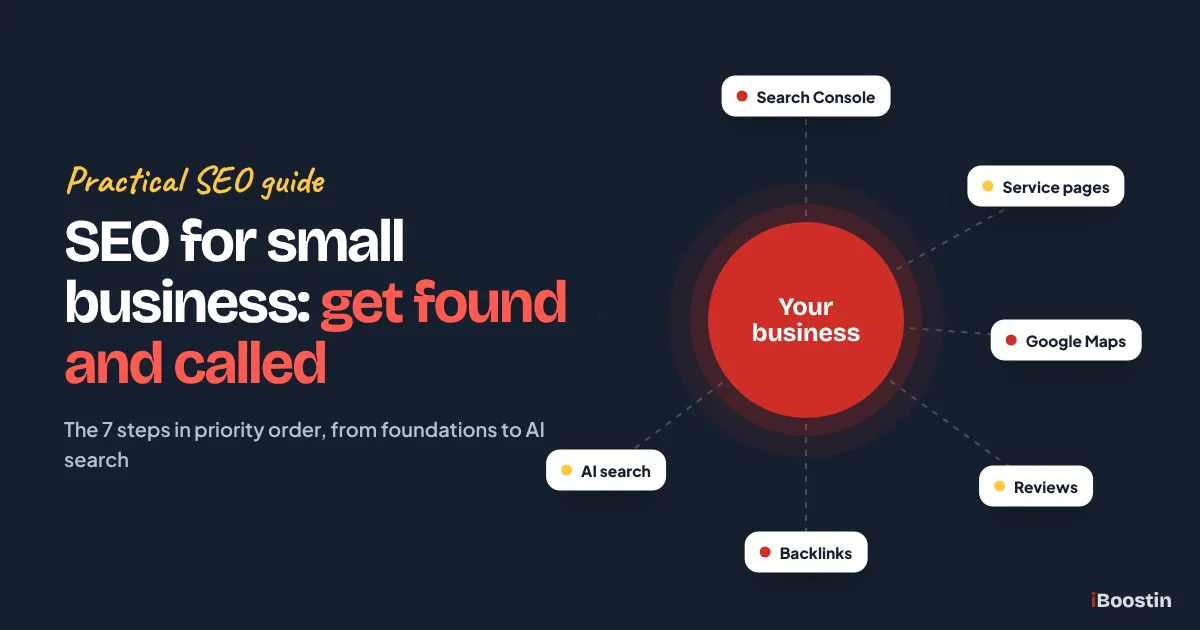
Small Business SEO Steps at a Glance
If you only read one part of this guide, read this table. It is the full plan in the order we use it, with what each step involves and when it usually starts to show.
| Step | What you do | When it usually shows |
|---|---|---|
| 1. Fix the foundations | Search Console, indexing, speed, mobile, HTTPS | Within weeks, as pages get indexed |
| 2. Find the right keywords | Services plus area, buyer wording, one keyword per page | Shapes everything after it |
| 3. Build the pages that bring calls | One strong page per service, real location pages, support posts | Months 2 to 4 |
| 4. On-page SEO | Titles, headings, depth, internal links, images, schema | Weeks after each change is crawled |
| 5. Local SEO | Google Business Profile, reviews, consistent details | Often the fastest wins for local businesses |
| 6. Authority | Local, industry and partner links and mentions | Months 4 to 12, and it keeps building |
| 7. AI search | Clear descriptions, reviews, mentions on trusted sites | Grows alongside steps 5 and 6 |
What Is SEO for Small Business?
SEO stands for search engine optimization. For a small business, it means a narrower and more practical job than the SEO big brands do. You are not trying to rank for every word in your industry. You are trying to show up for the few hundred searches that come from people ready to call, book or buy from a business like yours, in the places you actually serve.
How Google Decides Which Businesses to Show
Google ranks pages by asking three broad questions. Is this page relevant to what the person typed? Is the site behind it trustworthy and well known? Will the visitor have a good experience when they land? Relevance comes from your words, headings and page structure. Trust comes mostly from other websites linking to you, reviews, and how consistently your business is described across the web. Experience comes from speed, mobile layout and whether people find what they came for.
Small businesses usually do fine on relevance once their pages are written properly. Where they fall behind is trust. A new website with zero links and no reviews looks, to Google, like an unknown voice. That is why so many owners see impressions but no clicks: Google tests the page on page five or six, sees no strong reason to move it higher, and leaves it there. The rest of this guide is built around fixing both sides of that equation.
The Three Places Your Business Can Appear
When someone searches for a service, there are now three different spots you can win. The first is the map pack, the box with three local businesses and a map that appears for local searches. The second is the normal list of blue links, often called organic results. The third is the AI layer: Google AI Overviews and AI Mode at the top of many searches, and tools like ChatGPT that answer questions directly and sometimes name businesses.
Each spot uses slightly different signals, which is why a single tactic never fixes everything. The table below shows what drives each one. In our work with service businesses, the map pack usually brings the first calls for local trades and clinics, while organic results matter more for businesses that sell across a whole country or online.
| Where you appear | Who it matters most for | What mostly decides it |
|---|---|---|
| Map pack (local results) | Trades, clinics, salons, restaurants, local services | Google Business Profile, reviews, distance, consistent business details |
| Organic results | Service firms, B2B, online stores, national brands | Page relevance, links from other sites, technical health, content depth |
| AI answers (AI Overviews, AI Mode, ChatGPT) | Any business people ask about by type or problem | Clear entity information, mentions on trusted sites, reviews, well structured answers |
Why Does SEO Matter for a Small Business?
You can run a small business without SEO. Plenty do, living on referrals and paid ads. The question is what you leave on the table and how exposed you are when ads get more expensive or a referral partner disappears. For most of the owners we work with, SEO is the only channel where the results keep building after the work is done.
Search Is Where Buyers Start
When people need a service they have not bought before, they search for it. They type the service and their area, they compare the first few options, they read reviews and they call. If you are not visible during that short window, you do not get considered at all. A recommendation from a friend often ends up as a search too, because people look you up before they call.
That behavior is also why search traffic converts so well compared with social media. Someone scrolling Instagram was not looking for a dentist. Someone who types “emergency dentist open Saturday” is looking for one right now. Ranking for searches like that is worth more than thousands of social impressions, and it is exactly the kind of traffic a small business can win without a big budget.
Results Build on Each Other
Paid ads stop the moment you stop paying. SEO works differently. A service page that ranks well keeps bringing calls month after month, and every new page, review and link makes the next ranking easier to earn. That compounding effect is the reason we usually advise clients to run ads for quick leads while SEO builds underneath, which we explain in detail in SEO vs PPC for small business.
The downside is that compounding starts slowly. The first months feel like nothing is happening, because Google is still deciding whether to trust you. Owners who quit at month three usually quit right before the curve turns. Knowing the realistic timeline in advance, covered further down and in our guide on how long SEO takes, makes it much easier to stay the course.
AI Search Reads the Same Signals
Many owners now ask whether SEO still matters when people ask ChatGPT instead of Google. It matters more, not less. AI tools build their answers from pages they can find and from what trusted sites say about a business. A company with clear pages, good reviews and mentions across the web gets named. A company that is invisible on Google is usually invisible in AI answers too.
The good news is that the work overlaps almost completely. Clear service pages, a complete Google Business Profile, honest reviews and links from respected sites help you in both places. We cover the extra steps for AI tools in how to get your business mentioned in ChatGPT, but you do not need a separate strategy to get started.
The Small Business SEO Plan in Priority Order
Most SEO guides give you thirty tips in random order. That is how owners end up rewriting blog posts while their site still has an indexing problem. The order below is the one we use on every new client site, because each step makes the next one work better.

| Priority | What to do | Typical time for a small site | Why it comes here |
|---|---|---|---|
| 1 | Technical foundations and Search Console | One to two days | Nothing ranks if Google cannot index it |
| 2 | Keyword research by service and location | One to three days | Decides which pages you need |
| 3 | Service and location pages | One to three weeks | These pages bring the calls |
| 4 | On-page SEO on every key page | A few hours per page | Makes each page clearly relevant |
| 5 | Google Business Profile and local signals | One week, then monthly | Wins the map pack |
| 6 | Links and mentions from other sites | Ongoing, every month | Builds the trust Google is missing |
| 7 | AI search visibility | Ongoing, alongside 5 and 6 | Gets you named in AI answers |
Step 1: Fix the Foundations So Google Can Find You
Before keywords and content, make sure Google can reach, read and index your site. In our audits, roughly one in three small business websites has at least one serious technical problem that no amount of content would fix. Usually it is something simple: a leftover “discourage search engines” setting, a missing sitemap or pages blocked by mistake.
Set Up Google Search Console First
Google Search Console is a free tool that shows how Google sees your website. It tells you which pages are indexed, which searches you appear for, your average position and every technical error Google has found. Verify your domain, submit your XML sitemap and check the Pages report. If important pages are listed as “Discovered, currently not indexed” or “Crawled, currently not indexed”, that is your first job.
Also connect Google Analytics or another analytics tool so you can see what visitors do after they arrive. Search Console tells you about the search side, analytics tells you whether those visits turned into calls and form fills. Without both, you will be guessing about what works. If your site is not appearing at all, our guide on why your website is not showing up on Google walks through every common cause.
Make Sure Pages Can Be Indexed
Check four things on every important page. The page must return a normal status, not an error or a redirect chain. It must not carry a noindex tag. Your robots.txt file must not block it. And its canonical tag should point to itself, not to another page. These sound technical, but a site audit tool or the URL Inspection tool in Search Console shows all four in seconds.
Common mistake: WordPress sites built on a staging domain often go live with “Discourage search engines from indexing this site” still ticked under Settings, Reading. We see this more often than any other single problem. It tells every search engine to stay away, and the owner has no idea until someone checks.
Speed, Mobile and Core Web Vitals
Most local searches happen on phones, so Google looks at the mobile version of your site first. Open your site on your own phone and try to call you, find your prices page or fill in your form. If anything is slow, tiny or hidden, your visitors feel it too. Then run your main pages through PageSpeed Insights and look at the three Core Web Vitals: Largest Contentful Paint, Interaction to Next Paint and Cumulative Layout Shift.
You do not need a perfect score. You need pages that load quickly on a normal phone connection and do not jump around while loading. The usual fixes are compressing large images, removing plugins you do not use, enabling caching and choosing decent hosting. On WordPress, these fixes alone often turn a failing mobile score into a passing one.
Clean Structure and Secure Pages
Your site should run on HTTPS, with every old HTTP address redirecting to the secure version. URLs should be short and readable, like /emergency-plumber/ rather than /page-id-482/. Every important page should be reachable within two or three clicks from the homepage, ideally from the main menu.
A clean structure helps both people and search engines understand what you offer. Group related pages together: all your services under clear service pages, location pages linked from a service area page, blog posts linking back to the service they support. When Google sees that structure, it understands which page should rank for which search.

Step 2: Find the Keywords Your Customers Actually Use
Keyword research tells you what your customers type into Google and how many of them do it. For a small business, the goal is not to find the biggest keywords. It is to find the searches with clear buying intent that you can realistically win within a few months.
Start With Your Services and Your Area
Write down every service you offer, in the words customers use, not your internal jargon. A clinic might call it “dental prophylaxis”, but patients search “teeth cleaning”. Then add the places you serve. Combinations like “teeth cleaning in Austin” or “emergency plumber Manchester” are the backbone of local keyword research.
Next, add the problems that lead people to you. Someone with a leaking water heater might search “water heater leaking from bottom” before they search “water heater repair”. Problem searches are often less competitive and make excellent blog topics that link to your service page. Our full method is in how to do keyword research for small business.
Use Free Data Before Paid Tools
You can get a long way without paying for anything. Type your service into Google and note the autocomplete suggestions. Look at the “People also ask” box and the related searches at the bottom. Check the Queries report in Search Console, which shows real searches you already appear for. Look at which pages your top three competitors rank with.
Paid tools like Semrush or Ahrefs add search volume and a difficulty score, which help you decide what to target first. As a rule of thumb, a new website should start with keywords where the current top results are a mix of small businesses and directories, not national brands with thousands of links. If you would rather hand this part off, our keyword research services deliver a full keyword and page plan.
Match Each Keyword to the Right Page Type
Every keyword has an intent, and the intent decides which page should target it. A search like “roof repair near me” wants a service page with a phone number. A search like “how long does a roof repair take” wants an article. Putting the wrong page in front of the wrong intent is one of the most common reasons good content does not rank.
| Search type | Example | Best page to target it |
|---|---|---|
| Service plus location | emergency electrician Dallas | Service page or location page |
| Service only | bookkeeping services for contractors | Service page |
| Problem or question | why is my AC blowing warm air | Blog post linking to the service page |
| Comparison | invisalign vs braces cost factors | Blog post or comparison page |
| Brand | your business name reviews | Homepage, reviews page, Google Business Profile |
Once each keyword has a page type, assign it to exactly one page. If two of your pages target the same search, they compete with each other and Google often ranks neither of them well. A simple spreadsheet with three columns, keyword, intent and target page, is enough to keep this straight as your site grows.
Step 3: Build the Pages That Bring Calls
Once you know your keywords, you can see which pages are missing. Most small business sites have a homepage, an about page, a contact page and a single “Services” page listing everything. That structure makes it almost impossible to rank, because one page cannot be the best answer for ten different services.
One Strong Page for Each Main Service
Give every main service its own page with its own URL, title and heading. A dental clinic should have separate pages for implants, teeth whitening, emergency visits and children’s dentistry. A marketing firm should separate SEO, web design and paid ads. Each page then targets one main keyword and a handful of close variations.
A good service page explains what the service is, who it is for, how it works, what it costs or what affects the cost, why someone should choose you, and what to do next. It answers the questions people ask before they call. It shows proof: reviews, photos of real work, certifications. Thin pages with three paragraphs and a contact form rarely rank, because they give Google nothing to compare.
Location Pages Without Copy and Paste
If you serve several towns or areas, location pages can help you rank in each of them. The trap is creating twenty pages where only the town name changes. Google treats those as near duplicates and often ignores them, and they can drag down the rest of your site.
A location page earns its place when it has something specific to say: jobs you have done in that area, local reviews, the areas and landmarks you cover, travel times, local regulations or common problems in that area’s housing. If you cannot write at least a few genuinely local paragraphs, it is better to have one strong service area page than many weak copies.
Blog Posts That Support Your Service Pages
Blog content helps a small business when it answers real customer questions and links back to the service page that solves the problem. This is the topic cluster model: one main page on a subject, surrounded by supporting articles that each cover one question in depth and link back to it. This very guide is the main page for our small business SEO cluster.
Do not blog for the sake of it. A post about industry news nobody searches for will not move rankings or bring leads. Pick questions from your keyword research and from your inbox, write the most useful answer you can, and link to the relevant service. Ten focused posts beat fifty generic ones, and they also give AI tools clear answers to quote.
Step 4: On-Page SEO for Every Important Page
On-page SEO is the set of changes you make on each page so search engines understand exactly what it is about. It is the step most owners have heard of, and it is the step most often done halfway, with a keyword in the title and nothing else.
Titles, Meta Descriptions and Headings
The title tag is the blue headline in search results. Keep it under about 60 characters, put the main keyword near the start and make it worth clicking. The meta description is the short text under it. It does not affect rankings directly, but a clear, specific one improves clicks. Write it for a human in about 140 to 160 characters.
Each page should have one H1 heading that states what the page is about, usually including the main keyword. Below it, H2 and H3 headings should break the page into the questions your customer has. Search engines and AI tools both use these headings to understand the page, and a reader scanning on a phone uses them to decide whether to stay.
Content Depth and Internal Links
Look at the pages ranking in the top three for your keyword. Note which questions they answer, which details they include and what they leave out. Your page should cover everything they cover, plus the things only you can add: your process, your local experience, your real examples and your honest advice.
Then link your pages together. Service pages should link to related services, blog posts should link to the service they support, and your homepage should link to your most important services. Internal links pass authority around your site and tell Google which pages matter most. Use descriptive anchor text, like “kitchen remodeling services”, instead of “click here”.
Images, Schema and the Details That Add Up
Compress images, give them descriptive file names and write alt text that describes what is in the picture. Use real photos of your team and your work where you can. Stock photos do not hurt rankings, but real images build trust with visitors and can rank in image search.
Add structured data, also called schema, to help search engines read key facts. A LocalBusiness or Organization schema on your homepage, Service schema on service pages and FAQPage schema where you answer common questions all make your information easier to understand. Plugins like Rank Math add most of this on WordPress. For a full page by page list, see our small business SEO checklist or our on-page SEO services if you want it done for you.
Step 5: Local SEO and Your Google Business Profile
For any business with a physical location or a service area, local SEO is usually the fastest route to new calls. Google has said that local results are based mainly on relevance, distance and prominence. You cannot change distance, but you can do a lot about the other two.
Complete and Verify Your Google Business Profile
Claim and verify your Google Business Profile, then fill in every field. Choose the most accurate primary category, because it carries the most weight, and add secondary categories only where they truly apply. Add your services, service areas, opening hours, photos, a clear description and a link to the most relevant page on your site.
Keep it active. Post updates, add new photos of real work, answer questions and keep your hours correct on holidays. An active, complete profile signals that the business is real and current. Our step by step guide on how to rank higher on Google Maps covers each setting in detail.
Reviews: Ask Every Happy Customer
Reviews are one of the strongest local ranking signals, and they decide whether people click on you or the business next to you. Build asking into your process: send a short message with your review link after every finished job. Most happy customers will leave a review if you make it easy and ask at the right moment.
Reply to every review, good or bad, in a calm and helpful tone. Never buy reviews or offer rewards in exchange for positive ones. Fake reviews break Google’s policies, can get your profile suspended and erode the trust you are trying to build.
Consistent Business Details Everywhere
Your business name, address and phone number, often shortened to NAP, should be identical on your website, your Google Business Profile and every directory that lists you. Small differences, like an old phone number on one directory or “Street” on one site and “St.” on another, create doubt about which details are correct.
Start with the main directories in your country and industry, then local ones like your chamber of commerce. Fix any old listings you find. This work is not exciting, but it is one of the clearest prominence signals a small business can send. If you want a team to handle it, our local SEO services cover profiles, citations and reviews.
Step 6: Earn Authority With Links and Mentions
This is the step that separates sites stuck on page five from sites on page one. Links from other websites are still one of the strongest signals Google uses to decide which pages to trust. For a new small business website, the lack of links is usually the single biggest reason rankings stall.
Why Links Still Decide Competitive Searches
A link from another website works like a recommendation. When a respected local news site, an industry association or a supplier links to you, Google reads that as evidence that real people and organizations know and trust your business. Two pages with similar content will usually be ranked by which one has more and better recommendations.
Quality matters far more than quantity. One link from a relevant, trusted website is worth more than a hundred links from random directories nobody visits. Mentions of your business name without a link also help, especially for AI tools, which learn about businesses from what other sites say about them.
Safe Ways for a Small Business to Earn Links
Start with links you already deserve. Suppliers, manufacturers you are certified with, trade associations, local chambers and business partners often have pages listing their members or partners. Sponsor a local team or event, offer a genuine expert quote to a journalist, or write a useful guide for an industry blog. Each of these earns a link because there is a real relationship behind it.
Then create one or two resources worth linking to: a local cost guide, a checklist, original photos or a simple tool. These attract links over time without you asking. Our guide on how to get backlinks for a new website lists the safest sources we use, and our link building services handle the outreach if you do not have the time.
What to Avoid
Avoid any offer of hundreds of backlinks for a fixed package, private blog networks and link exchanges at scale. These links come from sites built only to sell links, and Google is very good at spotting them. At best they do nothing. At worst they lead to a manual action that removes your site from results until you clean it up.
Pro tip: before you accept any link building offer, ask to see five example links from the last month. If you would not be proud to show those sites to a customer, they will not impress Google either.
Step 7: Get Found in AI Search
Google AI Overviews, AI Mode and ChatGPT now answer many questions before anyone clicks a link. When someone asks “who is a good accountant for small restaurants in Leeds” or “best emergency plumber near me”, these tools sometimes name specific businesses. Being one of those names is becoming its own kind of ranking.
How AI Answers Choose Which Businesses to Name
AI tools look for businesses that are clearly described and consistently mentioned. They read your website, your Google Business Profile, review sites, directories and articles that mention you. When those sources agree on who you are, what you do and where you work, the AI can describe you with confidence. When the information is thin or inconsistent, it picks someone else.
They also favor content that answers questions directly. A page that opens with a clear one-paragraph answer, uses descriptive headings and includes facts like service areas and specialisms is easier for an AI to quote. That is why the first paragraph of every section in this guide answers the question in the heading.
Practical Steps You Can Take Now
Make sure your homepage and about page state plainly who you are, what you do, who you serve and where. Add Organization and LocalBusiness schema. Keep your Google Business Profile complete. Make sure your robots.txt does not block the crawlers AI tools use, such as OAI-SearchBot for ChatGPT search. Collect reviews on Google and on one or two industry review sites.
Then get mentioned. Industry directories, “best of” lists in your area, local news, podcasts and partner websites all teach AI tools that your business exists and is respected. Our guide on getting your business mentioned in ChatGPT has the full process, and our generative engine optimization services cover it for clients who want help.
SEO for a New Business: Your First 90 Days
A brand new business starts with no reviews, no links and a domain Google has never seen. That changes the order a little: you lean on local signals and basic visibility first, because authority takes longest to build.
| Days | Focus | What to do |
|---|---|---|
| 1 to 30 | Get found at all | Verify your Google Business Profile, set up Search Console and Bing Webmaster Tools, submit your sitemap, list the business on the main directories with the same name, address and phone everywhere |
| 31 to 60 | Pages that match searches | Build one page per main service, write titles around what buyers type, add clear prices or price factors, ask every early customer for a review |
| 61 to 90 | First authority | Get listed by suppliers, partners, local associations and chambers, publish one genuinely useful guide, check Search Console for the first queries and improve those pages |
Do not judge results in the first 90 days by leads alone. For a new site, the real early signs are pages getting indexed, impressions starting to rise in Search Console and the profile showing up in the map pack for your own business name and nearby searches.
Free SEO Tools Every Small Business Should Use
You do not need paid software to do the work in this guide. These free tools cover almost everything a small business needs, and most paid tools build on the same data.
| Tool | What it is for | How often to use it |
|---|---|---|
| Google Search Console | Indexing, queries, clicks, positions and errors, straight from Google | Monthly, and after every big change |
| Google Business Profile | Your listing in Maps and the local pack, reviews, posts and photos | Weekly |
| Google Analytics 4 | What visitors do on the site and which pages lead to enquiries | Monthly |
| Bing Webmaster Tools | Bing indexing and data, which also feeds some AI tools | Monthly |
| PageSpeed Insights | Speed and Core Web Vitals for any page | After design or plugin changes |
| Google Keyword Planner | Search volume ranges and keyword ideas | When planning new pages |
| Microsoft Clarity | Free heatmaps and session recordings to see where visitors get stuck | When a page gets traffic but no leads |
Start with the first two. Search Console tells you what Google sees, and your Business Profile is where most local customers meet you first.
How Do You Measure Small Business SEO Results?
You measure SEO by whether it brings more of the right visitors and more enquiries, not by whether one keyword moved up two places. Check the same few numbers every month, in the same tools, and look at the trend over three to six months rather than week to week.
The Numbers Worth Tracking
In Search Console, track total impressions, total clicks, average click-through rate and average position, and look at the Queries and Pages reports to see which searches and pages drive them. Impressions usually rise first, then positions improve, then clicks follow. In your analytics and your phone and form records, track calls, form submissions and bookings that came from organic search.

Use the same date range each time, ideally full calendar months, so seasonal swings do not confuse you. A busy summer for a lawn care company or a quiet January for a wedding venue says more about demand than about SEO. Comparing with the same month last year, once you have a year of data, gives the fairest picture.
| Metric | Where to find it | What it tells you |
|---|---|---|
| Impressions | Search Console, Performance | Google is testing your pages for more searches |
| Average position | Search Console, Performance | How close you are to page one |
| Clicks and click-through rate | Search Console, Performance | Whether your titles win the click |
| Profile views, calls, direction requests | Google Business Profile, Performance | Local visibility and map pack activity |
| Calls and form leads from organic | Analytics, call tracking, your inbox | Whether SEO is bringing customers |
A Simple Monthly Review Routine
Once a month, export last month’s Search Console data and compare it with the month before and the same month last year. Note which pages gained impressions and which lost them. Check the Pages report for new indexing errors. Read your new reviews and reply to any you missed.
Then pick three actions for the next month based on what you see. A page with many impressions but few clicks needs a better title. A page stuck on positions eight to fifteen needs more depth and a few internal links. A page with no impressions might target the wrong keyword. Small, steady improvements like these add up faster than occasional big overhauls.
How Long Does SEO Take for a Small Business?
For most small business websites, the first clear improvements show up in three to six months, and strong results for competitive searches usually take six to twelve months or more. Local map results can move faster when the Google Business Profile was neglected before. A brand new domain takes longer than an established one.

What Speeds It Up and What Slows It Down
Things that speed SEO up include an older domain with some history, a neglected Google Business Profile that suddenly gets completed, technical errors that were blocking indexing, and a niche or area with weak competition. Fixing those can show results within weeks, because you are removing a brake rather than building from zero.
Things that slow it down include a brand new domain, a very competitive service like personal injury law or insurance, a site with almost no links, and frequent changes that reset Google’s understanding of your pages. We break down each stage, with what to expect and what to do, in our guide on how long SEO takes.
Common SEO Mistakes Small Businesses Make
Most stalled small business sites make the same handful of mistakes. None of them are hard to fix once you know to look for them.

Putting Every Service on One Page
A single “Services” page that lists everything you do cannot rank for each of those services. Google needs a page that is clearly the best answer for one search. When ten services share one page, none of them gets the depth or the focus to compete.
The fix is simple but takes some writing: give each main service its own page, with its own keyword, title and content, and link them together. In almost every site we have rebuilt this way, those new service pages started collecting impressions within a few weeks of being indexed.
Targeting Keywords That Are Out of Reach
Many owners aim straight for the biggest keyword in their industry, like “lawyer” or “SEO services”. Those searches are dominated by national brands and directories with years of authority. A new site can spend a year on them and never reach page one.
Start with searches where you can realistically win: your service plus your town, specific sub-services and problem questions. Each win builds authority, which later makes the bigger terms possible. This is exactly how we plan keyword targets for new client websites.
Buying Cheap Links or Fake Reviews
Shortcuts like bulk link packages, private blog networks and paid reviews look tempting when progress is slow. They put the whole business at risk. Google can ignore the links, demote the site or suspend the profile, and recovering takes far longer than doing it properly would have.
Earn links through real relationships and useful content, and earn reviews by asking every happy customer. It is slower in the first months and much faster over a year, because nothing you build has to be undone later.
Never Checking Search Console
A surprising number of business owners have never opened Search Console, or never set it up. That means they do not know whether their pages are indexed, which searches they appear for or whether Google found a problem. They make changes blind.
Spend fifteen minutes a month in Search Console. It is free, it comes straight from Google and it will tell you about most problems before they cost you leads. It is also the first place we look in every audit.
How Much Does SEO Cost for a Small Business?
The honest answer is that it depends on how competitive your searches are and who does the work. There are three ways to pay for it.
| Option | What you pay with | Works best when |
|---|---|---|
| Do it yourself | Your time, a few hours a week, and free tools | One location, low competition, an owner who likes learning |
| Freelancer | A monthly fee or a project price | You need help with one part, such as pages or a technical fix |
| Agency | A monthly retainer covering strategy, content, local and links | You compete in a busy market or have no time to manage it |
What pushes the price up or down
Two businesses can ask for “SEO” and need very different amounts of work. These are the factors that decide which end of the range you land on.
- Competition: a plumber in a small town needs far less work than a law firm in a big city.
- Starting point: a site with technical problems or no service pages needs more work in the first months.
- Number of locations and services: each one needs its own page and local signals.
- Content and links: these take the most hours, so they drive most of the cost.
Red flags in cheap SEO offers
Be careful with packages that guarantee first place, promise hundreds of links for a small fee, never show you the work, or lock you into a long contract with no reporting. Good SEO shows you exactly what was done each month and what it changed in Search Console. Our monthly SEO services page shows what a proper monthly plan should include, whoever you hire.
A fair test before you sign anything: ask the provider which three pages they would change first and why. A good answer names real pages and real searches from your market. A vague answer about “optimisation” usually means a template package that will look the same for every client.
Is SEO Worth It Compared With Paid Ads?
For most small businesses, SEO is worth it when you can commit to it for at least six months and your customers search for your services online. Paid ads bring leads faster, but stop the day you stop paying. SEO is slower to start but builds an asset that keeps working.
When Ads Make More Sense First
If you need leads this month, have a new business with no reviews yet, or sell something with very short seasonal demand, paid search ads are usually the better first step. They put you at the top of the page immediately and tell you which keywords actually convert, which is useful data for SEO later.
Our usual advice is to run both for a while: ads for immediate leads, SEO building underneath, then shift budget toward SEO as organic traffic grows. The full comparison, with when each one wins, is in SEO vs PPC for small business. If you are still deciding whether SEO fits your business at all, read is SEO worth it for small business.
When SEO Is the Better Long-Term Bet
SEO is the better long-term bet when your customers search for your service regularly, when clicks in your industry are expensive and when you plan to be in business for years. Every month of good SEO work keeps paying back, while every month of ads has to be paid for again.
It also builds trust in a way ads cannot. Many people skip the sponsored results and click the first organic listing or the map pack, because they see those as earned rather than bought. Ranking there tells customers that Google, and other people, already trust you.
Doing SEO Yourself vs Getting Help
You can do a lot of small business SEO yourself, especially the foundations, your Google Business Profile and asking for reviews. Where most owners get stuck is the time it takes every month and the technical and link building work that needs experience.

When Doing It Yourself Makes Sense
DIY works well if you have a few hours every week, your market is not very competitive and you enjoy learning. Start with Step 1 and Step 5 of this guide: they bring the fastest results and need the least technical skill. Then add service pages and ask every customer for a review.
The risk with DIY is not doing it badly. It is stopping. SEO rewards consistency, and most owners have a business to run. If you go the DIY route, block a fixed time each week and follow the monthly review routine above so you can see progress.
When It Pays to Hire Help
Hiring makes sense when your competitors are already investing in SEO, when technical problems are beyond your comfort level, or when your time is worth more spent on the business itself. A good partner brings experience of what works in your industry and handles the slow, steady link and content work that most owners never get to.
Look for a team that explains its plan in plain language, reports on impressions, clicks and leads rather than vanity rankings, and never promises guaranteed positions. Our guide on how to choose an SEO company lists the questions to ask and the red flags to watch for. If you would like us to look at your site, our SEO services and monthly SEO services are built for small businesses in the USA, UK and the Gulf.
Frequently Asked Questions About SEO for Small Business
How do I do SEO for my small business?
Start by setting up Google Search Console and fixing any indexing problems. Then research the keywords your customers use, create one strong page for each main service, optimize titles and headings, complete your Google Business Profile, ask every happy customer for a review and earn links from suppliers, partners and local organizations. Review your results every month.
Can I do SEO myself as a small business owner?
Yes. Many owners handle the basics themselves: Search Console, Google Business Profile, reviews, service pages and on-page changes. The parts that usually need experience are technical fixes, competitive keyword strategy and link building. If you have a few hours a week and a less competitive market, DIY can work well for the first year.
What is the most important SEO step for a small business?
For local businesses, a complete and active Google Business Profile with steady reviews usually brings results fastest. For businesses that sell beyond one area, making sure every page is indexed and that each main service has its own strong page matters most. Both depend on Google being able to find and index your site first.
Is local SEO different from regular SEO?
Local SEO focuses on showing up in the map pack and for searches that include a location or “near me”. It relies heavily on your Google Business Profile, reviews and consistent business details across directories. Regular SEO focuses on organic results and relies more on page content, technical health and links. Most small businesses need both.
Does a small business need a blog for SEO?
Not at first. Service pages and your Google Business Profile matter more for a new small business. A blog helps once those are in place, when you answer real customer questions and link each article to the service it relates to. A few focused, genuinely useful posts do more than frequent posts on topics nobody searches for.
How much should a small business spend on SEO?
Spend enough to do the work your competition requires, consistently, for at least six months. In a quiet local market that can be your own time and free tools. In a busy market, a monthly plan from a freelancer or agency usually pays back faster than doing it alone. Judge any budget by what it delivers in Search Console and leads, not by the number of tasks listed.
Will AI search replace SEO for small businesses?
No. AI tools like ChatGPT and Google AI Mode build answers from websites, reviews and mentions they can find, so the same signals that help you rank on Google help you appear in AI answers. Clear service pages, a complete business profile, honest reviews and mentions on trusted sites matter more now, not less.
How do I know if my SEO is working?
Check Google Search Console every month. Rising impressions show Google is testing your pages for more searches, improving average position shows you are moving toward page one, and growing clicks show people are choosing you. Then confirm with real outcomes: calls, form submissions and bookings that came from organic search and your Google Business Profile.
Start With the Step That Is Holding You Back
Small business SEO is not a mystery or a trick. It is a series of clear jobs done in the right order: make sure Google can index you, target searches you can win, build a strong page for each service, prove you are a real local business, and earn the trust of other websites. AI search rewards exactly the same work.
Pick the step where your site is weakest and start there this week. If you are not sure which step that is, or you would rather spend your time running the business, our team can audit your site and show you the fastest path to page one, with no long contracts and plain English reports.