In this guide
- First, Find Out If Google Has Indexed Your Website
- If Your Website Is Not Indexed at All
- If Your Website Is Indexed but Not Ranking
- If Your Website Suddenly Disappeared From Google
- If Your Business Is Not Showing Up on Google Maps
- How Long Does It Take for a New Website to Show Up on Google?
- Fix It Yourself or Get Help?
- Frequently Asked Questions About Websites Not Showing Up on Google
- Find the Cause First, Then Fix It Once
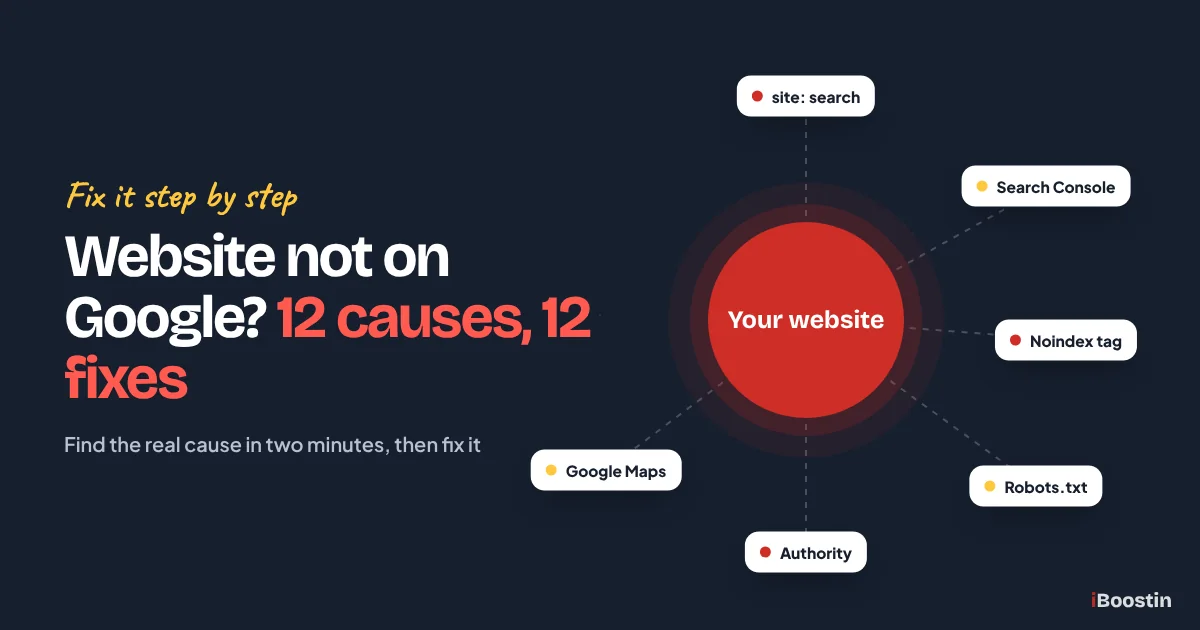
If your website is not showing up on Google, the cause is almost always one of two things: Google has not indexed your pages, or it has indexed them but ranks them too low to be seen. Indexing problems come from settings, noindex tags, robots.txt or a new site. Ranking problems come from weak relevance, authority or page quality.
Here is how it usually plays out. You launch a new website, type your business name into Google and nothing appears. Or the site shows up for your name but not for “plumber in Leeds” or “bookkeeping for contractors”, the searches that actually bring customers. Or it ranked fine last month and has now dropped out of sight. Each situation has a different cause, and guessing wastes weeks.
This guide gives you a quick test to find out which problem you have, then walks through the 12 causes we find most often when we audit small business websites, with the exact fix for each. It also covers businesses missing from Google Maps, since that is a separate problem with its own fixes. If you want the bigger picture of how search works for a business your size, our guide to SEO for small business puts all of this in context.
Key takeaways
- First find out whether your site is not indexed or indexed but not ranking. The fixes are completely different.
- A site: search and the URL Inspection tool in Google Search Console answer that question in two minutes.
- The most common indexing blockers are a “discourage search engines” setting, noindex tags, robots.txt rules and password protection left on after launch.
- Indexed pages that do not rank usually need better keyword targeting, stronger content or more links from other websites.
- A business missing from Google Maps is a Google Business Profile problem, not a website problem.
First, Find Out If Google Has Indexed Your Website
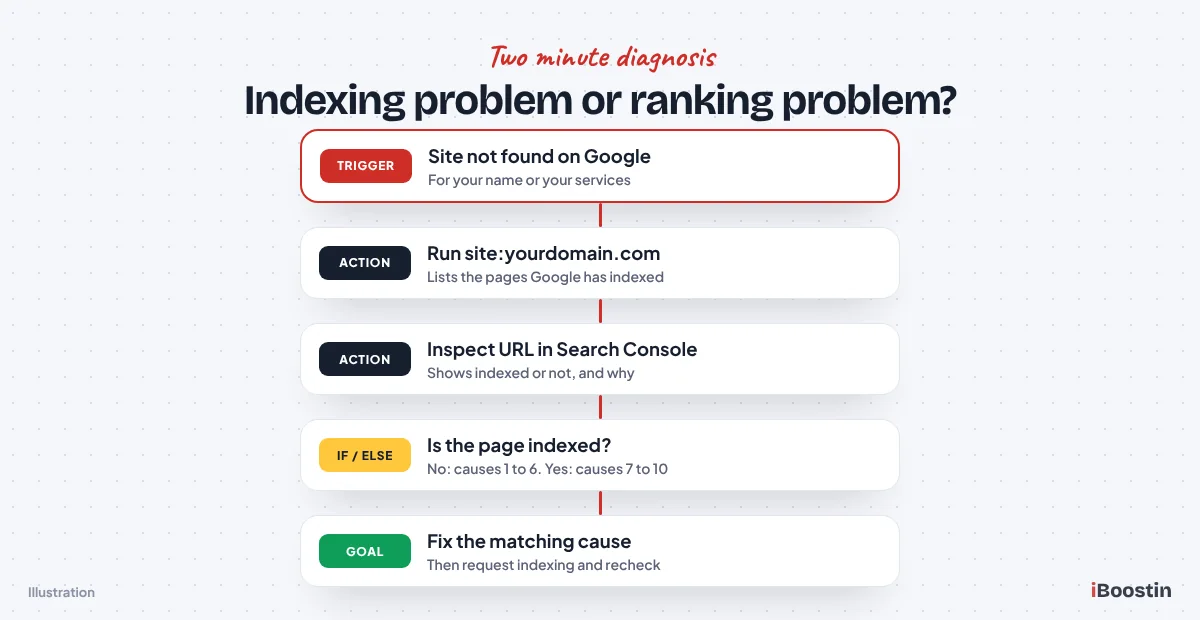
Before you change anything, find out which problem you actually have. An unindexed site is invisible no matter how good it is. An indexed site that does not rank is visible, just buried on page five or ten. Two quick checks tell you which one you are dealing with.
Run a Site Search on Google
Go to Google and type site:yourdomain.com, with your own domain and no spaces. Google will list the pages from your site it has in its index. If you see your homepage and service pages, your site is indexed and your problem is ranking. If you see “Your search did not match any documents” or only one or two pages, you have an indexing problem.
The site: search is a rough check, not an exact count. It can show slightly fewer or more pages than Google really holds, and very new pages may take a few days to appear. Still, it is the fastest way to tell whether Google knows your site exists. We run it as the very first step in every audit, before opening any tool.
Inspect Your Main Pages in Search Console
Google Search Console gives you the precise answer. Add and verify your site if you have not already, then paste the address of your homepage into the URL Inspection bar at the top. Search Console will tell you whether the page is on Google, when it was last crawled and, if it is not indexed, the reason why.
Then open the Pages report under Indexing. It splits your pages into indexed and not indexed, with a reason for each group, such as “Excluded by noindex tag”, “Blocked by robots.txt” or “Crawled – currently not indexed”. Those reasons map directly to the causes below, so write them down. They will save you hours of guessing.
Not Indexed vs Not Ranking: Know Which One You Have
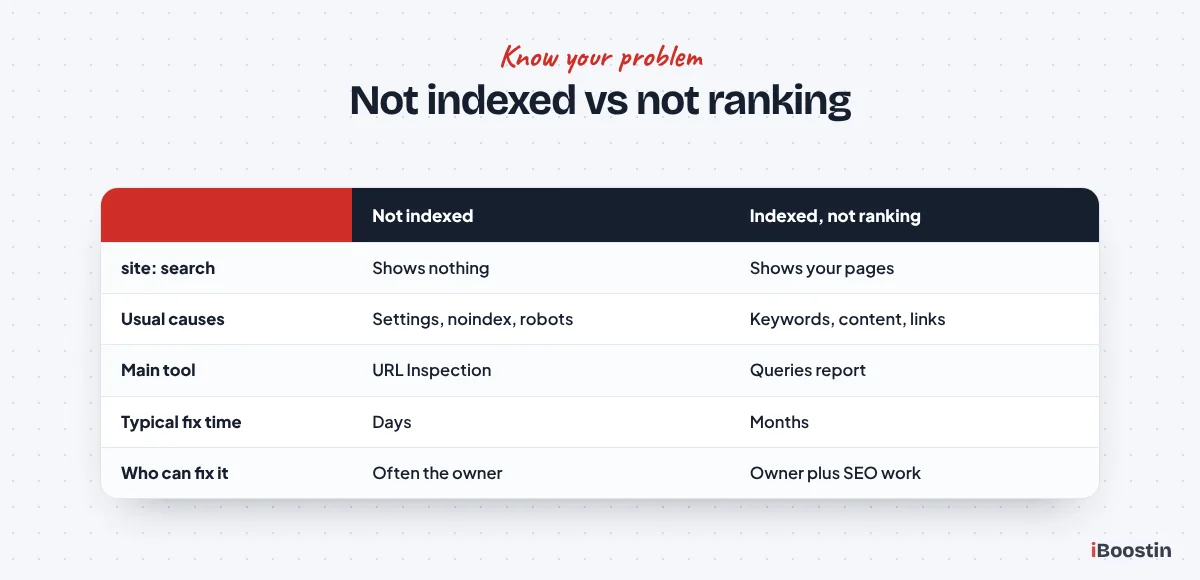
The table below shows what each symptom usually means. If your site does not appear for its own business name, start with the indexing causes. If it appears for its name but not for your services, skip ahead to the ranking causes. If it used to rank and suddenly vanished, jump to the section on sudden drops.
| What you see | What it usually means | Where to start |
|---|---|---|
| site: search shows nothing | Not indexed | Causes 1 to 6 |
| Some pages indexed, key pages missing | Page level indexing issue | Causes 3, 4 and 6 |
| Shows for your business name only | Indexed but not ranking | Causes 7 to 10 |
| Ranked before, now gone | Site change, penalty or update | Causes 11 and 12 |
| Website fine, but not on Google Maps | Google Business Profile issue | The Google Maps section |
Keep in mind that you can have both problems at once. Your homepage might be indexed and ranking for your name, while your service pages are excluded by a noindex tag. That is why we check the important pages one by one in URL Inspection rather than relying on the homepage alone. Fix any indexing issues first, because a page cannot start climbing the rankings until Google has added it to the index.
If Your Website Is Not Indexed at All
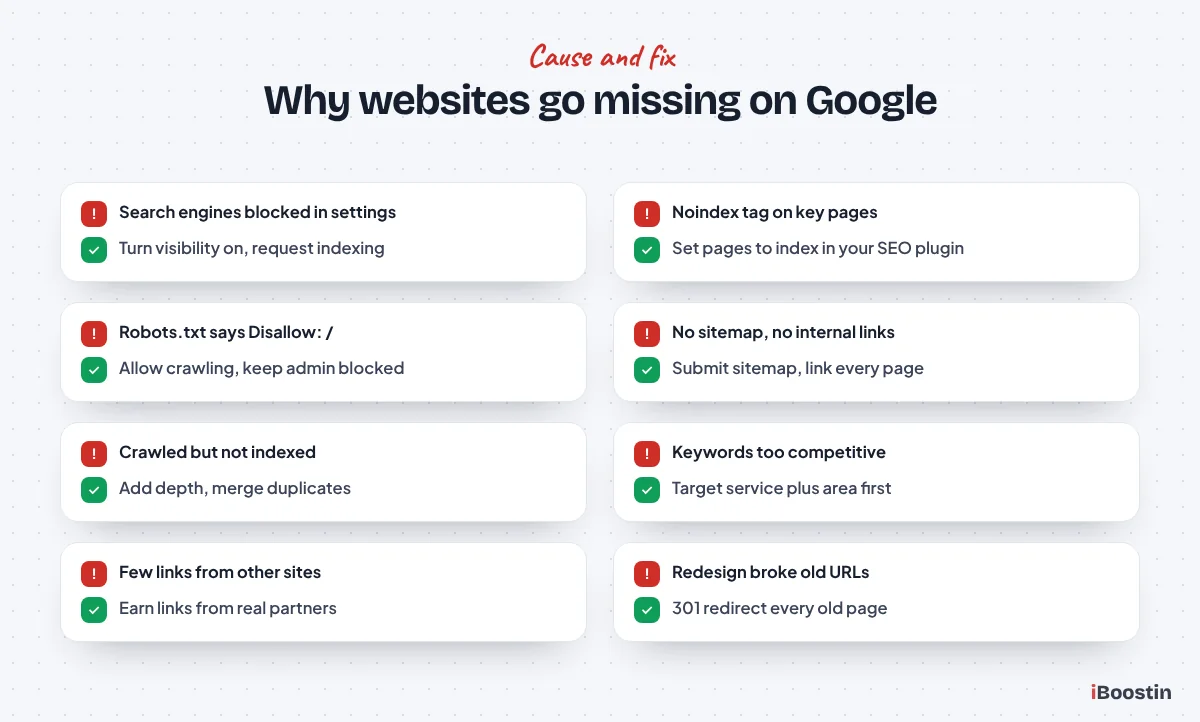
These six causes stop Google from adding your pages to its index. Fixing them does not guarantee good rankings, but nothing else matters until they are solved. In our audits, a surprising number of small business sites have at least one of them.
1. Your Website Is Brand New
Google does not know about a new website the moment it goes live. It discovers sites by following links from other pages and by reading sitemaps submitted in Search Console. A new domain with no links pointing to it and no sitemap submitted can sit unnoticed for weeks. Even after discovery, Google crawls and indexes new sites gradually.
The fix is to help Google find you. Verify the site in Search Console, submit your XML sitemap and use URL Inspection to request indexing for your homepage and main service pages. Then get a few links from places Google already crawls: your Google Business Profile, your social profiles, industry directories and partner websites. Most new sites appear for their brand name within a few days to a few weeks once these steps are done.
2. Search Engines Are Blocked in Your Website Settings
Most website builders have a setting that hides the site from search engines, and it is often switched on while the site is being built. If nobody switches it off at launch, the site stays invisible. This is the single most common cause we find on newly launched small business websites, and it takes less than a minute to fix.
| Platform | Where to check |
|---|---|
| WordPress | Settings, Reading: untick “Discourage search engines from indexing this site” |
| Shopify | Online Store, Preferences: remove the password protection page once you launch |
| Wix | Site settings, SEO: make sure search engines are allowed to index your site |
| Squarespace | Site visibility settings: the site must be public, not password protected |
| Other builders (GoDaddy, Canva and others) | Look in the publish or SEO settings for a search engine visibility option |
If your website was built by someone else, ask them to confirm this setting directly. After you change it, request indexing again in Search Console so Google comes back sooner rather than waiting for its next scheduled visit.
3. A Noindex Tag Is Telling Google to Stay Away
A noindex tag is a small line in a page’s code that tells search engines not to include that page in their results. It is useful for thank-you pages and admin pages, but it is often left on important pages by mistake. SEO plugins like Rank Math and Yoast can set it page by page, and some themes or page builders add it to templates.
Search Console lists affected pages under “Excluded by noindex tag” in the Pages report. Open each important page in your SEO plugin and make sure it is set to index. On WordPress, also check the plugin’s global settings for whole post types or categories set to noindex. Once removed, inspect the page again and request indexing.
Common mistake: after a redesign, the developer copies settings from the staging site, including a site-wide noindex. Everything looks perfect in the browser, but Google drops every page over the following weeks. If traffic fell right after a redesign, check this first.
4. Your Robots.txt File Blocks Google
Robots.txt is a small text file at yourdomain.com/robots.txt that tells crawlers which parts of your site they may visit. A single line, “Disallow: /”, blocks your entire website. Staging sites often use that line, and it sometimes survives the move to the live domain. Some security plugins and hosting setups also add rules that block important folders.
Open yourdomain.com/robots.txt in your browser and read it. For most small business sites, it should allow everything except admin areas, and it should list your sitemap. Search Console flags blocked pages as “Blocked by robots.txt”. Be careful with edits here: a wrong rule can hide the whole site, so change one line at a time and test the result with URL Inspection.
5. Google Cannot Find Your Pages
Even when nothing blocks them, pages can stay undiscovered if nothing points to them. Pages that are not in your menu, not linked from other pages and not in your sitemap are effectively hidden. We often see this with location pages and landing pages built for ads, which exist on the site but have no internal links.
Make sure every page you want to rank is in your XML sitemap and linked from at least one other page on your site, ideally from the main menu or a relevant service page. Submit the sitemap in Search Console and check that its status says “Success”. Internal links matter more than many owners think: they are how Google finds pages and judges which ones are important.
6. Google Crawled Your Pages but Chose Not to Index Them
Sometimes Search Console says “Crawled – currently not indexed” or “Discovered – currently not indexed”. Nothing is technically blocking the page. Google has seen it, or knows it exists, and has decided it is not worth adding yet. This usually points to pages that look thin, very similar to other pages, or not useful enough compared with what is already in the index.
The fix is to make the page clearly worth indexing. Add real, specific content: what the service includes, who it is for, your process, prices or price factors, FAQs and proof like reviews or photos. Merge near-duplicate pages, such as location pages where only the town name changes. Link to the page from stronger pages on your site. Then request indexing again. Repeated requests without improving the page rarely change the result.
If Your Website Is Indexed but Not Ranking
If a site: search shows your pages but you still cannot find them for your services, Google knows about your site and simply ranks other pages higher. This is the situation most small businesses are in, especially in the first months. It is a relevance, quality and authority problem, not a technical block.
7. You Are Targeting Keywords You Cannot Win Yet
Many owners search for the biggest term in their industry, like “lawyer”, “SEO services” or “dentist”, and conclude they are not on Google. Those terms are dominated by national brands, directories and businesses with years of authority. A new or small site will not appear there for a long time, even if everything is set up perfectly.
Check Search Console’s Queries report to see the searches you already appear for and your position for each. Then target searches you can realistically win: your service plus your town, specific sub-services and the questions your customers ask. Each smaller win builds the authority you need for bigger terms later. Our guide on how long SEO takes explains what to expect at each stage.
8. Your Page Does Not Match What Searchers Want
Google ranks the type of page that best matches the intent behind a search. If people searching “emergency plumber near me” want a service page with a phone number and you show them a blog post, you will struggle to rank. If people searching “how to unblock a drain” want instructions and your page is a sales page, the same happens in reverse.
Search your target keyword and look at the top five results. Are they service pages, guides, lists or local listings? Build the same type of page, then make it better than what you see. Matching intent is often the difference between position thirty and position eight, without adding a single link.
9. Your Pages Are Thin, Duplicated or Slow
A service page with three short paragraphs gives Google very little to work with. Pages copied from manufacturers, competitors or your own other pages compete with each other or get filtered out. And pages that load slowly or break on phones lose out to faster, cleaner competitors, because Google looks at the mobile version of your site first.
Rewrite your most important pages so each one fully answers the questions a customer has before they call. Remove or merge duplicates and use one page per service. Then check speed in PageSpeed Insights and fix the big items: oversized images, unused plugins, missing caching. Our small business SEO checklist covers every on-page and technical check in order.
10. Your Website Has Little Authority
This is the cause behind most “impressions but no clicks” reports we see in Search Console. Google tests a new page on page five or six, sees no strong evidence that other sites trust it, and leaves it there. Without links from other websites and mentions of your business elsewhere, even well written pages struggle against older, better known competitors.
Authority is built slowly and safely: links from suppliers, partners, trade associations, local organizations, industry directories and genuine press mentions, plus a complete Google Business Profile and steady reviews. Avoid bought link packages, which carry real risk. Our guide on how to get backlinks for a new website lists the safest sources for small businesses.
If Your Website Suddenly Disappeared From Google
A site that ranked last month and has now vanished usually points to a recent change on your side, a penalty or a Google update. Start by noting the exact date the traffic dropped in Search Console’s Performance report. The date usually tells you which of these it is.
11. A Redesign, Migration or Plugin Update Broke Something
Redesigns and moves to a new domain or platform are the most common causes of sudden drops we investigate. Old URLs change without redirects, so the pages Google ranked now return errors. Noindex settings come across from the staging site. Content gets shortened or removed during the rebuild. Even a single plugin update can add a noindex tag or change your robots.txt.
Compare your old and new URLs and set up 301 redirects from every old page to its closest new equivalent. Re-run the indexing checks from causes 2 to 4. Compare the content on your top pages before and after the change. If your site runs on WordPress and the problem keeps coming back, our WordPress SEO services cover plugin and theme settings in detail.
12. A Manual Action or a Google Algorithm Update
A manual action is a penalty applied by a Google reviewer, usually for spammy links, hidden text, thin pages or hacked content. Check the Manual Actions report under Security and Manual Actions in Search Console. If one is listed, the report explains the issue. Fix it completely, then submit a reconsideration request describing what you changed.
If there is no manual action, compare your drop date with Google’s announced updates on its search status page. Core updates can move rankings for many sites at once without any penalty involved. The response is not a quick fix: improve the depth, accuracy and usefulness of the affected pages, show real experience and proof, and give it time. Sites that improve quality usually recover at a later update.
If Your Business Is Not Showing Up on Google Maps
Not appearing on Google Maps, or in the local map results above the normal listings, is a different problem from your website not appearing. Map results come from your Google Business Profile. Your website supports it, but the profile itself is what ranks. Autocomplete shows many owners searching “business not showing on Google Maps after verification”, so this section covers that case first.
Your Profile Is Not Verified or Is Under Review
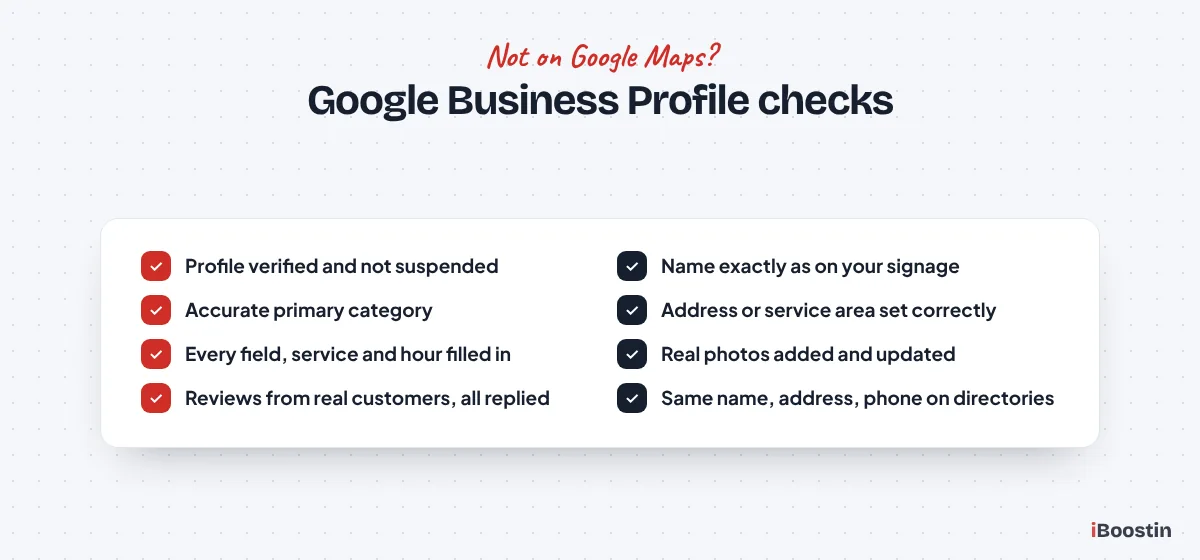
A Google Business Profile only appears publicly once it is verified, and edits to key details can send it back into review. Newly verified profiles can also take some time before they show for searches. If your profile was recently suspended or flagged, it will not appear at all until the issue is resolved.
Log in to your profile and check its status. If verification is pending, complete it. If the profile is suspended, read the reason, fix anything that breaks Google’s guidelines, such as keywords stuffed into the business name or a virtual office address, and request reinstatement. Keep your name, address and phone number exactly as they appear on your website and signage.
Your Category, Details or Location Hold You Back
Google ranks local results mainly on relevance, distance and prominence. A wrong primary category hurts relevance, and an incomplete profile gives Google little to match against searches. Distance matters too: a business is unlikely to appear for searchers far outside its location or service area, however good the profile is.
Choose the most accurate primary category, add relevant secondary ones, list your services and fill in every field. Add real photos and post updates regularly. Then build prominence with reviews from real customers and consistent listings across directories. Our full guide on how to rank higher on Google Maps goes through each setting, and our local SEO services handle it for you if you prefer.
How Long Does It Take for a New Website to Show Up on Google?
Once indexing is unblocked and a sitemap is submitted, most new websites start appearing for their brand name within a few days to a few weeks. Ranking for competitive service keywords takes much longer, usually several months, because it depends on content quality and authority built over time.
What You Can Speed Up and What You Cannot
You can speed up discovery. Submitting your sitemap, requesting indexing for key pages, linking your site from your Google Business Profile and social profiles, and getting a few links from established sites all help Google find and crawl you sooner. Fixing technical blockers often brings visible results within days, because you are removing a brake.
You cannot rush trust. Google watches how your site and business grow: reviews arriving, other sites linking to you, people clicking and staying. That takes months, not days, and no tool or paid service can skip it. Knowing this upfront makes it easier to keep going. We cover the full timeline in how long does SEO take.
Fix It Yourself or Get Help?
Many of the causes above are quick fixes you can do yourself: a visibility setting, a noindex tag, a sitemap submission, a Google Business Profile category. If your site does not show up at all and the cause is one of those, you may be visible again within days.
When You Can Fix It Yourself
If Search Console shows a clear reason, such as “Excluded by noindex tag” or “Blocked by robots.txt”, and you are comfortable in your website’s settings, follow the steps above and request indexing. The same goes for Google Business Profile issues like an incomplete profile or wrong category. Make one change at a time and note the date, so you can see what worked.
Use the site: search and URL Inspection checks again a week later to confirm the fix. If the page is now indexed but still not ranking, move on to the ranking causes. Those take longer, but the work is the same steps covered in our SEO for small business guide.
When It Is Worth Bringing in an Expert
Get help when Search Console shows many errors you do not understand, when pages are crawled but not indexed despite good content, after a migration or redesign that lost traffic, or when a manual action appears. These problems can take a lot of trial and error without experience, and some changes, like robots.txt edits, can make things worse.
Our technical SEO services start with a full indexing and Search Console audit, then fix the issues and explain what we changed. If your site is indexed but stuck on page five or six, our SEO services cover keyword targeting, content and authority building for small businesses in the USA, UK and the Gulf.
Frequently Asked Questions About Websites Not Showing Up on Google
Why is my website indexed but not showing up on Google?
If a site: search shows your pages, Google has indexed them but ranks other pages higher for the searches you tried. This usually means you are targeting keywords that are too competitive, your page does not match what searchers want, the content is thin or your site has few links from other websites. Check your real positions in Search Console’s Queries report.
How do I get my website to show up on Google?
Verify your site in Google Search Console, submit your XML sitemap and request indexing for your homepage and main pages. Make sure no setting, noindex tag or robots.txt rule blocks search engines. Then build service pages that match what customers search, complete your Google Business Profile and earn links from other trusted websites.
Why is my website not showing up on Google after publishing?
Google needs time to discover and crawl new pages, often days to a few weeks for a new site. Check that the “discourage search engines” or password protection setting is off, submit your sitemap in Search Console and request indexing. If the page is still missing after a few weeks, inspect it for noindex tags or robots.txt blocks.
Why does my website show up for my business name but not my services?
Ranking for your own name is easy because few other pages match it. Ranking for services means competing with every other business offering them. Give each service its own detailed page, target searches that include your area, complete your Google Business Profile, collect reviews and build links from relevant websites. Results usually take a few months.
Why is my business not showing up on Google Maps after verification?
Newly verified profiles can take some time to appear, and edits can trigger another review. Check that your profile is not suspended, that the primary category is accurate and every field is complete. Distance also matters: you are unlikely to appear for searchers far from your location or service area. Reviews and consistent listings improve visibility over time.
Does paying for Google Ads help my website rank on Google?
No. Google Ads and organic rankings are completely separate systems. Paying for ads puts your listing in the sponsored spots while the ads run, but it does not improve your organic position or get your pages indexed. Ads can be useful for quick leads while SEO builds, but they are not a fix for an indexing or ranking problem.
How do I check if my website is indexed by Google?
Type site:yourdomain.com into Google to see the pages it has indexed. For a precise answer, use the URL Inspection tool in Google Search Console: paste any page address and it tells you whether the page is on Google and, if not, why. The Pages report under Indexing lists every indexed and excluded page with a reason.
Find the Cause First, Then Fix It Once
When a website is not showing up on Google, the worst thing you can do is change ten things at once. Start with the site: search and URL Inspection, decide whether you have an indexing problem, a ranking problem, a sudden drop or a Maps problem, and work through the matching causes in order. Most indexing problems are fixed in an afternoon. Ranking problems take steady work over months.
If you have checked the obvious settings and your site is still missing, or Search Console is full of errors you are not sure how to read, our team can find the cause for you. We look at the same reports Google gives you, explain them in plain English and fix what is holding your site back.