In this guide
- How to Use This SEO Checklist
- Tracking and Setup Checks (1 to 5)
- Technical SEO Checks (6 to 12)
- Keyword and Site Structure Checks (13 to 16)
- On-Page SEO Checks for Every Important Page (17 to 23)
- Content Checks (24 to 27)
- Local SEO Checks (28 to 33)
- Authority Checks (34 to 37)
- AI Search Checks (38 to 40)
- Your Monthly SEO Checklist
- Checklist Notes for Common Website Platforms
- Common Mistakes When Using an SEO Checklist
- Where to Start if You Failed Many Checks
- Frequently Asked Questions About Small Business SEO Checklists
- Forty Checks, One at a Time
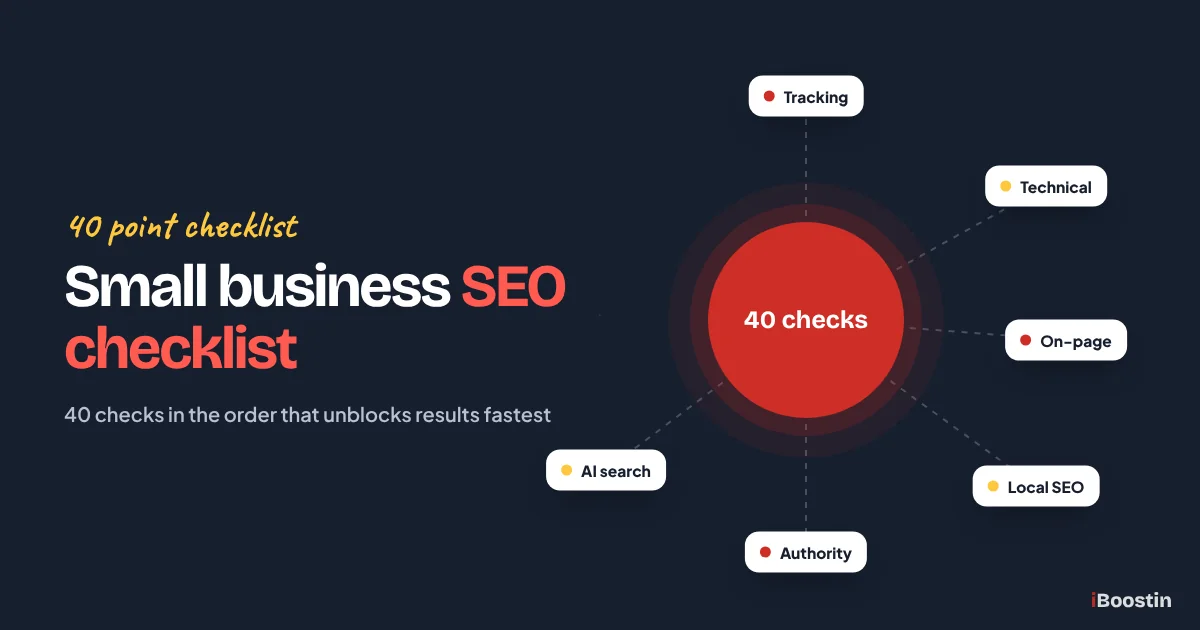
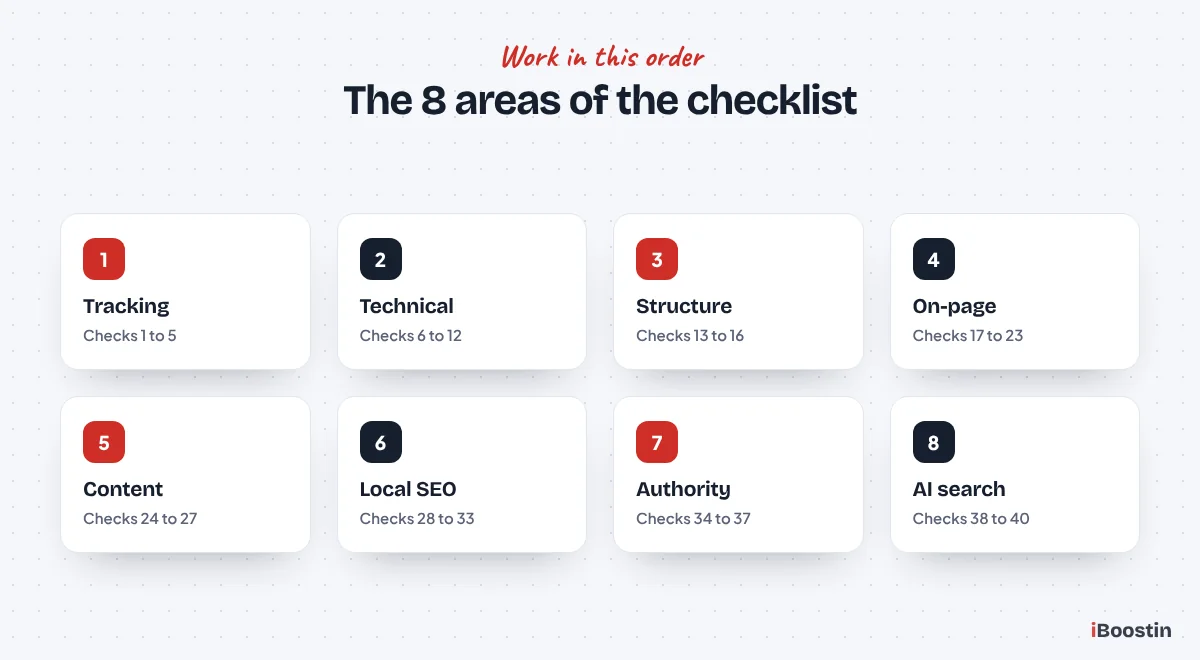
A small business SEO checklist covers eight areas: tracking setup, technical health, keywords and site structure, on-page SEO for each important page, content, local SEO, authority and AI search visibility. Work through them in that order. Fix anything blocking indexing first, then improve your service pages, then build local signals and links.
Most SEO checklists online are written for marketers and run to a hundred items, many of which do not matter for a ten page business website. Owners either give up halfway or spend a weekend on details that change nothing, while the real problem, a noindex tag on the services page or a half empty Google Business Profile, goes unnoticed.
This checklist is the one we use at iBoostin when we audit small business websites. It has 40 checks, grouped and ordered so the ones that matter most come first, with a short explanation of why each group matters and how to check it without paid tools. It is the hands-on companion to our guide on SEO for small business, which explains the strategy behind each step.
Key takeaways
- Run the checklist in order: tracking and technical checks first, because nothing else works if Google cannot index your pages.
- Each main service needs its own page with one clear keyword, a unique title, one H1 and content that answers customer questions.
- For local businesses, the Google Business Profile, reviews and consistent business details are as important as the website.
- Authority from links and mentions is usually what moves a well built site from page three to page one.
- Repeat a short version of this checklist every month and a full pass every quarter.
How to Use This SEO Checklist
Go through the checks in order and mark each one as pass, fail or not sure. You will need access to your website’s admin area, Google Search Console and your Google Business Profile. Most checks take a few minutes. A full first pass on a typical small business site takes an afternoon.
Why the Order Matters
The order follows what blocks results. If Google cannot index a page, improving its title does nothing. If a page targets the wrong keyword, links pointing to it help less. If your Business Profile is incomplete, more blog posts will not put you in the map pack. Fixing the earlier groups first means every later fix has its full effect.
Do not try to fix everything in one day. Note all the failures first, then fix them group by group. Write down the date of each change, so you can see in Search Console which fixes made a difference over the following weeks.
What You Will Need
You need admin access to your website, Google Search Console verified for your domain, Google Analytics or another analytics tool, and access to your Google Business Profile if you serve customers locally. PageSpeed Insights, a free Google tool, covers the speed checks.
Paid tools like Semrush or Ahrefs can speed up some checks, but they are optional. Everything in this checklist can be checked with free tools and a careful look at your own pages.
Tracking and Setup Checks (1 to 5)
Without tracking, you cannot see problems or measure progress. These five checks take about thirty minutes and make every other check easier.
Make Sure You Can Measure Results
Search Console shows how Google sees your site and which searches you appear for. Analytics shows what visitors do. Lead tracking connects both to real enquiries. Most small businesses we audit have at least one of these missing or set up incorrectly.
- Google Search Console is verified for your domain, ideally as a domain property covering all versions of your site.
- Your XML sitemap is submitted in Search Console and shows a “Success” status.
- Google Analytics or another analytics tool is installed and recording visits on every page.
- Calls, form submissions and bookings are tracked, so you can see which ones come from organic search.
- You have recorded your current baseline: impressions, clicks, average position and monthly enquiries.
The baseline in check 5 is easy to skip and painful to miss. Without it, you cannot show whether your SEO work changed anything. Export last month’s numbers today and keep them in a simple spreadsheet.
Technical SEO Checks (6 to 12)
Technical checks make sure Google can find, crawl, index and render your pages properly, and that visitors get a fast, stable experience. Problems here block everything else, so fix them before moving on.
Indexing and Crawl Checks
Start with the Pages report in Search Console, under Indexing. It lists every page Google has indexed and every page it excluded, with a reason. Any important page on the excluded list is your first priority.
- Your homepage and every main service page show as indexed when you check them with URL Inspection.
- No important page has a noindex tag, and the WordPress “Discourage search engines” setting is off.
- Your robots.txt file does not block important pages, folders or the resources pages need to load.
- Every page you want to rank is in your sitemap and linked from at least one other page on your site.
If any of these fail, our guide on why your website is not showing up on Google walks through each cause and fix in detail. Indexing problems are the most common reason small business sites get impressions on some pages and nothing on others.
Speed, Mobile and Security Checks
Most local searches happen on phones, and Google looks at the mobile version of your site first. Run your homepage and main service pages through PageSpeed Insights and look at the mobile results.
- Core Web Vitals pass, or are close to passing, on your main pages: Largest Contentful Paint, Interaction to Next Paint and Cumulative Layout Shift.
- Every page works well on a phone: text is readable, buttons are easy to tap and nothing spills off the side of the screen.
- The whole site runs on HTTPS, and old HTTP and non-www or www versions redirect to one version.
The usual speed fixes are compressing large images, removing unused plugins, turning on caching and choosing decent hosting. On WordPress sites, our technical SEO services and WordPress SEO services cover these fixes when they go beyond simple settings.
Keyword and Site Structure Checks (13 to 16)
Structure decides which page should rank for which search. A site with one page listing every service cannot rank for each of them, however well written it is.
One Page for Each Service and Search
Each main service needs its own page that targets the searches customers use for it. The keyword research behind this is covered in our guide on how to do keyword research for small business.
- Each main service has its own page with its own URL, rather than sharing a single “Services” page.
- Each important page targets one main keyword, and no two pages target the same keyword.
- URLs are short and readable, like /emergency-plumber/ instead of /page-id-482/.
- Your main services are reachable from the main menu, within two or three clicks of the homepage.
Check 14 matters more than it looks. When two pages target the same search, Google often ranks neither of them well. Keep a simple list of pages and their keywords, and check it before adding new pages.
On-Page SEO Checks for Every Important Page (17 to 23)
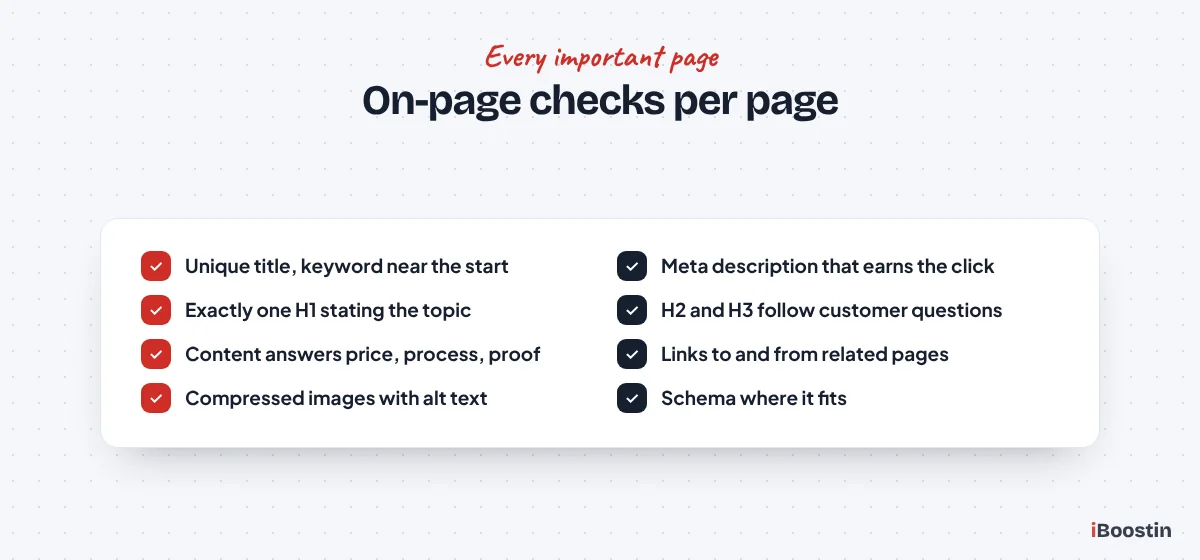
Run these seven checks on your homepage and each main service and location page. They tell Google and visitors exactly what each page is about, and they decide whether people click your result.
Titles, Descriptions and Headings
Titles and descriptions are what people see in search results. Headings are how Google and readers understand the structure of the page. Getting them right is quick and often lifts clicks within weeks.
- Each page has a unique title tag of about 60 characters or fewer, with the main keyword near the start.
- Each page has a unique meta description of roughly 140 to 160 characters that explains the benefit and invites the click.
- Each page has exactly one H1 that states what the page is about, usually including the main keyword.
- H2 and H3 headings break the page into the questions customers ask, in a logical order, without skipping levels.
Write titles and descriptions for people, not just search engines. A specific title like “Emergency Plumber in Leeds, Same Day Callouts” earns more clicks than “Home | Plumbing Services”. Our on-page SEO services rewrite these across a whole site when there are many pages to fix.
Content, Links, Images and Schema
The body of the page has to answer the searcher’s questions better than the pages already ranking. Internal links, images and structured data then help Google understand and trust it.
- The content covers what the service is, who it is for, how it works, what affects the price, why choose you and what to do next, with real proof such as reviews or photos.
- The page links to related services and is linked from relevant pages and articles, using descriptive anchor text.
- Images are compressed, have descriptive file names and alt text, and structured data such as LocalBusiness, Service and FAQ schema is added where it fits.
Compare each page with the top three results for its keyword. Note what they cover that you do not, and what you can add that they cannot, such as your local experience, your process and real examples. That gap is your content plan for the page.
Content Checks (24 to 27)
Content beyond your service pages helps when it answers real customer questions and supports your services. Content written only to have something new on the blog rarely helps a small business.
Useful Content That Supports Your Services
Look at your blog and resource pages with a critical eye. Does each one answer a question customers actually ask? Does it link to the service that solves the problem? Is it still accurate?
- Your site answers the most common customer questions, either on service pages, in FAQ sections or in articles.
- Each article links to the relevant service page, and service pages link to their most useful articles.
- There are no thin or near duplicate pages, such as location pages where only the town name changes.
- Important content has been reviewed in the last twelve months, with outdated details, prices and screenshots updated.
Fewer, better pages beat many weak ones. If you find thin or duplicate pages, merge them into one stronger page and redirect the old addresses. This often improves rankings for the whole site.
Local SEO Checks (28 to 33)
For any business that serves customers in a specific area, these checks can matter as much as the website itself. They decide whether you appear in the map pack for local searches.
Google Business Profile Checks
Your Google Business Profile is what appears in Google Maps and the local results. Google ranks it mainly on relevance, distance and prominence, and a complete, active profile helps with both relevance and prominence.
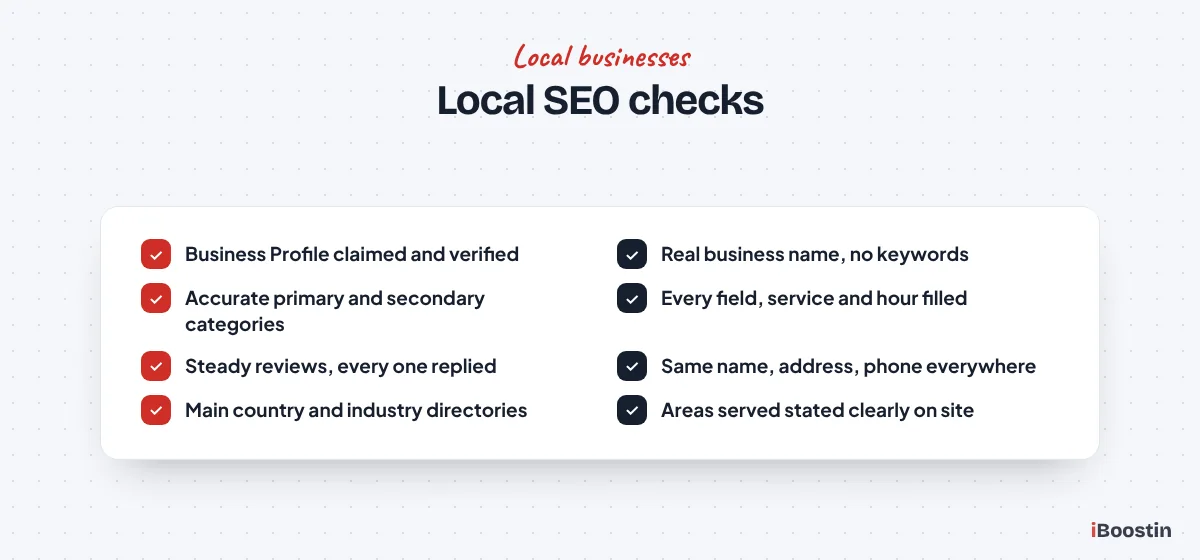
- Your Google Business Profile is claimed, verified and uses your real business name, without added keywords.
- The primary category matches your main service, relevant secondary categories are added and every field, service and opening hour is filled in.
- You have recent, genuine reviews, you ask every happy customer for one and you reply to every review.
Our guide on how to rank higher on Google Maps explains each profile setting in detail, including the mistakes that can get a profile suspended.
Business Details and Local Pages
Google and AI tools cross-check your business details across the web. Consistent details make your business easy to verify. Inconsistent ones create doubt.
- Your business name, address and phone number are identical on your website, Google Business Profile and every directory listing.
- You are listed on the main directories in your country and industry, and old or duplicate listings have been fixed.
- Your website clearly states the areas you serve, and any location pages contain genuinely local information.
Check 33 is about honesty as much as SEO. Only create location pages for areas you truly serve, and give each one real local detail. A single strong service area page is better than many copied town pages.
Authority Checks (34 to 37)
Authority is what usually separates a well built site stuck on page three from one on page one. It comes from links and mentions on other trusted websites.
Links and Mentions From Other Websites
Use the Links report in Search Console to see which sites link to you. If the list is very short, authority is likely your main limit, especially if your technical and on-page checks already pass.
- Your site has links from relevant, trusted sites, such as suppliers, partners, associations, local organizations or industry publications.
- You have no links from obvious spam sites, link networks or paid link packages.
- You have a plan to earn a few new relevant links every month, rather than none or a sudden burst.
- Mentions of your business on other sites, such as articles, lists and directories, describe you accurately.
Our guide on how to get backlinks for a new website lists the safest ways to earn links for a small business, starting with the ones that take an afternoon.
AI Search Checks (38 to 40)
AI tools like Google AI Overviews, AI Mode and ChatGPT now recommend businesses directly. Most of the checks above already help with that. These three cover what is specific to AI search.
Make Your Business Easy for AI Tools to Understand
AI tools favor businesses they can verify across several sources and content that answers questions clearly. These checks make sure nothing on your side stops them.
- Your robots.txt and security settings allow search crawlers such as Googlebot and OAI-SearchBot to reach your pages.
- Your homepage and about page state clearly who you are, what you do, who you serve and where, in plain text.
- Key sections of your service pages open with a direct answer of one or two sentences before the detail.
Check how AI tools describe your business by asking ChatGPT and Google AI Mode the questions your customers would ask. Our guide on getting your business mentioned in ChatGPT covers the full process.
Your Monthly SEO Checklist
After the first full pass, you do not need to run all 40 checks every month. A short monthly routine catches new problems early and keeps progress steady. Run the full checklist again every three months.
The 30 Minute Monthly Routine
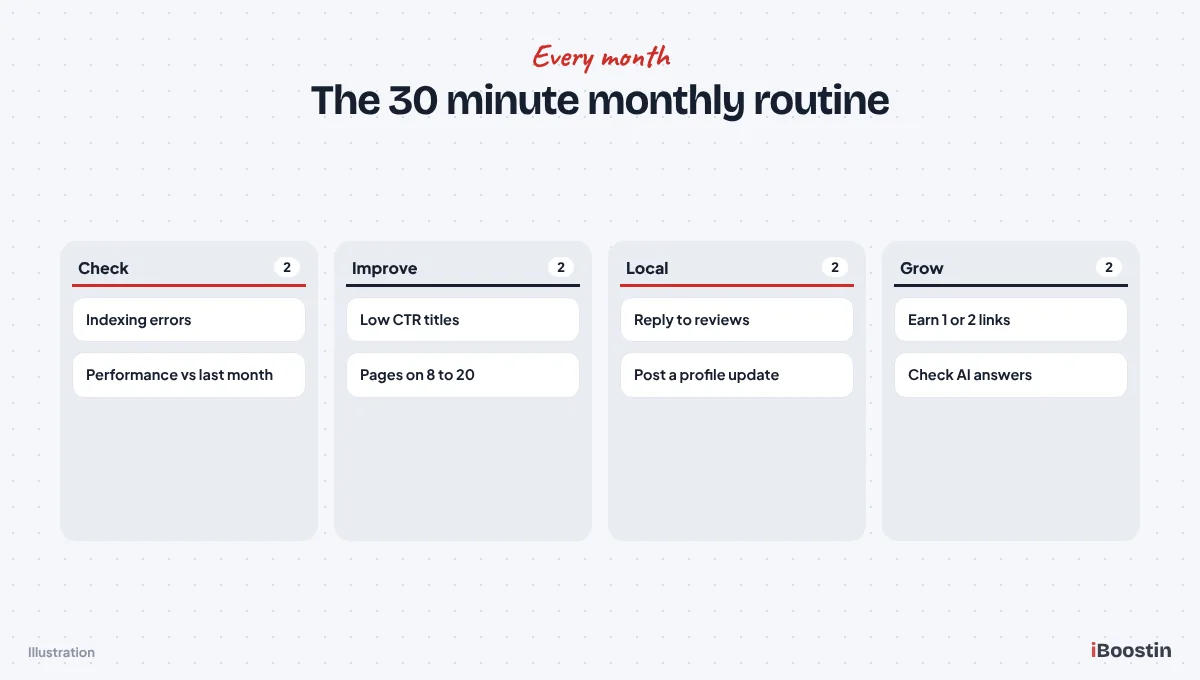
Once a month, check the Pages report in Search Console for new indexing errors. Compare impressions, clicks and average position with the previous month. Note pages that gained or lost visibility. Reply to new reviews and post an update on your Google Business Profile.
Then choose three actions for the coming month: improve the title of a page with many impressions but few clicks, strengthen a page sitting on positions eight to twenty, and earn one or two new links or mentions. Small, steady improvements compound over a year.
When to Run the Full Checklist Again
Run all 40 checks again every quarter, after any redesign or migration, after installing major plugins or themes, and whenever traffic drops sharply. Those are the moments when indexing settings, redirects and page structure most often break without anyone noticing.
Keep each completed checklist with its date. Over a year, the record shows exactly what changed on your site and when, which makes it much easier to connect improvements in Search Console to the work that caused them.
Checklist Notes for Common Website Platforms
The checks are the same on every platform, but where you find the settings differs. These notes cover the platforms we see most often on small business websites.
WordPress Sites
On WordPress, most on-page checks are handled through an SEO plugin such as Rank Math or Yoast: titles, meta descriptions, noindex settings, sitemaps and basic schema. Check the plugin’s global settings as well as individual pages, because a single setting can noindex whole sections, such as categories or a custom post type.
Speed is where WordPress sites most often fail. Page builders, heavy themes and too many plugins slow pages down. A caching plugin, image compression, removing unused plugins and good hosting fix most problems. Also check Settings, Reading for the “Discourage search engines” box after any relaunch.
Wix, Squarespace and Shopify Sites
Hosted builders handle much of the technical setup for you, including HTTPS, sitemaps and basic mobile layouts. That makes the technical checks quicker, but it also means some settings are tucked away in SEO or site settings panels. Check that the site is set to be visible to search engines and is not password protected.
The on-page, content, local and authority checks apply exactly as they do on any other site. Builders make it easy to publish thin pages quickly, so pay extra attention to checks 21 and 26: each important page needs real, specific content, not just a heading and a few lines.
Common Mistakes When Using an SEO Checklist
A checklist is only useful if it leads to the right fixes. These are the mistakes we see when owners work through checklists on their own.
Fixing Low-Impact Items First
It is tempting to start with the easy, visible items, like image alt text or a blog post, because they feel productive. Meanwhile, a noindex tag or a missing service page holds back the whole site. That is why this checklist is ordered by impact, with tracking and technical checks first.
When you have a list of failures, sort them by how much they block. Anything stopping important pages from being indexed or found comes first. Anything that only polishes a page that already ranks well can wait.
Changing Too Much at Once
Rewriting every title, restructuring the menu and changing URLs in the same week makes it impossible to tell what helped and what hurt. It can also reset some of what Google has learned about your site, especially if URLs change without redirects.
Make changes in small batches, note the date of each one and give Google a few weeks to respond before judging. If you do need to change URLs, set up 301 redirects from every old address to the new one at the same time.
Ticking Boxes Without Checking Results
A page can pass every on-page check and still not rank, because the keyword is too competitive, the content is weaker than competitors’ or the site lacks authority. Passing the checklist is the foundation, not the finish line.
Always connect the checklist to results in Search Console. If a page passes every check but impressions stay flat, look at the keyword choice, the competitors ranking above you and how many sites link to them. That tells you what the checklist alone cannot.
Where to Start if You Failed Many Checks
If you failed a lot of checks, do not panic and do not try to fix everything at once. Most small business sites fail a good number on the first pass. What matters is fixing them in the right order.
Fix in This Order
Start with any failures in checks 1 to 12, because tracking and technical problems block or hide everything else. Next, fix structure and on-page checks 13 to 23 on your most important service pages. Then work on local checks 28 to 33 if you serve a local area. Content, authority and AI checks come after, and continue month by month.
Within each group, start with the pages that matter most to your revenue. A perfect blog post matters less than a services page that finally gets indexed with a clear title and strong content.
When to Get Help
Many checks are simple settings and copy changes an owner can make. Others, like Core Web Vitals, structured data, redirects and link building, take more experience. If you are unsure, it is better to ask than to change settings that could hide your site from Google.
We run this exact checklist for clients as part of our SEO services, then fix the failures in priority order. If you only need the page level work, our on-page SEO services cover titles, headings, content and schema across your site.
Frequently Asked Questions About Small Business SEO Checklists
What should be on a small business SEO checklist?
A small business SEO checklist should cover tracking setup, technical health and indexing, keywords and site structure, on-page SEO for each important page, content quality, local SEO including your Google Business Profile, authority from links and mentions, and visibility in AI search. Work through them in that order.
How often should I run an SEO checklist?
Run a short routine monthly: check Search Console for errors, compare performance, update one or two pages, reply to reviews and earn a few links. Run the full checklist every quarter and after any redesign, migration, major plugin change or sudden drop in traffic.
What are the most important SEO checks for a small business?
Make sure your important pages are indexed, that each main service has its own page with a clear title and H1, that your Google Business Profile is complete and verified, and that you collect genuine reviews. After that, earning relevant links usually makes the biggest difference to rankings.
Can I do SEO for my small business myself with a checklist?
Yes, for most of it. Owners can handle tracking setup, indexing checks, titles, headings, content updates, the Google Business Profile and reviews. Technical speed fixes, structured data, redirects and link building often need more experience, especially in competitive markets.
What are the four types of SEO?
SEO is often split into technical SEO, which makes sure search engines can crawl and index your site, on-page SEO, which optimizes each page’s content and structure, off-page SEO, which builds authority through links and mentions, and local SEO, which covers your Business Profile, reviews and listings.
How long does it take to see results after fixing SEO checklist items?
Indexing fixes and Business Profile improvements can show results within days or weeks. Title and content changes usually take a few weeks to settle in rankings. Authority from links builds over months. Most small business sites see clear progress within three to six months of working through the checklist.
Do I need paid SEO tools to use this checklist?
No. Every check can be done with free tools: Google Search Console, Google Analytics, PageSpeed Insights, your Google Business Profile and a careful look at your own pages and the search results. Paid tools like Semrush or Ahrefs speed up some checks but are optional.
Forty Checks, One at a Time
A checklist does not rank a website. Fixing the things it reveals does. Start with tracking and technical checks, give each main service a strong page, complete your local presence and keep earning trust from other websites. Repeat the short version monthly, and the full version every quarter.
If you would rather hand the checklist to someone else, we can run all 40 checks on your site, show you exactly what passed and failed, and fix the issues in the order that will make the biggest difference to your enquiries.