In this guide
- What Does a WordPress Developer Actually Do?
- Step 1: Write a Short Project Brief
- Step 2: Choose Between a Freelancer and an Agency
- Step 3: Where to Find WordPress Developers
- Step 4: Ask These 10 Questions
- Red Flags to Watch For
- Step 5: Compare Proposals Fairly
- Step 6: Protect Your Business Before Work Starts
- Step 7: Manage the Project and the Launch
- How to Judge a Developer’s Portfolio
- Hiring a Developer to Take Over an Existing Site
- Freelancer, Agency or In-House: Which Fits Your Business?
- Common Mistakes Business Owners Make When Hiring
- Frequently Asked Questions About Hiring a WordPress Developer
- Hire for the Long Term, Not Just the Launch
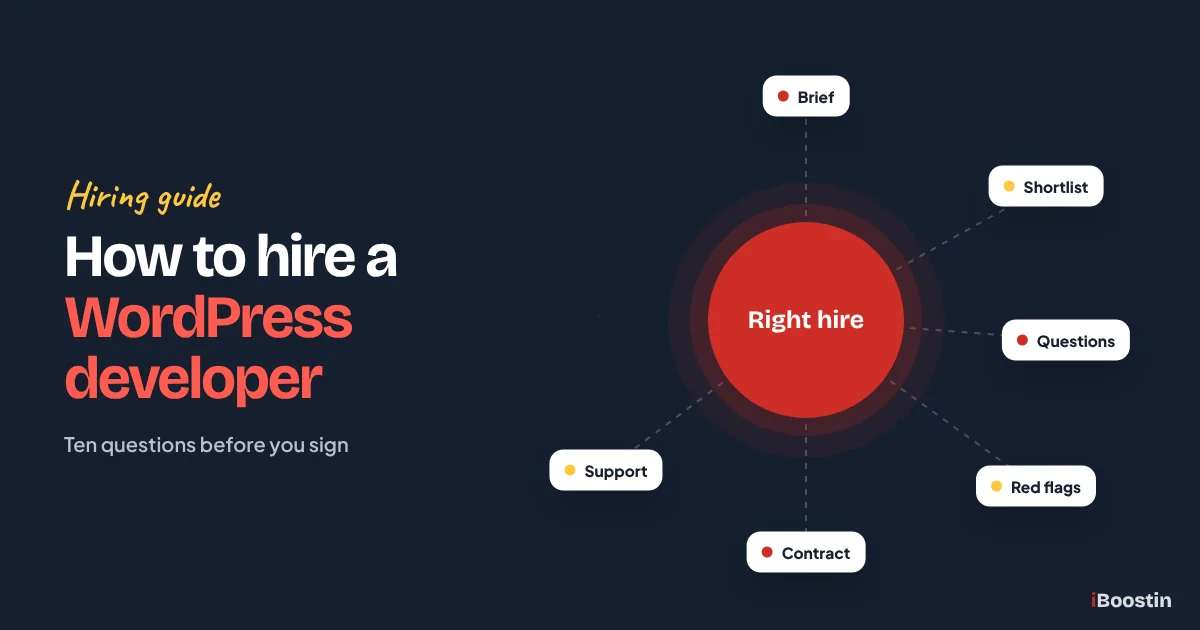
To hire a WordPress developer, start by writing a short brief of what you need, decide whether a freelancer or an agency fits the job, shortlist three to five candidates with relevant live work, ask each the same ten questions, run a small paid test or discovery phase, and sign a written scope that covers ownership, access, timeline, testing and support after launch.
Hiring a developer is one of the few website decisions that is hard to undo. A good developer gives you a fast, secure site you own and can grow. A poor one leaves you with a site nobody else wants to touch, logins you do not control and a bill to rebuild it a year later. Most of the difference can be spotted before you sign, if you know what to ask.
This guide walks you through the full process from a business owner’s point of view: what kind of developer you actually need, where to find good ones, the ten questions to ask with the answers you should expect, red flags, how to compare proposals and how to protect your business once work begins. It is written by the iBoostin team, and it is the same checklist we would want a client to use on us. If you want to understand the build process first, read our guide on how to create a website in WordPress.
Key takeaways
- Decide what you need first: a theme setup, a custom design build, a WooCommerce store, speed or security work, or ongoing care.
- Freelancers suit small, well-defined jobs. Agencies suit larger builds and businesses that need design, development, SEO and support in one team.
- Judge candidates on live sites, clear process and how they answer questions, not on the lowest quote.
- Ask about ownership, access, staging, testing, speed, security and support before you sign anything.
- Keep the domain, hosting and admin account in your own name from day one.
What Does a WordPress Developer Actually Do?
“WordPress developer” covers a wide range of skills. Some people install themes and add content. Others design and build custom websites, write plugins, build stores or specialize in speed and security. Knowing which kind of work you need is the first step to hiring well.
The Main Types of WordPress Work
Most small business projects fall into one of these categories:
- Theme setup and customization: installing a ready-made theme or builder layout and adapting it to your brand and content.
- Custom design and build: a unique design created for your business, then built in WordPress with a page builder or as a custom theme.
- WooCommerce stores: products, checkout, payments, shipping and tax configured in WordPress.
- Speed, security and fixes: improving performance, cleaning malware, fixing errors and plugin conflicts.
- Ongoing maintenance: updates, backups, monitoring and small changes every month.
A developer who is excellent at one of these may be average at another. Someone who builds beautiful Elementor sites may not be the right person to clean a hacked server, and a performance specialist may not be the right person to design your brand.
Developer, Designer or Agency?
A designer focuses on how the site looks and how visitors move through it. A developer focuses on how it is built and how it works. Many freelancers do both for simpler sites. Larger or more important projects usually benefit from a team where design, development, content and SEO are handled by people who specialize in each.
If you only need a site built from your existing design and content, a developer is enough. If you need help with structure, copy, design and search visibility as well, you are really looking for a web design and development partner. Our WordPress development services cover the whole process, from planning to launch and care.
Step 1: Write a Short Project Brief
A one or two page brief saves time for everyone and gets you far more accurate proposals. It does not need to be technical. It needs to explain what the site is for and what success looks like.
What to Include in Your Brief
Cover these points in plain language:
- What your business does and who your customers are.
- The main goal of the site: calls, quote requests, bookings, sales or information.
- The pages you expect to need, even as a rough list.
- Features such as forms, booking, a store, a members area or integrations with your CRM.
- Websites you like and why, plus anything you dislike about your current site.
- Who will provide content and photos.
- Your ideal launch timing and any hard deadline.
If you are redesigning an existing site, include its address, how many pages it has and how much traffic it gets from Google. That helps the developer plan redirects and protect your rankings. Our guide on signs you need a new website can help you list what is wrong with the current one.
Decide What Matters Most
Every project balances speed, budget and scope. Decide which matters most to you before talking to developers. If the launch date is fixed, scope may need to shrink. If the scope is fixed, timing may need to move.
Being clear about this up front helps developers give realistic proposals and makes it much easier to compare them fairly.
Step 2: Choose Between a Freelancer and an Agency
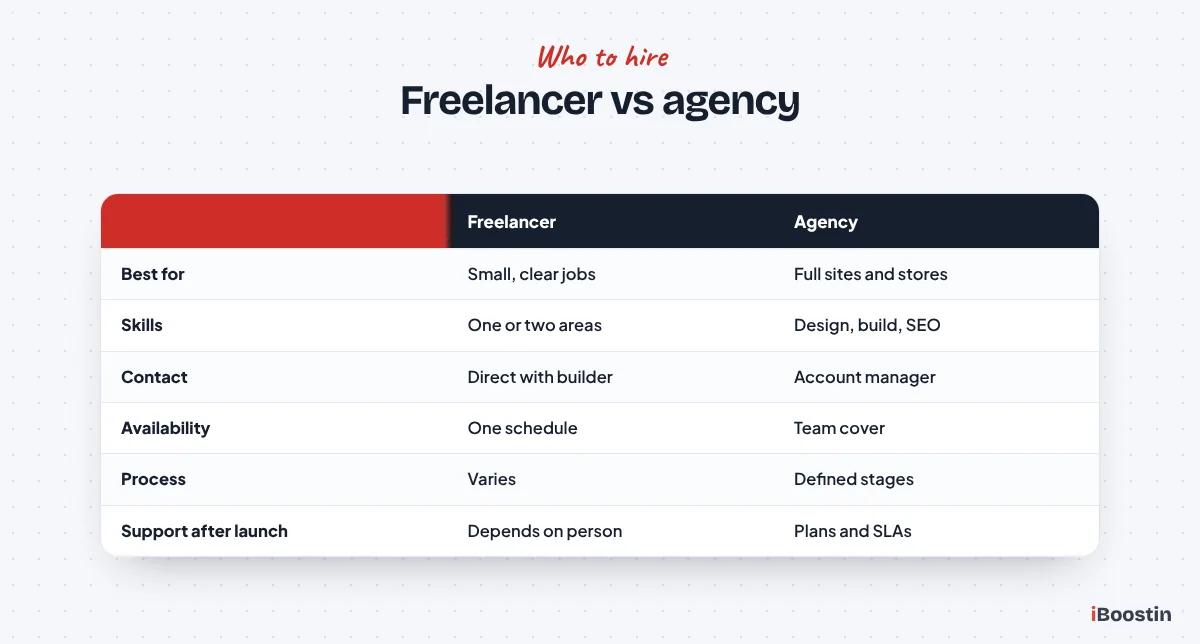
Both can do excellent work. The right choice depends on the size of the job, how much support you need and how much risk you can accept.
When a Freelancer Makes Sense
A freelancer is often a good fit for small, well-defined jobs: a simple site from an existing design, a few new pages, fixing a specific error or setting up a plugin. You talk directly to the person doing the work, communication is simple and decisions are quick.
The risks are availability and coverage. One person cannot be expert in everything, holidays and illness stop progress, and support depends on one schedule. If you hire a freelancer for an important site, ask who covers urgent problems when they are away.
When an Agency Makes Sense
An agency suits larger builds, business-critical sites, stores and projects that need design, development, content and SEO working together. You get a process, several specialists and continuity if one person leaves.
The trade-offs are more structure and less direct contact with the developer. Ask who your day-to-day contact will be, who actually builds the site and whether the work is done in-house or passed to subcontractors.
Step 3: Where to Find WordPress Developers
There is no single best place. What matters is finding people with relevant, verifiable work.
Good Places to Look
Ask other business owners you trust which developers they used and whether they would hire them again. Look at sites you admire in your industry and check whether they credit their builder in the footer. Search for WordPress agencies and freelancers that specialize in your type of project, and review their case studies and live client sites.
Freelance marketplaces can work for small, well-defined tasks, especially when you can see detailed reviews from similar projects. For a full business website, look for someone with a portfolio of complete projects rather than a list of small fixes.
How to Build a Shortlist
Aim for three to five candidates. For each one, open several live sites they built, test them on your phone and check how fast they load. Look for sites similar in size and purpose to yours.
Remove anyone who cannot show live work, whose sites are slow or broken on mobile, or whose portfolio is entirely templates that look the same. Then contact the rest with your brief.
Step 4: Ask These 10 Questions
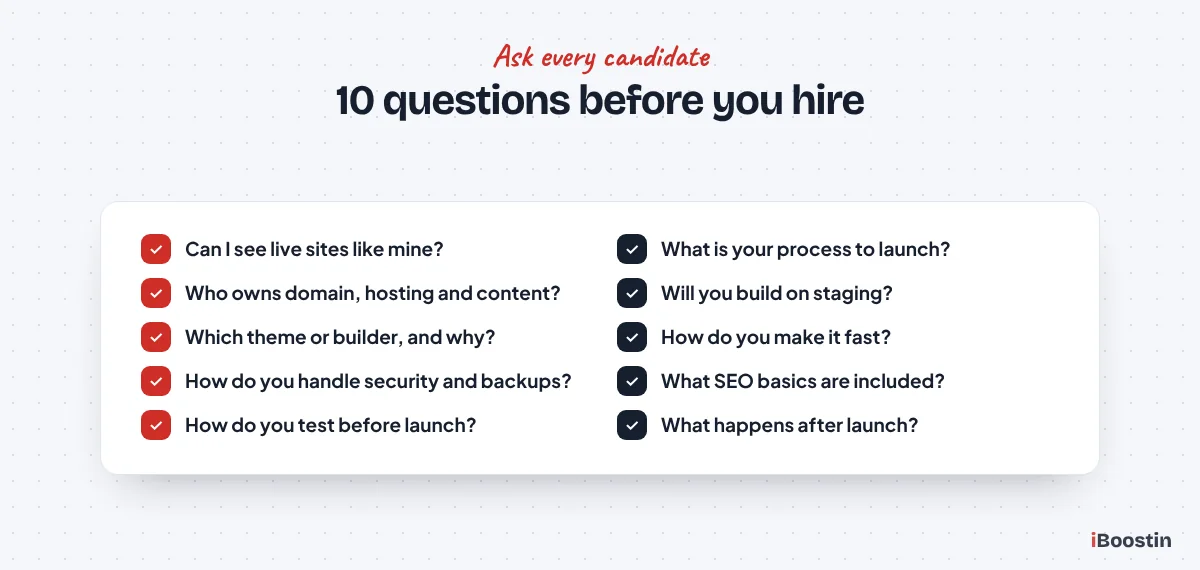
Ask every candidate the same questions, in writing or on a call, and compare the answers side by side. Good developers answer clearly and specifically. Vague answers are a warning sign.
Questions 1 to 5: Process and Ownership
1. Can you show me live sites similar to mine? Expect several real addresses you can visit, not just screenshots. Ask what their role was on each.
2. What is your process from start to launch? Expect clear stages: discovery, structure, design, build, content, testing and launch, with your approvals at key points.
3. Who will own the domain, hosting, theme, plugins and content? The right answer is you. Paid themes and plugins should be licensed to you or clearly explained, and you should get full admin access.
4. Will you build on a staging site? Expect yes. A staging copy lets you review work safely, and on a redesign it keeps the live site running until launch.
5. Which theme or page builder will you use, and why? Expect a reasoned answer, such as a lightweight theme with Elementor or the block editor, not “whatever I always use” without explanation.
Questions 6 to 10: Quality, Launch and Support
6. How do you make sure the site is fast? Expect specifics: image optimization, caching, limiting plugins, good hosting and testing with tools like PageSpeed Insights.
7. How do you handle security and backups? Expect a minimal, reputable plugin set, strong logins, regular backups stored off the server and updates handled after launch.
8. What SEO basics are included? Expect page titles, meta descriptions, clean URLs, heading structure, an XML sitemap, Search Console setup and, on a redesign, 301 redirects for old URLs.
9. How do you test before launch? Expect testing on phones and desktop, form and email checks, link checks and speed checks, plus a launch checklist.
10. What happens after launch? Expect a clear fix window, training or a handover guide and an optional maintenance plan. Our guide on what is included in website maintenance explains what good ongoing care looks like.
Red Flags to Watch For
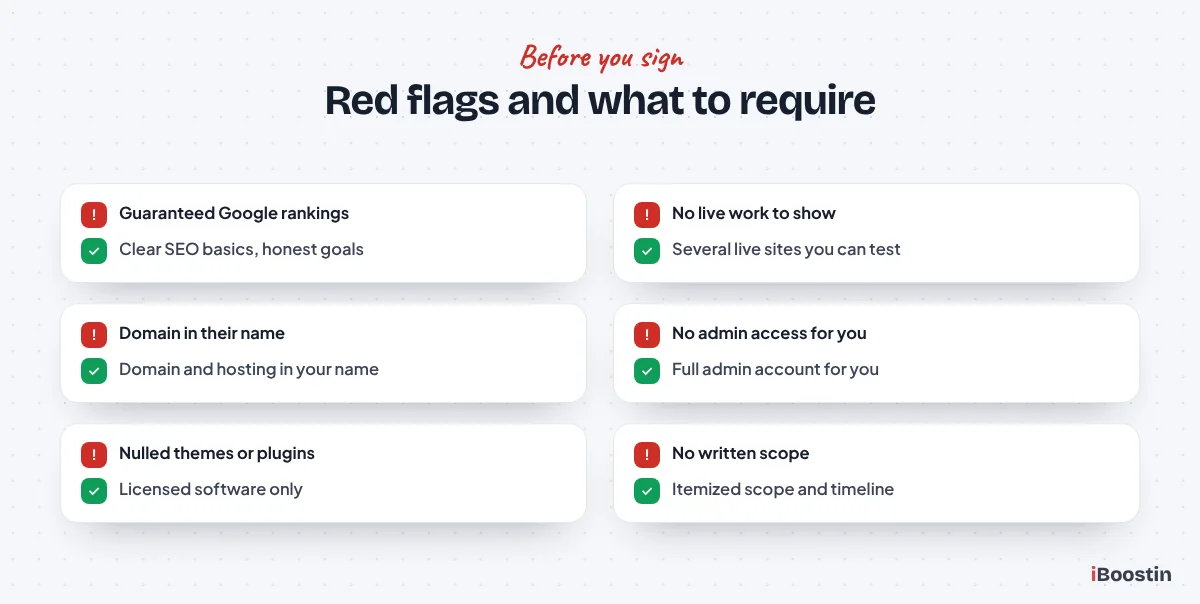
Some warning signs are easy to spot once you know them. Any one of these is a reason to ask more questions. Several together are a reason to walk away.
Red Flags in the Sales Process
Be cautious of developers who promise first page Google rankings or guaranteed results, quote without asking questions about your business, cannot show live work, push you to decide immediately, or are vague about who will actually build the site.
Also watch for unusually low quotes for large projects. They often mean shortcuts: a template with your logo, no testing, no SEO setup or extra charges later for things you assumed were included.
Red Flags in the Contract and Setup
Do not accept a developer registering your domain or hosting in their own name, refusing to give you admin access, using pirated or “nulled” themes and plugins, or offering no written scope. Each of these leaves you dependent on them, and pirated software is a common source of malware.
Ask for everything in writing: what is included, what is not, the timeline, the approval stages, who owns what and how changes outside the scope are handled.
Step 5: Compare Proposals Fairly
Proposals rarely line up neatly. One may include copywriting and SEO, another may assume you provide all content. Compare what is actually delivered, not just the headline figure.
What a Good Proposal Includes
A strong proposal restates your goals in its own words, lists the pages and features, explains the process and timeline, states what you need to provide and when, covers testing, launch and support, and makes ownership clear.
If a proposal does not mention mobile testing, speed, SEO basics, backups or support after launch, ask whether they are included. Often the cheaper option becomes the more expensive one once these are added.
Use a Paid Test or Discovery Phase
For larger projects, a paid discovery phase is one of the best ways to reduce risk. The developer maps your pages, features and content, and you get a written plan you own. If the relationship does not work, you can take that plan to someone else.
For smaller jobs, a small paid task such as fixing a specific issue or building one page shows you how a developer communicates, how they handle feedback and whether they deliver on time.
Step 6: Protect Your Business Before Work Starts
A few simple steps protect you whatever happens with the project. Set them up before the developer starts.
Keep Accounts in Your Name
Register your domain and hosting in your own name, with your own email address and payment method. Give the developer their own user account rather than sharing your passwords. When the project ends, you can remove their access without changing anything else.
Store important logins in a password manager and switch on two-factor authentication where available. This also makes life easier if you ever change developers.
Agree on Milestones and Approvals
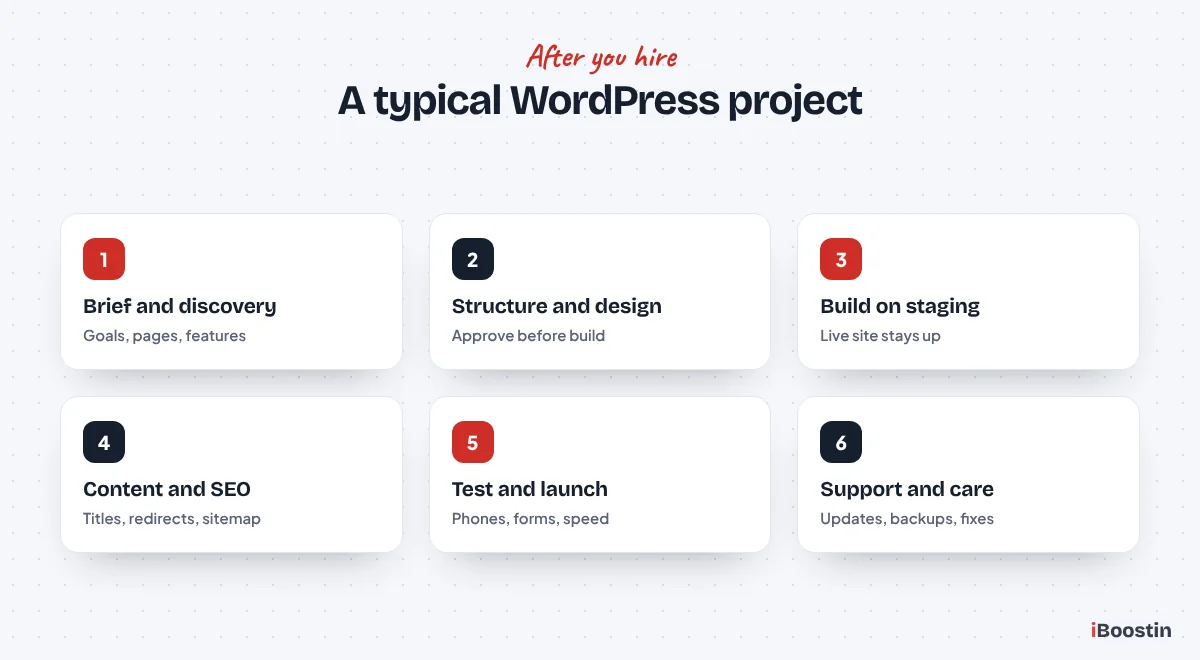
Break the project into stages, such as structure, design, build and launch, with your approval at each. That way problems are caught early, when they are cheap to fix, rather than at the end.
Agree how feedback will be given, how many revision rounds are included and how extra work is handled. Clear rules prevent most disagreements.
Step 7: Manage the Project and the Launch
Once the right developer is hired, your main job is to make decisions and supply content on time. Content delays are the most common reason projects run late.
During the Build
Review work on the staging site at each milestone, test it on your own phone and give consolidated feedback rather than a stream of separate messages. Ask questions when you do not understand a decision.
Keep a simple shared list of decisions, open questions and content still to send. A weekly check-in of fifteen minutes is usually enough to keep a small project moving and to stop small misunderstandings from growing into delays.
If you want to know what a realistic schedule looks like, our guide on how long it takes to build a WordPress website breaks down timelines by project type.
At Launch and After
Before launch, check every page, form and link yourself. After launch, confirm the site is in Google Search Console, that old URLs redirect correctly on a redesign, and that backups and updates are running.
Ask for a short handover: how to edit pages, add posts, update contact details and who to call if something breaks. A good developer makes you confident running your own site.
How to Judge a Developer’s Portfolio
A portfolio tells you more than any sales call, but only if you look at it properly. Pretty screenshots prove very little. Live sites you can open, click and test on your own phone tell you how the developer really works.
What to Check on Each Live Site
Open three or four sites from the portfolio on your phone and on a computer. Check how quickly the first screen appears, whether menus and buttons work easily with a thumb, whether text is readable without zooming and whether forms submit properly. Run one or two pages through PageSpeed Insights to get a rough idea of performance.
Then look at the details. Are headings clear and logical? Do images look sharp without being slow? Is the contact information easy to find? Small details like broken links, placeholder text or a missing privacy page suggest the developer does not test carefully before launch.
Questions to Ask About the Portfolio
Ask what the developer was responsible for on each project. Did they design it, build it, write the content or only make changes to an existing site? Ask what the client’s goal was and whether the site achieved it, but be wary of exact results that cannot be verified.
If possible, ask for one or two client references and contact them. Ask whether the project ran on time, how problems were handled and whether they would hire the developer again. A developer confident in their work will be happy to connect you.
Hiring a Developer to Take Over an Existing Site
Many owners are not starting from scratch. They have a site built by someone who has disappeared, and they need a new developer to take over. This needs a slightly different approach.
Gather Access Before You Hire
Before you contact developers, collect everything you can: domain registrar login, hosting account, WordPress admin access, any paid theme or plugin licenses, email and DNS settings, and analytics or Search Console access. If you cannot access something, note it. A new developer can often recover access, but it takes time.
Share a short list of what is wrong and what you want changed. Include error messages, screenshots and the pages affected. The clearer the picture, the more accurate the proposal will be.
Expect an Audit First
A good developer will want to audit an inherited site before promising anything. They will check the WordPress, theme and plugin versions, look for security issues, review backups and test speed. This audit protects you, because it reveals hidden problems before you commit to a bigger project.
Sometimes the audit shows that fixing the existing site is the sensible choice. Sometimes it shows the site is so outdated or fragile that a rebuild is cheaper over time. Either way, you make the decision with real information rather than guesswork.
Freelancer, Agency or In-House: Which Fits Your Business?
Some growing businesses wonder whether to hire a developer as an employee. For most small businesses, it does not make sense: a WordPress site rarely needs a full-time developer, and one person cannot cover design, development, SEO and security alone.
When In-House Makes Sense
An in-house developer makes sense when your website or store is central to the business and changes every week, for example a busy online store, a membership platform or a product built on WordPress. In that case, having someone who knows the system deeply pays off.
Even then, many companies combine an in-house person with an agency for specialist work such as design, performance or security audits.
When an Ongoing Partner Is Better
For most small businesses, the best model is a reliable agency or freelancer for the build, then an ongoing maintenance and support plan. You get specialists when you need them and predictable care the rest of the time.
Choose a partner you are comfortable working with for years, not just for launch. The relationship matters as much as the first build.
Common Mistakes Business Owners Make When Hiring
Even careful owners make a few predictable mistakes. Avoiding them saves money, time and stress.
Hiring on Price Alone
The cheapest quote often leaves out testing, SEO setup, security, training or support, and the gaps appear after launch. The most expensive quote is not automatically the best either. Compare scope, process and the quality of live work first, then price.
Think about cost over two or three years, including fixes, maintenance and lost leads from a slow or broken site. A site that works and brings in enquiries is far cheaper than one that needs rebuilding.
Skipping the Brief and the Contract
Without a brief, every developer quotes for a different project, and comparisons become guesswork. Without a written scope, disagreements about what was included are almost guaranteed.
An hour spent writing a brief and reading the scope carefully prevents most of the problems that make owners regret their choice.
Not Planning Who Looks After the Site
Many owners forget that a WordPress site needs ongoing updates, backups and security checks. Months later, plugins are out of date, the site slows down or is hacked, and the original developer has moved on.
Decide before launch who will maintain the site. If it will be the same developer, agree the details in writing. If you need help with that later, our guide on what to do if your WordPress site is hacked shows why maintenance matters.
Frequently Asked Questions About Hiring a WordPress Developer
How do I find a good WordPress developer?
Ask business owners you trust for recommendations, check who built sites you admire and look for developers or agencies who specialize in your type of project. Shortlist three to five with relevant live work, test their sites on your phone, then ask each the same questions and compare their answers.
Should I hire a freelancer or an agency for WordPress?
Hire a freelancer for small, well-defined jobs where one skill set is enough. Hire an agency for full business websites, stores and projects that need design, development, SEO and support together, or when the site is critical and you need continuity if one person is unavailable.
What questions should I ask a WordPress developer?
Ask to see similar live sites, how their process works, who will own the domain, hosting and content, whether they use staging, which theme or builder they use and why, how they handle speed, security and SEO, how they test before launch and what support they offer afterward.
How long does it take a WordPress developer to build a website?
A small site built on a customized theme can take a few weeks. A custom-designed business site often takes one to three months, and stores or larger sites can take longer. Content readiness and how quickly you give feedback usually affect the timeline more than the build itself.
Should the developer own my domain and hosting?
No. Register your domain and hosting in your own name with your own email and payment details, and give the developer their own login. That way you keep control of your website even if you change developers in the future.
What are red flags when hiring a WordPress developer?
Watch for guaranteed rankings, no live work to show, quotes without questions about your business, pressure to decide quickly, domains or hosting registered in their name, refusal to give you admin access, pirated themes or plugins and no written scope.
Do I need a WordPress developer after the website launches?
Usually yes, or at least someone responsible for maintenance. WordPress, themes and plugins need regular updates, backups and security checks, and most businesses also want small changes over time. A maintenance plan with your developer or another provider keeps the site safe and working.
Hire for the Long Term, Not Just the Launch
The best WordPress developer for your business is not the one with the lowest quote or the flashiest portfolio. It is the one who understands your goals, explains their process clearly, builds on solid foundations, gives you full ownership and is still there when you need help a year later.
Use the brief, the ten questions and the red flags in this guide, and you will be able to choose with confidence. If you would like us to be one of the developers on your shortlist, we are happy to answer every question here in writing.