In this guide
- The Short Answer: Elementor Is SEO Friendly When Built Right
- How Elementor Can Help SEO
- Where Elementor Can Hurt SEO
- Elementor Settings That Improve SEO and Speed
- Choose a Lightweight Theme
- How to Build an SEO Friendly Elementor Page
- Elementor Theme Builder and SEO
- Core Web Vitals on Elementor Sites
- Hosting and Caching for Elementor Sites
- Elementor vs the Block Editor for SEO
- Elementor SEO Problems on Existing Sites
- Local SEO and Structured Data With Elementor
- Elementor SEO Myths
- Is Elementor Right for Your Business Website?
- Frequently Asked Questions About Elementor and SEO
- Elementor Is a Tool: Build It Right and It Ranks
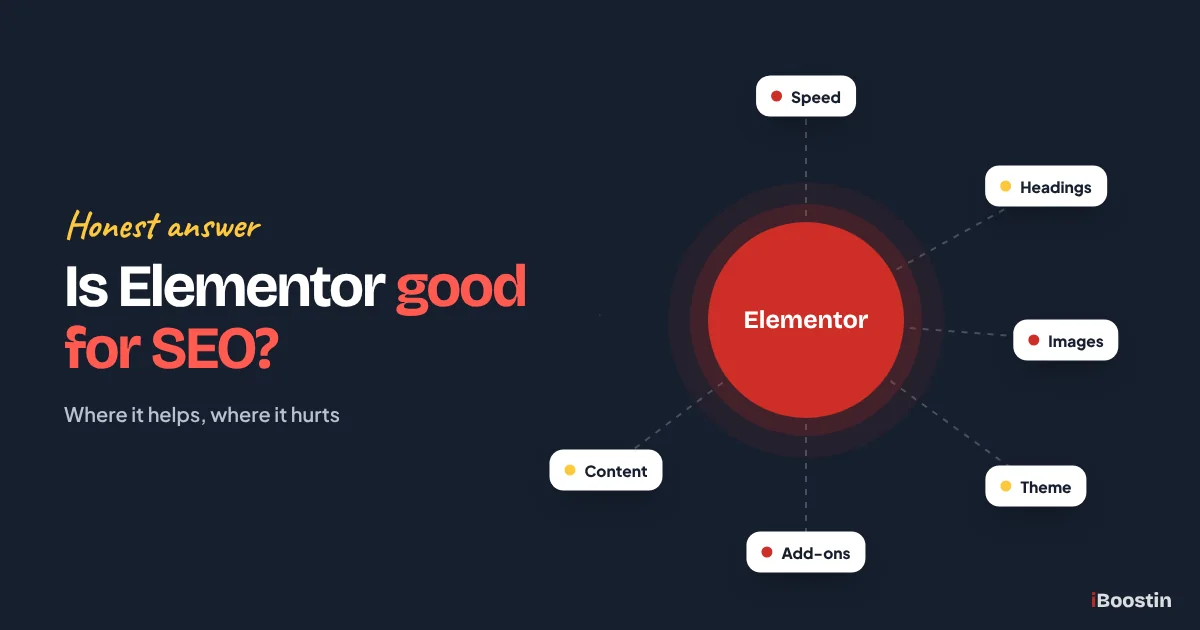
Yes, Elementor is good for SEO when it is set up properly. Elementor itself does not stop pages from ranking: Google can read Elementor pages, and you control titles, headings, content, images and links. Problems come from how sites are built with it: heavy layouts, too many add-ons, poor heading structure, unoptimized images and slow hosting. Fix those, and Elementor sites can rank as well as any other WordPress site.
The question comes up often because Elementor has a reputation for being “bloated”. Some of that reputation is earned by older versions and badly built sites. A lot of it is outdated. Recent versions include performance features that remove much of the extra code, and many fast, well-ranking business sites are built with Elementor.
This guide gives you an honest answer: where Elementor helps SEO, where it can hurt, the exact settings and build habits that make the difference, and when a different approach might suit you better. It is written by the iBoostin team, who build and fix Elementor sites every week. If you are planning a new site, our guide on how to create a website in WordPress explains where Elementor fits in the process.
Key takeaways
- Elementor does not hurt SEO by itself. Search engines read the content, headings and links on Elementor pages normally.
- The real SEO risks are speed, heading structure, image weight, duplicate theme builder content and too many add-ons.
- Turn on Elementor’s performance features, use a lightweight theme such as Hello and keep layouts simple.
- Use an SEO plugin like Rank Math or Yoast for titles, meta descriptions, schema and sitemaps. Elementor does not replace it.
- Content quality and site structure matter far more for rankings than which page builder you use.
The Short Answer: Elementor Is SEO Friendly When Built Right
Elementor is a visual page builder. It controls how your pages look and how they are laid out. Google cares about what is on the page, how fast it loads, how easy it is to use and how well it answers the searcher’s question. Elementor affects some of these, but it does not decide them on its own.
What Google Actually Sees
When Google crawls an Elementor page, it reads the final HTML: your headings, paragraphs, images, links and structured data. It does not care which tool produced that HTML. A clear page with helpful content, logical headings and fast loading can rank whether it was built in Elementor, the block editor or a custom theme.
That means the important question is not “is Elementor good for SEO”, but “is my Elementor site built in an SEO friendly way”. The rest of this guide answers that.
Where Elementor’s Reputation Comes From
Older Elementor versions added more wrapper elements and loaded more CSS and JavaScript than necessary. Combined with heavy themes, many add-on packs and large images, that produced slow sites. Many of those sites still exist, which keeps the reputation alive.
Newer versions introduced flexbox containers, optimized asset loading and other performance features that reduce code significantly. A site built on current Elementor with these features switched on is a very different thing from one built years ago.
How Elementor Can Help SEO
Used well, Elementor has real advantages for small business websites, especially when the people editing the site are not developers.
Better Pages, Faster
Elementor makes it easy to build clear, well-designed landing pages and service pages without code. Good design helps visitors stay, read and take action, which supports the engagement and conversion side of SEO.
Because changes are visual and quick, owners and marketers can update content, add sections, improve calls to action and test new layouts without waiting for a developer. Sites that are easy to improve tend to improve, and fresh, helpful content is good for rankings.
Full Control of On-Page Elements
In Elementor, you choose the HTML tag for every heading, add alt text to images, control links and structure content into clear sections. With the theme builder, you can design consistent templates for posts, archives and service pages.
Paired with an SEO plugin, you get full control of titles, meta descriptions, canonical URLs, schema and sitemaps. Many SEO plugins also show their content analysis inside the Elementor editor, so you can check keyword use, headings and readability while you design rather than after the page is live. Elementor handles the design, the SEO plugin handles the technical metadata, and together they cover everything most business sites need.
Where Elementor Can Hurt SEO
The risks are real, but nearly all of them come from how the site is built and configured, not from Elementor itself.
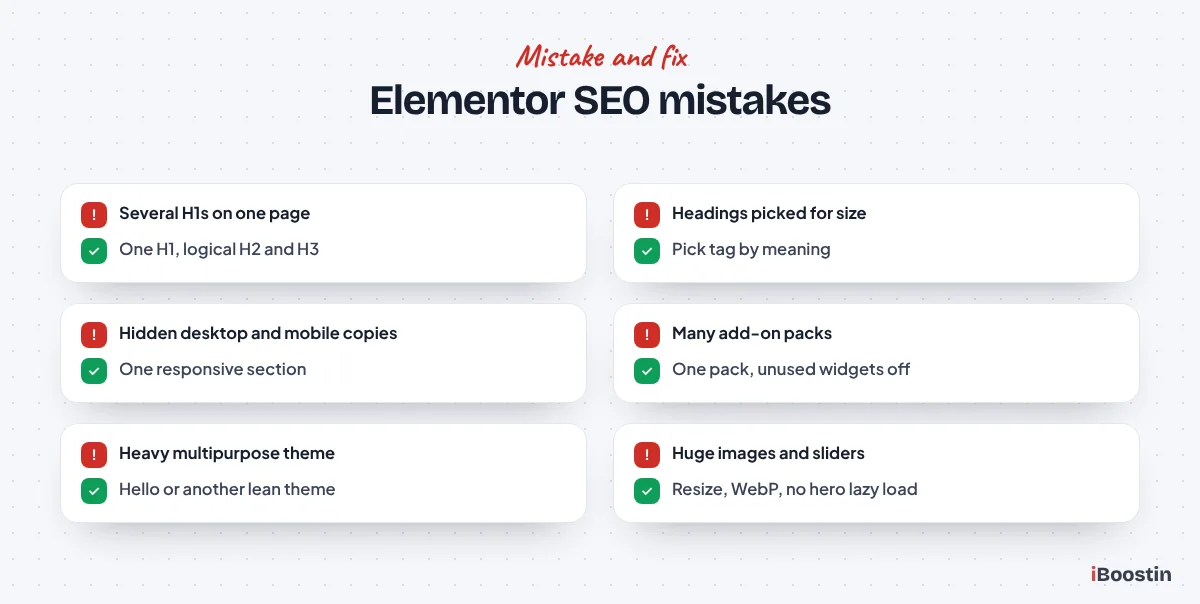
Speed and Code Weight
Elementor pages can become heavy when they use many nested sections, lots of widgets, animations, sliders and several add-on packs. Each adds CSS, JavaScript and HTML that the browser must download and process.
Heavy pages load slowly on phones and may fail Core Web Vitals, which affects both rankings and conversions. Our guide on why your WordPress site is so slow covers the wider causes, many of which apply to Elementor sites.
Heading Structure Problems
Elementor lets you style any text as any heading size, which is great for design but easy to misuse. We often see pages with several H1 tags, headings chosen for their size rather than their meaning, or important section titles set as plain text.
Search engines use headings to understand a page’s structure. A logical outline, with one H1 for the page topic and H2s and H3s for sections and subsections, helps them understand and rank your content.
Duplicate and Hidden Content
Responsive design in Elementor sometimes involves building one version of a section for desktop and another for mobile, then hiding one on each device. Both versions stay in the HTML, so search engines see duplicate content and the page is heavier.
Theme builder templates can also create repeated content, such as the same long text block in every post footer or several H1 headings coming from both the template and the page. These dilute what each page is about.
Elementor Settings That Improve SEO and Speed
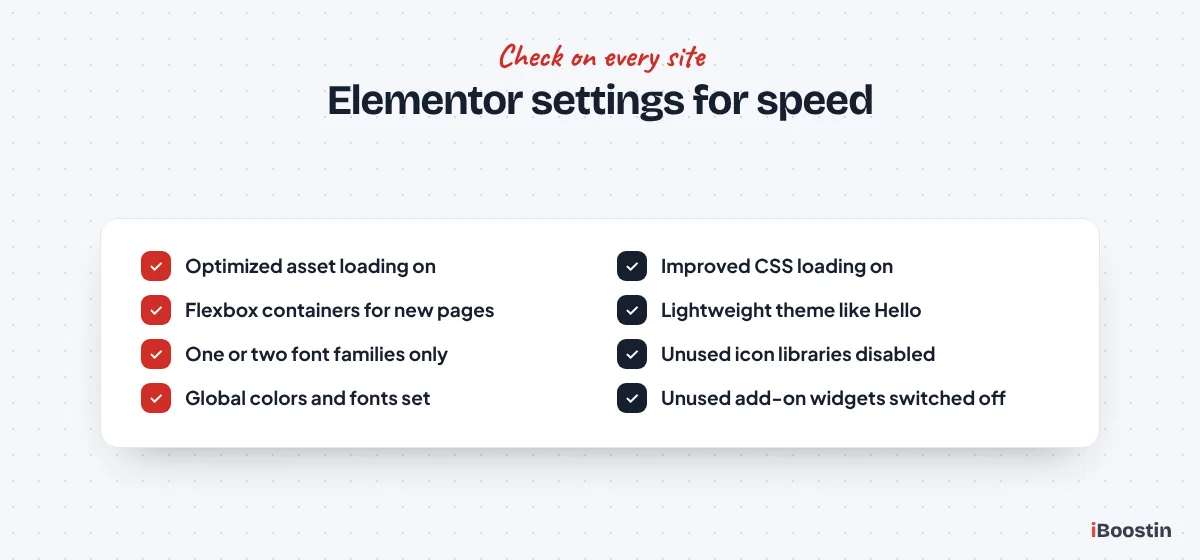
A handful of settings make a big difference. Check these on every Elementor site, testing on staging first.
Performance Features
In the Elementor settings, review the Performance and Features areas. Options such as optimized asset loading, improved CSS loading, lazy loading of background images and loading only the scripts each page uses reduce page weight noticeably. Names and locations change between versions, so check the current Elementor documentation for your version.
Use the flexbox container layout instead of old sections and columns for new pages. Containers produce cleaner HTML with fewer wrapper elements, which helps both speed and code quality.
Fonts, Icons and Global Styles
Limit fonts to one or two families with only the weights you use, and consider loading them locally rather than from external servers. Disable icon libraries you do not use, or switch to inline SVG icons where available.
Set global colors and typography so the whole site uses consistent styles. This keeps the design tidy, reduces the amount of CSS each page needs and makes future updates quicker.
Choose a Lightweight Theme
The theme matters as much as Elementor itself. A heavy multipurpose theme loads its own scripts, styles and features on top of Elementor, often for things you never use.
Why Hello Is a Good Default
Elementor’s own Hello theme is deliberately minimal. It provides basic structure and lets Elementor and the theme builder handle design. That means less duplicate code and fewer conflicts.
Other lightweight themes, such as GeneratePress and Astra, also work well with Elementor. The key is a theme that does little on its own, so Elementor is not fighting with it for control of the layout.
Avoid Stacking Add-On Packs
Third-party Elementor add-on packs offer dozens of extra widgets. Installing several packs to use one or two widgets from each adds a lot of code to every page.
Check which add-on widgets you actually use, keep the one pack that covers them, and disable unused widgets within it. Many packs let you switch off individual widgets so their code does not load.
How to Build an SEO Friendly Elementor Page
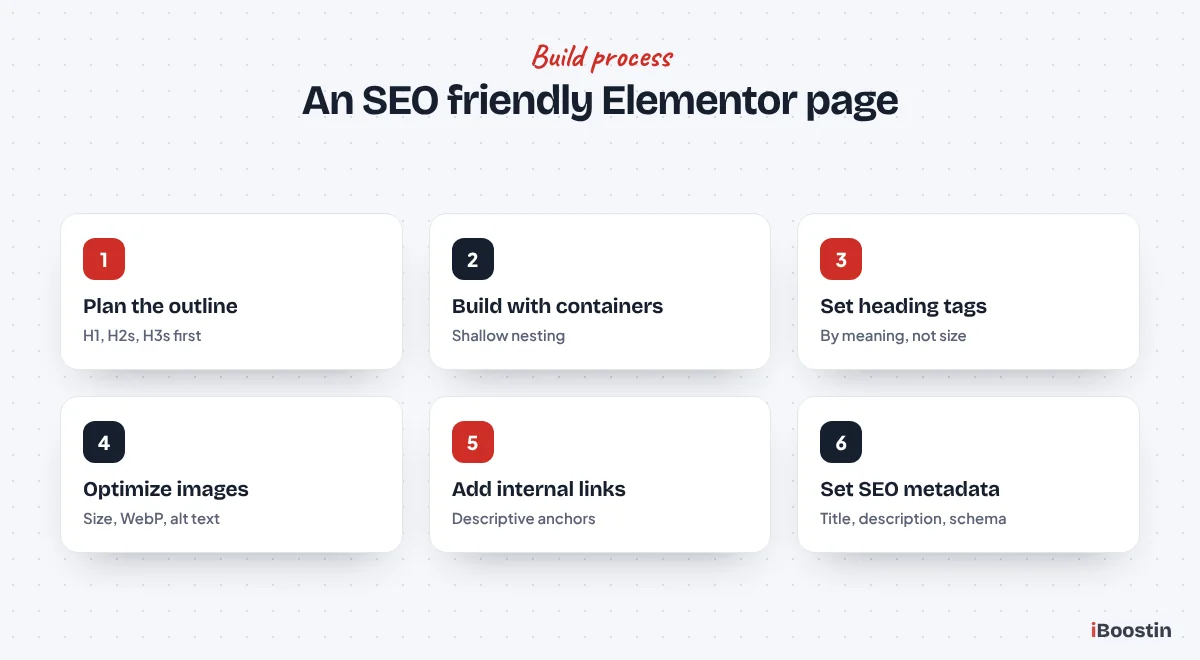
Settings help, but good build habits matter most. Follow this process for every important page.
Plan Content Before Design
Start with the outline: the main topic of the page as the H1, then the sections visitors need as H2s, with H3s for detail. Write or gather the content first, then design around it. Pages designed first and filled with content later often end up with headings chosen for looks rather than meaning.
Make sure each service has its own page focused on one main topic, with enough helpful content to answer what customers ask before they get in touch. Look at the questions your team answers on the phone every week, and make sure the page answers them clearly. That content helps visitors decide, and it gives Google far more to understand and rank than a short block of text under a large image.
Build Lean and Check Your Headings
Use containers, keep nesting shallow and choose widgets that do one job. Avoid building separate desktop and mobile versions of the same content; use responsive settings to adjust one version instead.
Set every heading’s HTML tag deliberately. Use one H1, then follow a logical order. Use paragraphs or styled text, not headings, for decorative labels. After building, check the outline with a browser extension that lists headings.
Optimize Images and Media
Upload images at the size they display, compress them and use WebP. Add descriptive alt text to every meaningful image. Avoid large background videos and heavy sliders on key pages, since they slow the first screen and rarely help conversions.
Do not lazy load the main hero image, because it is usually the largest element on the first screen. Lazy load images further down the page instead.
Add Links and Metadata
Link to related pages using descriptive anchor text, especially from service pages to supporting guides and back. Internal links help visitors and search engines understand how your content connects.
Finally, set the page title, meta description and focus keyword in your SEO plugin, and check the page appears correctly in the sitemap. Elementor does not handle these on its own.
Elementor Theme Builder and SEO
Elementor Pro’s theme builder lets you design headers, footers, single post templates, archive pages and other templates visually. It is powerful, but because templates repeat across many pages, a small mistake in one template repeats everywhere.
Get Template Headings Right
The most common theme builder problem is heading duplication. A single post template might set the post title as an H1, while the content of each post also starts with an H1. Or the header template uses an H1 for the logo or site name, which then appears on every page.
Check your templates carefully. The site name in the header should not be a heading at all. The post or page title should be the only H1, and sidebar or footer widget titles should use plain styled text or lower heading levels so they do not compete with the main content.
Keep Archive and Category Pages Useful
Archive templates for categories, tags and blog listings are often left as simple grids of post titles. These pages can rank for broader topics if they include a short, helpful introduction and clear links to the most important posts.
Use the archive description from WordPress or your SEO plugin, display it in the template and keep pagination crawlable. Decide which archives should be indexed; tag archives with only one or two posts are often better set to noindex in your SEO plugin.
Core Web Vitals on Elementor Sites
Core Web Vitals measure loading, responsiveness and visual stability. They are part of Google’s page experience signals and a good proxy for how pleasant the site feels on a phone.
Largest Contentful Paint
On Elementor sites, the largest element on the first screen is usually a hero image, a background image or a large heading. Background images set in Elementor can load later than normal images, which delays this metric.
Use a properly sized, compressed hero image, consider an image widget rather than a container background for the main hero, and make sure it is not lazy loaded. Preloading the main hero image and the main font can also help.
Layout Shift and Responsiveness
Layout shift happens when elements move as the page loads, often because images have no set dimensions, fonts swap late or banners and popups appear above content. Set image sizes, reserve space for embeds and avoid popups that push content down.
Responsiveness suffers when heavy JavaScript runs as visitors tap and scroll. Reduce animations, entrance effects and sliders, delay non-essential scripts and keep add-ons to a minimum. Our Elementor expert service tunes these issues on existing sites.
Hosting and Caching for Elementor Sites
Elementor generates CSS files for each page and relies on the server to deliver them quickly. Good hosting and correctly configured caching make a large difference.
Choose Hosting That Suits Elementor
Elementor’s editor and front end both benefit from current PHP, enough memory and server-level caching. Cheap shared hosting often struggles, making both the editor and the public site slow.
If the Elementor editor takes a long time to load or regularly shows errors, check your host’s memory limits and PHP version. Managed WordPress hosting usually solves these problems and makes speed work much easier.
Avoid Caching Conflicts
Caching and optimization plugins can conflict with Elementor’s generated CSS and scripts. Common symptoms include broken layouts for logged-out visitors, missing styles after updates or animations that stop working.
After major Elementor or plugin updates, regenerate Elementor’s CSS files and clear all caches. Configure one optimization plugin carefully, and test key pages in a private window after every change.
Elementor vs the Block Editor for SEO
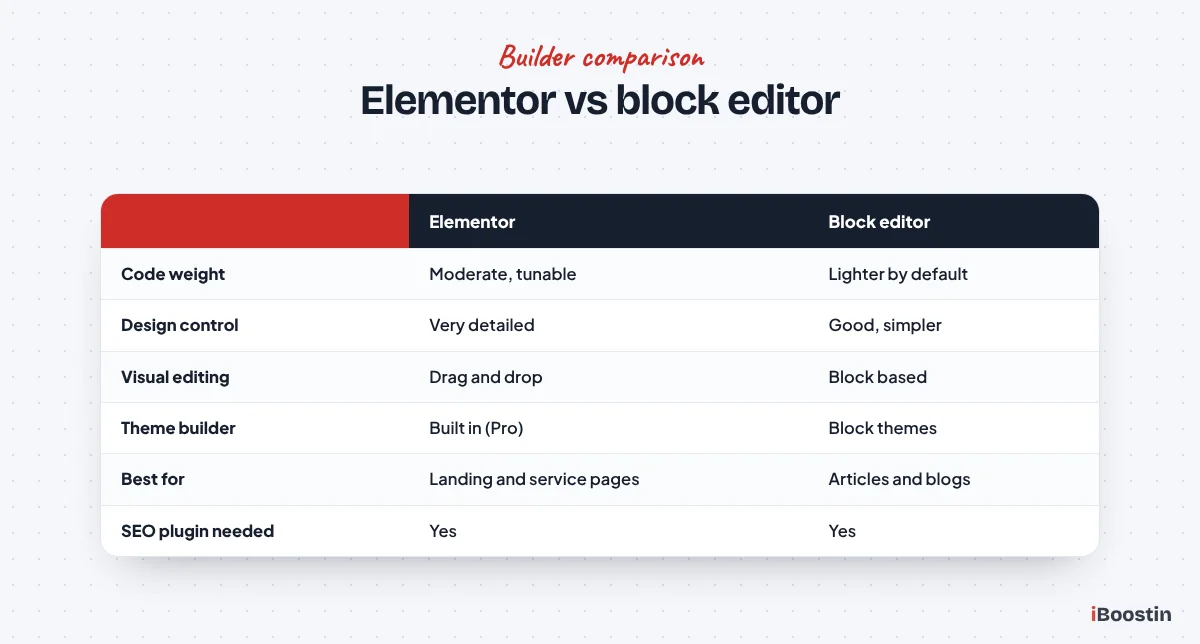
WordPress’s built-in block editor, also known as Gutenberg, is the main alternative to Elementor. Both can produce well-ranking sites.
When the Block Editor Has the Edge
The block editor generally produces lighter pages because it is built into WordPress and loads less code. For content-heavy sites with many articles, or for teams comfortable with simpler layouts, it is a strong, fast option.
Block themes and patterns have improved a lot, so many business sites can be built entirely with the block editor if design needs are modest.
When Elementor Makes More Sense
Elementor is often the better choice when you need detailed visual control, complex landing pages or a design team and marketers who want to edit visually. Its theme builder and design tools make it faster to create polished, consistent layouts.
Many sites use both: Elementor for key landing and service pages, and the block editor for blog posts. That combines Elementor’s design control with lighter article pages.
Elementor SEO Problems on Existing Sites
If your site already uses Elementor and rankings are disappointing, check these areas before deciding the builder is the problem.
Run a Quick Audit
Test key pages on mobile in PageSpeed Insights and note load times. Check the heading outline of each important page. Look at image sizes, the number of active add-on packs and whether Elementor’s performance features are switched on.
Also review the content. Many Elementor sites look good but have thin service pages with only a few lines of text. Helpful, detailed content is often the biggest missing piece.
Fix or Rebuild?
Most Elementor SEO problems can be fixed: switching to a lighter theme, enabling performance features, converting key pages to containers, fixing headings, optimizing images and improving content. Fixing is usually faster and cheaper than rebuilding.
A rebuild makes more sense if the site is very old, uses many conflicting add-ons, or needs a new structure anyway. Our guide on how to redesign a website without losing SEO explains how to protect rankings if you go that way. Our WordPress development services cover both paths, from targeted Elementor fixes to complete rebuilds on clean foundations.
Local SEO and Structured Data With Elementor
For local businesses, rankings in map results and local searches matter as much as general rankings. Elementor helps you present local information clearly, but structured data still comes from your SEO plugin.
Show Your Business Details Consistently
Put your business name, address, phone and service area in a consistent format in the footer template, on the contact page and on relevant service pages. Make sure the details match your Google Business Profile exactly.
Create pages for each main service and, where relevant, for the areas you serve, with real content about that area rather than copies with the town name swapped. Elementor templates make these pages faster to build, but the content must still be unique and useful.
Add Schema Through Your SEO Plugin
Use Rank Math or Yoast to add Local Business, Organization, Article, FAQ and other schema types. Some Elementor widgets and add-ons add their own schema, which can create duplicates. Check your pages with Google’s Rich Results Test and remove overlapping markup.
Clean, accurate structured data helps search engines understand who you are, where you work and what each page is about. It can also make your pages eligible for richer search results, which often improves click-through even when your ranking position stays the same.
Elementor SEO Myths
A few common beliefs about Elementor and SEO are outdated or simply wrong.
Myth: Google Penalizes Page Builders
Google does not penalize sites for using Elementor or any other builder. It evaluates content, usability and speed. Elementor pages that are slow or poorly structured may rank lower, but because of those issues, not because of the builder.
Many sites that rank at the top of competitive searches use Elementor. What they have in common is good content, solid structure and fast loading.
Myth: Elementor Replaces an SEO Plugin
Elementor controls design and on-page layout, but it is not an SEO plugin. You still need a tool like Rank Math or Yoast for titles, meta descriptions, schema, redirects and sitemaps.
Elementor works smoothly with these plugins, and many of them show their analysis directly inside the Elementor editor so you can optimize as you build.
Myth: Switching Builders Will Fix Rankings
Changing from Elementor to another builder rarely fixes rankings on its own. If the content, structure and speed problems move with you, the new site will have the same issues. Fix those underlying problems first, whatever builder you use.
If you are choosing a platform from scratch, our guide on WordPress vs Wix for small business explains why WordPress with a well-configured builder is often the stronger long-term option for SEO.
Is Elementor Right for Your Business Website?
Beyond SEO, the right builder depends on who will edit the site, how much design freedom you need and how the site will grow. Elementor suits many small businesses, but not every one.
Elementor Suits You If
Elementor is a good fit if you want a distinctive, polished design, need landing pages for campaigns, expect marketers or team members without coding skills to edit pages, or want consistent templates across many service pages. Its visual editor shortens the time between an idea and a live page.
It also suits businesses that work with an agency for the build but want to make everyday changes themselves. With global styles and saved templates in place, owners can add sections and pages without breaking the design.
Consider Another Approach If
If your site is mostly articles, you publish a lot of content and design needs are simple, the block editor with a lightweight block theme may be lighter and simpler. If you need a highly custom application or unusual functionality, a custom theme built by a developer might be more appropriate.
Whatever you choose, the SEO fundamentals stay the same: helpful content, clear structure, fast loading, good internal links and regular maintenance. The builder is only one part of the picture.
Frequently Asked Questions About Elementor and SEO
Is Elementor bad for SEO?
No. Elementor itself does not hurt SEO. Search engines read the content, headings and links on Elementor pages normally. Problems come from heavy layouts, too many add-ons, poor heading structure, large images and slow hosting, all of which can be fixed with the right settings and build habits.
Does Elementor slow down a website?
It can add some weight, but a well-built Elementor site on good hosting with a lightweight theme and performance features switched on can be fast. Heavy layouts, many add-on packs, sliders and unoptimized images are the usual causes of slow Elementor sites.
Do I need an SEO plugin with Elementor?
Yes. Elementor handles design, not SEO metadata. Use Rank Math or Yoast to set titles, meta descriptions, schema, redirects and sitemaps. Both work well with Elementor and can show SEO analysis inside the editor.
Which theme is best for Elementor SEO?
A lightweight theme works best. Elementor’s Hello theme is a popular choice because it is minimal and lets Elementor handle design. GeneratePress and Astra are also good options. Avoid heavy multipurpose themes that load their own features on top of Elementor.
Is the block editor better than Elementor for SEO?
The block editor usually produces lighter pages, which helps speed, but both can rank well. Elementor offers more design control and easier visual editing. Many sites use Elementor for key pages and the block editor for blog posts to get the benefits of both.
How do I make my Elementor site faster?
Use good hosting and caching, a lightweight theme, Elementor’s performance features and flexbox containers. Limit fonts and add-on packs, optimize images, avoid hidden duplicate sections and keep layouts simple. Test key pages on mobile after each change.
Can an Elementor website rank on the first page of Google?
Yes. Many first-page sites are built with Elementor. Rankings depend on helpful content, clear structure, good internal linking, speed and authority. Elementor does not stop any of these when the site is built properly.
Elementor Is a Tool: Build It Right and It Ranks
Elementor is neither an SEO miracle nor an SEO problem. It is a design tool. Built on a lean theme, with performance features enabled, clean headings, optimized images and helpful content, an Elementor site can compete with any other WordPress site in search.
If your Elementor site is slow or not ranking, start with the settings and build habits in this guide. If you would rather have experts handle it, we can audit and fix your site, or build a new one on clean foundations.